
China DOS Union
-- Unite DOS · Advance DOS · Grow DOS --Union site: www.cn-dos.net Forum site: www.cn-dos.net/forum
|
China DOS Union-- Unite DOS · Advance DOS · Grow DOS --Union site: www.cn-dos.net Forum site: www.cn-dos.net/forum |
| Guest | Log in | Register | Members | Search | China DOS Union |
|
中国DOS联盟论坛 The time now is 2026-09-30 05:06 |
47,813 topics / 349,918 posts / today 0 new / 48,278 members |
| DOS学习入门 & 精彩文章 (教学室) » Download: MS-DOS 7.10 Complete Installation Version (Including Graphic Installation Program) |
| Printable Version 265,816 / 639 |
| Floor1 Wengier | Posted 2003-10-02 00:00 |
| 系统支持 Posts 10,521 Credits 27,736 | |
|
Everyone knows that to learn or use DOS, it is very necessary to install a DOS and carry out practical operations. MS-DOS 7.10 is a very good and powerful operating system, and it has very strong compatibility and performance. To install MS-DOS 7.10 in the system, you can use the MS-DOS 7.10 installer to automatically install MS-DOS 7.10 into the system. The MS-DOS 7.10 installer has a graphical/menu interface and adopts a wizard-style method. Through this installer, everyone can easily install MS-DOS 7.10 onto the hard disk.
Characteristics of the MS-DOS 7.10 installer: operates in full graphical mode, can select the installation path (default is C:\DOS7), installation method (full installation, install only DOS commands, minimal installation), etc., and supports coexistence with Win9x, automatically identifies existing Windows NT/2K/XP or older versions of DOS (such as MS-DOS 6.x) in the system, and allows the user to choose whether to automatically make a dual boot. After installing this MS-DOS 7.10, you can directly run Win3.x, Win9x, etc. on the hard disk, because Win3.x/9x are just GUI programs under DOS. Supports plug-in functions (there are plug-in downloads in the subsequent posts, such as PDOS95 plug-in, CCDOS97 plug-in, Windows GUI plug-in, etc., and there are also integrated plug-in downloads)! Instructions: If the hard disk has not been partitioned or formatted, the installer will automatically partition, format, activate the partition, etc. for the hard disk. Then continue with the installation of MS-DOS 7.10. You can directly use the floppy disk installation version, that is, first make the installation floppy disk, then boot the system with installation disk 1 and then automatically carry out the complete installation of MS-DOS 7.10 (or run SETUP inside directly after booting from the hard disk), and follow the prompts to complete the installation. Download addresses of the MS-DOS 7.10 installer: Installation disk 1: http://www.cn-dos.net/msdos71/dos71_1.zip (required) Installation disk 2: http://www.cn-dos.net/msdos71/dos71_2.zip (optional) You can also make the two 1.44MB IMG floppy disk images into boot images of 720K, 1.44MB, 2.88MB for CDs to carry out installation. Below is the MS-DOS 7.10 CD installation ISO version: Installation CD: http://help.cn-dos.net/soft/dos71cd.zip For the IMG file, use software such as HD-COPY or WinImage to expand it to a floppy disk and then boot. And it can also run completely normally in virtual machines (such as Virtual PC, VMWare, Bochs)! So you can also test or use this complete MS-DOS 7.10 installation version in a virtual machine. It is best to carefully read the following article before installation, which also has some screen captures, etc.: http://www.cn-dos.net/newdos/dosart32.htm The following is a screen capture of the installation interface: 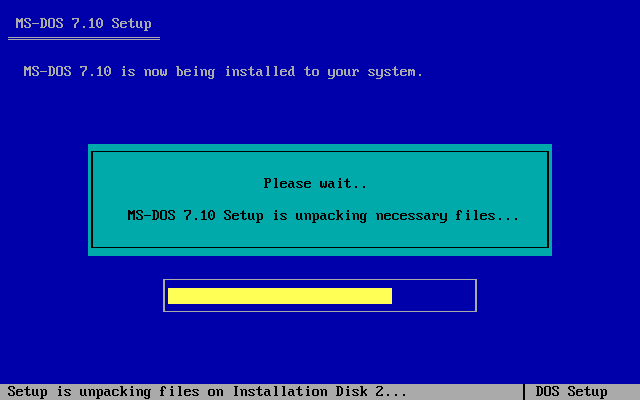 |
|
| Floor2 asouxuning | Posted 2003-10-03 00:00 |
| 中级用户 Posts 25 Credits 207 | |
|
I used the grub_for_dos method released by the webmaster on linuxeden to boot the decompressed dos71_1.img, but it crashed as soon as the characters like DOS7;1... appeared. And my floppy drive is broken and cannot be used.
|
|
| Floor3 asouxuning | Posted 2003-10-03 00:00 |
| 中级用户 Posts 25 Credits 207 | |
|
Also, is it that after burning the iso file downloaded here http://newdos.yginfo.net/dosware/dos71.zip to a CD, you can install it by booting from the CD after powering on?
|
|
| Floor4 Wengier | Posted 2003-10-03 00:00 |
| 系统支持 Posts 10,521 Credits 27,736 | |
|
Yes, download the ISO file of DOS71.ZIP and burn it to a CD, then you can start and install by booting from the CD.
As for the problem of freezing when using GRUB for DOS to call DOS71.IMG, that may be some bugs of GRUB for DOS and other issues, which has nothing to do with the "MS-DOS 7.10 Installation Edition" itself. |
|
| Floor5 gao7240 | Posted 2003-10-10 00:00 |
| 初级用户 Posts 24 Credits 155 | |
|
Download first~~~~~!
|
|
| Floor6 frankiezd | Posted 2003-10-11 00:00 |
| 初级用户 Posts 2 Credits 110 | |
|
Hello, wengierwu!
Hello, webmaster! I just recently chose a course on network practical technology, and I need to use the DOS system for learning NetWare, but I'm currently using Windows XP. I read your article and tried it, but since I'm too novice, I didn't succeed. Could you please introduce the detailed steps? Thank you! Best regards! |
|
| Floor7 frankiezd | Posted 2003-10-11 00:00 |
| 初级用户 Posts 2 Credits 110 | |
|
Is the ISO file downloaded from http://newdos.yginfo.net/dosware/dos71.zip necessarily to be burned onto a CD to be used?
|
|
| Floor8 Wengier | Posted 2003-10-11 00:00 |
| 系统支持 Posts 10,521 Credits 27,736 | |
|
The IMG floppy disk version should be used on a floppy disk or hard disk, and the ISO CD version should be used on a CD.
|
|
| Floor9 user110 | Posted 2003-10-14 00:00 |
| 初级用户 Posts 3 Credits 120 | |
|
Why is there no hard disk installation version? In this way, those without optical and floppy drives can also install it.
|
|
| Floor10 Wengier | Posted 2003-10-15 00:00 |
| 系统支持 Posts 10,521 Credits 27,736 | |
The following is a quote from user110 on October 14, 2003, 18:49:54: Didn't I say that you can directly extract the IMG file to the hard disk and then install from the hard disk? |
|
| Floor11 user110 | Posted 2003-10-15 00:00 |
| 初级用户 Posts 3 Credits 120 | |
|
Sorry, I didn't pay attention, I'll be careful in the future~~~*^&^*
|
|
| Floor12 聆听 | Posted 2003-10-18 00:00 |
| 初级用户 Posts 1 Credits 105 | |
|
I am an XP, NTFS user. I downloaded the CD version of DOS 7.1, burned it to a CD, then booted from the CD drive, pressed SETUP.BAT, and when choosing the agreement or non-agreement version and then pressing NEXT, the screen said that the installation couldn't be done. It seemed like it was saying that FAT doesn't support something. Please give me some advice.
|
|
| Floor13 Wengier | Posted 2003-10-18 00:00 |
| 系统支持 Posts 10,521 Credits 27,736 | |
The following is a quote from Listening who posted on 2003-10-18 17:51:23: It means that DOS must be installed on a FAT partition, and the C drive cannot be NTFS. Please first convert the C drive to NTFS format, or use VFLOPPY. |
|
| Floor14 happysam | Posted 2003-10-21 00:00 |
| 初级用户 Posts 5 Credits 117 | |
|
May I ask the webmaster if there is a registration code for the MS-DOS 4.1 tutorial!!!!
|
|
| Floor15 Wengier | Posted 2003-10-23 00:00 |
| 系统支持 Posts 10,521 Credits 27,736 | |
The following is the speech of happysam on 2003-10-21 9:28:35: What does this have to do with the "MS-DOS 7.10 Installed Version"? |
|
| 1 2 3 4 … 43 Next |
|
[ Contact the Union admin team -
中国DOS联盟 -
Standard version ] Sponsored by ifanr Inc | © 2001–2023 |