
 DigestI
 StickyI
Everyone knows that to learn or use DOS, it is very necessary to install a DOS and carry out practical operations. MS-DOS 7.10 is a very good and powerful operating system, and it has very strong compatibility and performance. To install MS-DOS 7.10 in the system, you can use the MS-DOS 7.10 installer to automatically install MS-DOS 7.10 into the system. The MS-DOS 7.10 installer has a graphical/menu interface and adopts a wizard-style method. Through this installer, everyone can easily install MS-DOS 7.10 onto the hard disk.
Characteristics of the MS-DOS 7.10 installer: operates in full graphical mode, can select the installation path (default is C:\DOS7), installation method (full installation, install only DOS commands, minimal installation), etc., and supports coexistence with Win9x, automatically identifies existing Windows NT/2K/XP or older versions of DOS (such as MS-DOS 6.x) in the system, and allows the user to choose whether to automatically make a dual boot.
After installing this MS-DOS 7.10, you can directly run Win3.x, Win9x, etc. on the hard disk, because Win3.x/9x are just GUI programs under DOS.
Supports plug-in functions (there are plug-in downloads in the subsequent posts, such as PDOS95 plug-in, CCDOS97 plug-in, Windows GUI plug-in, etc., and there are also integrated plug-in downloads)!
Instructions: If the hard disk has not been partitioned or formatted, the installer will automatically partition, format, activate the partition, etc. for the hard disk. Then continue with the installation of MS-DOS 7.10.
You can directly use the floppy disk installation version, that is, first make the installation floppy disk, then boot the system with installation disk 1 and then automatically carry out the complete installation of MS-DOS 7.10 (or run SETUP inside directly after booting from the hard disk), and follow the prompts to complete the installation.
Download addresses of the MS-DOS 7.10 installer:
Installation disk 1: http://www.cn-dos.net/msdos71/dos71_1.zip (required)
Installation disk 2: http://www.cn-dos.net/msdos71/dos71_2.zip (optional)
You can also make the two 1.44MB IMG floppy disk images into boot images of 720K, 1.44MB, 2.88MB for CDs to carry out installation. Below is the MS-DOS 7.10 CD installation ISO version:
Installation CD: http://help.cn-dos.net/soft/dos71cd.zip
For the IMG file, use software such as HD-COPY or WinImage to expand it to a floppy disk and then boot. And it can also run completely normally in virtual machines (such as Virtual PC, VMWare, Bochs)! So you can also test or use this complete MS-DOS 7.10 installation version in a virtual machine.
It is best to carefully read the following article before installation, which also has some screen captures, etc.:
http://www.cn-dos.net/newdos/dosart32.htm
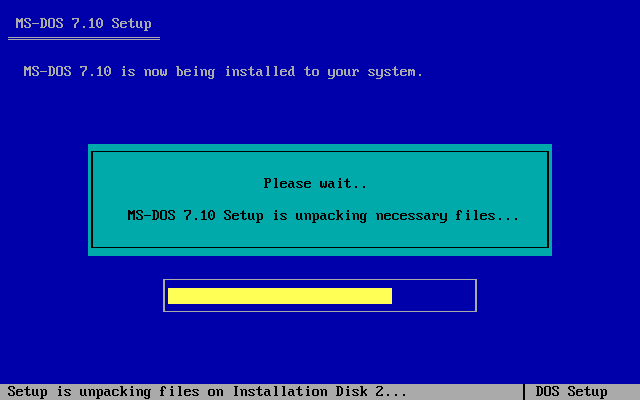
The following is a screen capture of the installation interface:
Characteristics of the MS-DOS 7.10 installer: operates in full graphical mode, can select the installation path (default is C:\DOS7), installation method (full installation, install only DOS commands, minimal installation), etc., and supports coexistence with Win9x, automatically identifies existing Windows NT/2K/XP or older versions of DOS (such as MS-DOS 6.x) in the system, and allows the user to choose whether to automatically make a dual boot.
After installing this MS-DOS 7.10, you can directly run Win3.x, Win9x, etc. on the hard disk, because Win3.x/9x are just GUI programs under DOS.
Supports plug-in functions (there are plug-in downloads in the subsequent posts, such as PDOS95 plug-in, CCDOS97 plug-in, Windows GUI plug-in, etc., and there are also integrated plug-in downloads)!
Instructions: If the hard disk has not been partitioned or formatted, the installer will automatically partition, format, activate the partition, etc. for the hard disk. Then continue with the installation of MS-DOS 7.10.
You can directly use the floppy disk installation version, that is, first make the installation floppy disk, then boot the system with installation disk 1 and then automatically carry out the complete installation of MS-DOS 7.10 (or run SETUP inside directly after booting from the hard disk), and follow the prompts to complete the installation.
Download addresses of the MS-DOS 7.10 installer:
Installation disk 1: http://www.cn-dos.net/msdos71/dos71_1.zip (required)
Installation disk 2: http://www.cn-dos.net/msdos71/dos71_2.zip (optional)
You can also make the two 1.44MB IMG floppy disk images into boot images of 720K, 1.44MB, 2.88MB for CDs to carry out installation. Below is the MS-DOS 7.10 CD installation ISO version:
Installation CD: http://help.cn-dos.net/soft/dos71cd.zip
For the IMG file, use software such as HD-COPY or WinImage to expand it to a floppy disk and then boot. And it can also run completely normally in virtual machines (such as Virtual PC, VMWare, Bochs)! So you can also test or use this complete MS-DOS 7.10 installation version in a virtual machine.
It is best to carefully read the following article before installation, which also has some screen captures, etc.:
http://www.cn-dos.net/newdos/dosart32.htm
The following is a screen capture of the installation interface:
Recent Ratings for This Post
( 1 in total)
Click for details
| Rater | Score | Time |
|---|---|---|
| — | +1 | 2010-04-23 11:42 |
Wengier - 新DOS时代
欢迎大家来到我的“新DOS时代”网站,里面有各类DOS软件和资料,地址:
http://wendos.mycool.net/
E-Mail & MSN: wengierwu AT hotmail.com (最近比较忙,有事请联系DOSroot和雨露,谢谢!)

欢迎大家来到我的“新DOS时代”网站,里面有各类DOS软件和资料,地址:
http://wendos.mycool.net/
E-Mail & MSN: wengierwu AT hotmail.com (最近比较忙,有事请联系DOSroot和雨露,谢谢!)


