I downloaded the DOS 6.22 installation file (in zip format), which contains a 3geIMG file. It is required to use HDCOPY or Undisk to extract it and then run the installation program. How to extract the installation program using HDCOPY or Undisk??? Thanks

China DOS Union
Union site: www.cn-dos.net Forum site: www.cn-dos.net/forum
DOS stands for freedom, openness and progress. Let us work hard, learn from the openness and GNU spirit of FreeDOS and Linux, and together build and grow a free GNU GPL world!
中国DOS联盟论坛 » DOS学习入门 & 精彩文章 (教学室) » Please clarify the specific operation steps or related context about "how to use HDCOPY or Undisk to unpack the DOS6.22 installation file". The current content is too simple to directly translate. Please provide more detailed information.
View 2,537 Replies 6
Original Poster
Posted 2009-08-18 00:26 · 中国 辽宁 抚顺 联通
Floor 2
Posted 2009-08-18 04:42 · 中国 北京 鹏博士BGP
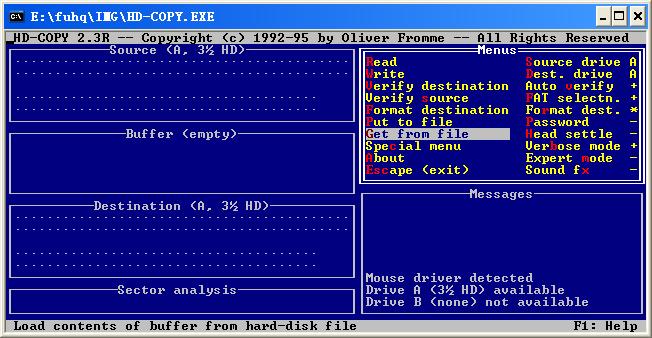
First, you need to have a floppy disk drive, that is, a drive with the drive letter A: or B:. Then you can run HD-Copy. Then press the arrow keys on the keyboard to select Get from file, and then enter the storage location of the IMG file. For example, mine is in C:\DOS_1.img, then press Enter, as shown in the figure:
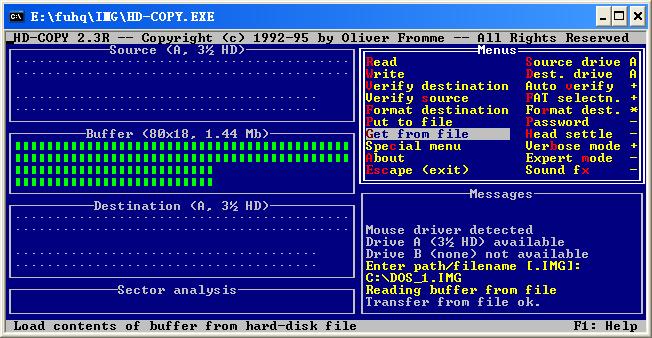
Then press the arrow keys on the keyboard to select Write. If there are files on the floppy disk, you also need to press Y once to confirm deleting all files on the floppy disk. When all the green Vs flash, the content of DOS_1.img has been written to the floppy disk. To write the next file, select Get from file, then enter DOS_2.img, press Enter, then change to an empty floppy disk, and then select Write.
Then press the arrow keys on the keyboard to select Write. If there are files on the floppy disk, you also need to press Y once to confirm deleting all files on the floppy disk. When all the green Vs flash, the content of DOS_1.img has been written to the floppy disk. To write the next file, select Get from file, then enter DOS_2.img, press Enter, then change to an empty floppy disk, and then select Write.
Floor 3
Posted 2009-08-19 00:14 · 中国 山东 济宁 兖州区 联通
Do you have a floppy drive? If not, use undisk to extract the img file, just like using winrar to extract rar files. But the extracted floppy disk version may not be able to install normally.
简单就是美
Floor 4
Posted 2009-08-24 00:22 · 中国 辽宁 抚顺 联通
Floor 5
Posted 2009-12-30 17:45 · 中国 辽宁 沈阳 科技网
Hehe, this is under the DOS system. If you want to extract the img file to a floppy disk under the XP system, what software should be used. You need to install the DOS system first.
Floor 6
Posted 2010-01-04 14:00 · 中国 广东 东莞 电信

Open and extract with WinImage.
Floor 7
Posted 2010-01-10 12:36 · 中国 辽宁 沈阳 科技网
Originally posted by ql1307096 at 2010-1-4 14:00:
Open and extract with WinImage,
I can't open it with it, and hdcopy also has errors, I'm really fed up. Can't handle it
Forum Jump: