
China DOS Union
-- Unite DOS · Advance DOS · Grow DOS --Union site: www.cn-dos.net Forum site: www.cn-dos.net/forum
|
China DOS Union-- Unite DOS · Advance DOS · Grow DOS --Union site: www.cn-dos.net Forum site: www.cn-dos.net/forum |
| Guest | Log in | Register | Members | Search | China DOS Union |
|
中国DOS联盟论坛 The time now is 2026-11-20 03:45 |
47,820 topics / 349,938 posts / today 0 new / 48,297 members |
| DOS学习入门 & 精彩文章 (教学室) » [Share] How to Add Pure DOS to WinXP |
| Printable Version 150,109 / 593 |
| Floor46 cksdxz | Posted 2005-12-04 17:09 |
| 新手上路 Posts 2 Credits 4 From fj | |
|
Just making a comment. Learned another thing again.
|
|
| Floor47 wind198341 | Posted 2005-12-04 20:38 |
| 新手上路 Posts 5 Credits 18 | |
|
Causes of the problem: I have installed the WINXP - SP2 system (all partitions are in FAT32 format), and I want to add a DOS system to make it a dual - system. After seeing your introduction of MS - DOS 7.10, which says it can directly add a DOS system on the basis of XP, so I downloaded your software and tried it, but two problems occurred:
1: I burned the CD installation version of MS - DOS 7.10 you gave into a CD, and I can normally boot into the DOS interface. But when booting from the CD, there is no prompt asking me "whether to boot from CD - ROM", but it directly enters the DOS interface. I don't know if this is a problem? Does it have no impact on the system? 2: After entering the DOS interface, how to operate to install DOS to the hard disk to get a dual - system? (I am not familiar with DOS)? More detailed: That is, how to operate to see this interface? (I have been looking for a long time and didn't see any "Setup" command? I only saw an MSDOS71.ISO file in the H drive. If it exists, where is it?)  Then how to enter this interface? 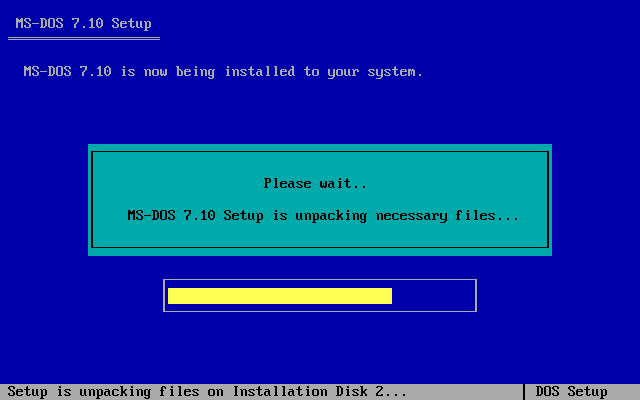 Finally, it is displayed to this interface.  Maybe I am too stupid, but I sincerely hope that all experts can answer patiently! [ Last edited by wind198341 on 2005-12-4 at 22:21 ] |
|
| Floor48 chujiafu | Posted 2005-12-06 10:14 |
| 银牌会员 Posts 595 Credits 1,339 From 安徽 宿州 | |
|
Sorry, I haven't used the full installation version of MS-DOS 7.10 CD, so I can't answer you.
|
|
| Floor49 gdxuzy | Posted 2005-12-07 21:19 |
| 初级用户 Posts 7 Credits 30 | |
|
I really want to ask a question.
That is, after removing the hard disk of the notebook, using an adapter card and connecting it to the desktop, how to be able to boot into DOS when going back to the notebook.??? It sounds simple, but I did it once. The notebook is a Fujitsu netbook, with no optical or floppy drive. But the hard disk can be connected to the desktop using an adapter card. I heard that it must be partitioned on the notebook. The hard part is that I partitioned it on the desktop. So, I have been unable to boot on the notebook, and my netbook is ruined. QQ44808757 |
|
| Floor50 qzwqzw | Posted 2005-12-08 20:51 |
| 银牌会员 Posts 636 Credits 2,343 | |
|
Are there no floppy drives or optical drives? What about USB ports? Or interfaces for other bootable devices?
If there are none, then you must have been scammed by a merchant. Also, have you tried partitioning all into FAT16 or other old formats? |
|
| Floor51 xwgodxwgod | Posted 2005-12-22 21:20 |
| 新手上路 Posts 4 Credits 12 | |
|
I am C drive XP, D drive 98, and I fixed it with this method and the console. When entering 98, it prompts I/O error. The BOOT file is also generated. Both drives are FAT32. Is there any way?
|
|
| Floor52 chujiafu | Posted 2005-12-23 11:32 |
| 银牌会员 Posts 595 Credits 1,339 From 安徽 宿州 | |
|
You installed XP first and then 98. After installation, you can only boot from 98 and not from XP. Your question is: How to restore the dual-boot menu of Win98 and WinXP? It is suggested that you look for it online, as there are solutions to such problems everywhere. It should be noted that your C: drive is WinXP and D: drive is Win98.
|
|
| Floor53 taoran | Posted 2005-12-23 16:49 |
| 新手上路 Posts 2 Credits 4 | |
|
Mine is NTFS, so it doesn't work well!
|
|
| Floor54 taoran | Posted 2005-12-24 08:12 |
| 新手上路 Posts 2 Credits 4 | |
|
What methods are there to change the NTFS format of the C drive (I installed XP on the C drive and 2000 on the D drive) to the FAT32 format? Thanks! Looking forward to your reply!
|
|
| Floor55 kong | Posted 2005-12-24 10:54 |
| 新手上路 Posts 2 Credits 4 | |
Originally posted by chujiafu at 2005-8-30 18:30: |
|
| Floor56 chujiafu | Posted 2005-12-25 14:16 |
| 银牌会员 Posts 595 Credits 1,339 From 安徽 宿州 | |
Originally posted by taoran at 2005-12-24 08:12 AM: Using PqMagic is okay. |
|
| Floor57 ilovery | Posted 2005-12-27 23:13 |
| 新手上路 Posts 5 Credits 18 | |
|
Boss, the method you mentioned doesn't work~~~ It made me unable to even boot into XP. It directly boots into DOS.
Among what you said: 4. Echo y|Bootpart winnt boot:c: (This step is to re - restore the boot kernel of Nt, because you used Sys a: c: to overwrite the original boot information of Nt on the C: drive. If this step is not carried out, booting from the hard disk will become pure DOS.) I used it and it prompted command bad. It's depressing~~~ Can't recover it. I have to reinstall the system. By the way, vfloppy is virtual, isn't it pure DOS? Originally I asked, some people said it was pure. |
|
| Floor58 chenyy | Posted 2005-12-28 10:06 |
| 初级用户 Posts 49 Credits 143 | |
|
Good content, thank you to the楼主.
|
|
| Floor59 XHR | Posted 2006-01-08 02:33 |
| 新手上路 Posts 2 Credits 4 | |
|
Can't we just install pure DOS directly?
|
|
| Floor60 XHR | Posted 2006-01-08 03:46 |
| 新手上路 Posts 2 Credits 4 | |
|
I directly downloaded the DOS 7.0 version, then used a virtual drive to open this ISO file, and cut and pasted all the DOS directories in the ISO to the C drive. Then I booted into DOS with a boot disk and ran setup.bat to complete the installation!
|
|
| Prev 1 2 3 4 5 6 7 … 40 Next |
|
[ Contact the Union admin team -
中国DOS联盟 -
Standard version ] Sponsored by ifanr Inc | © 2001–2023 |