
Old machine configuration: Pentium III 550MHz + 440BX motherboard + 128M memory + 80G hard disk + 9250 graphics card
Selected system: Windows FLP, feels that the speed is still acceptable.
Main use: surfing the Internet to watch online videos. Youku, Tudou,......
Number of handles: 6499
Number of threads: 318
Number of processes: 22
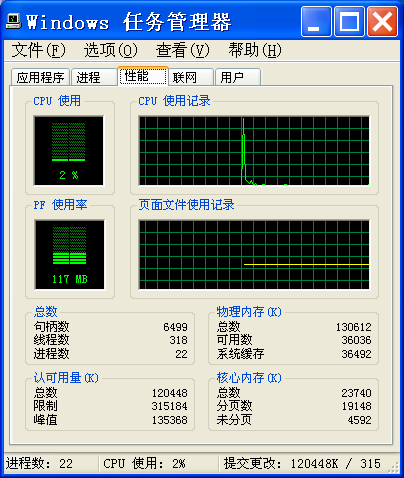
Do not increase memory. Continue to use WinFLP, do not switch to Win2000 or others.
Under this premise.
I wonder if I can close some services to further reduce the burden, improve responsiveness, and improve fluency?
Name Status Startup type
Alerter Disabled
Application Management Manual
Background Intelligent Transfer Service Manual
ClipBook Disabled
COM+ System Application Manual
Fast User Switching Compatibility Manual
HTTP SSL Manual
IMAPI CD-Burning COM Service Manual
Indexing Service Disabled
Messenger Disabled
MS Software Shadow Copy Provider Manual
Net Logon Manual
Network DDE Manual
Network DDE DSDM Manual
Network Provisioning Service Manual
Peer Name Resolution Protocol Manual
Peer Networking Manual
Peer Networking Group Authentication Manual
Peer Networking Identity Manager Manual
Performance Logs and Alerts Manual
Portable Media Serial Number Service Manual
QoS RSVP Manual
Remote Access Auto Connection Manager Manual
Remote Access Connection Manager Manual
Remote Desktop Help Session Manager Manual
Remote Procedure Call (RPC) Locator Manual
Removable Storage Manual
Routing and Remote Access Disabled
SNMP Trap Service Manual
System Restore Service Automatic
Uninterruptible Power Supply Manual
Universal Plug and Play Device Host Manual
Volume Shadow Copy Manual
Windows Image Acquisition (WIA) Manual
Windows Installer Manual
Windows Management Instrumentation Driver Extensions Manual
Windows User Mode Driver Framework Manual
WMI Performance Adapter Manual
Application Layer Gateway Service Started Manual
Automatic Updates Started Automatic
COM+ Event System Started Manual
Computer Browser Started Automatic
Cryptographic Services Started Automatic
DCOM Server Process Launcher Started Automatic
DHCP Client Started Automatic
Distributed Transaction Coordinator Started Manual
DNS Client Started Automatic
Error Reporting Service Started Automatic
Event Log Started Automatic
Help and Support Started Automatic
Infrared Monitor Started Automatic
IPSEC Services Started Automatic
IPv6 Helper Service Started Automatic
Logical Disk Manager Started Automatic
Logical Disk Manager Administrative Service Started Manual
Message Queuing Started Automatic
Message Queuing Triggers Started Automatic
Network Connections Started Manual
Network Location Awareness (NLA) Started Manual
NT LM Security Support Provider Started Manual
Plug and Play Started Automatic
Print Spooler Started Automatic
Protected Storage Started Automatic
Remote Procedure Call (RPC) Started Automatic
Remote Registry Started Automatic
Secondary Logon Started Automatic
Security Accounts Manager Started Automatic
Security Center Started Automatic
Server Started Automatic
Shell Hardware Detection Started Automatic
Smart Card Started Automatic
SNMP Service Started Automatic
SSDP Discovery Service Started Manual
System Event Notification Started Automatic
Task Scheduler Started Automatic
TCP/IP NetBIOS Helper Started Automatic
Telephony Started Automatic
Terminal Services Started Manual
Themes Started Automatic
WebClient Started Automatic
Windows Audio Started Automatic
Windows Firewall/Internet Connection Sharing (ICS) Started Automatic
Windows Management Instrumentation Started Automatic
Windows Time Started Automatic
Wireless Zero Configuration Started Automatic
Workstation Started Automatic
Selected system: Windows FLP, feels that the speed is still acceptable.
Main use: surfing the Internet to watch online videos. Youku, Tudou,......
Number of handles: 6499
Number of threads: 318
Number of processes: 22
Do not increase memory. Continue to use WinFLP, do not switch to Win2000 or others.
Under this premise.
I wonder if I can close some services to further reduce the burden, improve responsiveness, and improve fluency?
Name Status Startup type
Alerter Disabled
Application Management Manual
Background Intelligent Transfer Service Manual
ClipBook Disabled
COM+ System Application Manual
Fast User Switching Compatibility Manual
HTTP SSL Manual
IMAPI CD-Burning COM Service Manual
Indexing Service Disabled
Messenger Disabled
MS Software Shadow Copy Provider Manual
Net Logon Manual
Network DDE Manual
Network DDE DSDM Manual
Network Provisioning Service Manual
Peer Name Resolution Protocol Manual
Peer Networking Manual
Peer Networking Group Authentication Manual
Peer Networking Identity Manager Manual
Performance Logs and Alerts Manual
Portable Media Serial Number Service Manual
QoS RSVP Manual
Remote Access Auto Connection Manager Manual
Remote Access Connection Manager Manual
Remote Desktop Help Session Manager Manual
Remote Procedure Call (RPC) Locator Manual
Removable Storage Manual
Routing and Remote Access Disabled
SNMP Trap Service Manual
System Restore Service Automatic
Uninterruptible Power Supply Manual
Universal Plug and Play Device Host Manual
Volume Shadow Copy Manual
Windows Image Acquisition (WIA) Manual
Windows Installer Manual
Windows Management Instrumentation Driver Extensions Manual
Windows User Mode Driver Framework Manual
WMI Performance Adapter Manual
Application Layer Gateway Service Started Manual
Automatic Updates Started Automatic
COM+ Event System Started Manual
Computer Browser Started Automatic
Cryptographic Services Started Automatic
DCOM Server Process Launcher Started Automatic
DHCP Client Started Automatic
Distributed Transaction Coordinator Started Manual
DNS Client Started Automatic
Error Reporting Service Started Automatic
Event Log Started Automatic
Help and Support Started Automatic
Infrared Monitor Started Automatic
IPSEC Services Started Automatic
IPv6 Helper Service Started Automatic
Logical Disk Manager Started Automatic
Logical Disk Manager Administrative Service Started Manual
Message Queuing Started Automatic
Message Queuing Triggers Started Automatic
Network Connections Started Manual
Network Location Awareness (NLA) Started Manual
NT LM Security Support Provider Started Manual
Plug and Play Started Automatic
Print Spooler Started Automatic
Protected Storage Started Automatic
Remote Procedure Call (RPC) Started Automatic
Remote Registry Started Automatic
Secondary Logon Started Automatic
Security Accounts Manager Started Automatic
Security Center Started Automatic
Server Started Automatic
Shell Hardware Detection Started Automatic
Smart Card Started Automatic
SNMP Service Started Automatic
SSDP Discovery Service Started Manual
System Event Notification Started Automatic
Task Scheduler Started Automatic
TCP/IP NetBIOS Helper Started Automatic
Telephony Started Automatic
Terminal Services Started Manual
Themes Started Automatic
WebClient Started Automatic
Windows Audio Started Automatic
Windows Firewall/Internet Connection Sharing (ICS) Started Automatic
Windows Management Instrumentation Started Automatic
Windows Time Started Automatic
Wireless Zero Configuration Started Automatic
Workstation Started Automatic