
China DOS Union
-- Unite DOS · Advance DOS · Grow DOS --Union site: www.cn-dos.net Forum site: www.cn-dos.net/forum
|
China DOS Union-- Unite DOS · Advance DOS · Grow DOS --Union site: www.cn-dos.net Forum site: www.cn-dos.net/forum |
| Guest | Log in | Register | Members | Search | China DOS Union |
|
中国DOS联盟论坛 The time now is 2026-08-26 16:34 |
47,812 topics / 349,910 posts / today 0 new / 48,264 members |
| 其它操作系统综合讨论区 » Who has a valid link for NT 3.51 Simplified Chinese edition |
| Printable Version 5,879 / 19 |
| Floor1 xkai2010 | Posted 2010-08-10 10:19 |
| 初级用户 Posts 57 Credits 121 | |
|
I've been feeling nostalgic lately and want to try some old versions of Windows systems
Also, who has the Chinese version of Win95 OSR2.5 (95C)? I looked around a lot and only found the English version. Also looking for the full installation package of IE5.5 SP2 in Simplified Chinese. Microsoft's online installer can no longer be downloaded. Thanks! |
|
| Floor2 fujianabc | Posted 2010-08-10 13:23 |
| 金牌会员 Posts 1,616 Credits 3,467 | |
|
Win95 OSR 2.5 seems to only have an English version.
|
|
| Floor3 xkai2010 | Posted 2010-08-10 13:37 |
| 初级用户 Posts 57 Credits 121 | |
|
Got it.
Then give me an NT 3.51 Chinese version, I still haven't even seen what it looks like. I can see from the forum that someone installed it, but I can't find it. |
|
| Floor4 doslike | Posted 2010-08-12 08:50 |
| 版主 Posts 285 Credits 326 From 黑龙江省 | |
|
I have it, 50m
|
|
| Floor5 xkai2010 | Posted 2010-08-12 09:04 |
| 初级用户 Posts 57 Credits 121 | |
|
Moderator, upload it to a net drive. I downloaded one before, but it was the English version and wasn't easy to use.
|
|
| Floor6 jinzihao | Posted 2010-08-12 13:57 |
| 初级用户 Posts 62 Credits 111 From http://ms-dos.cz.cc | |
|
I have them
Windows NT 3.51 Workstation Chinese version: http://ms-dos.cz.cc/show.php?id=7 Windows NT 3.51 Server Chinese version: http://ms-dos.cz.cc/show.php?id=8 Windows NT 3.51 Workstation VMWare virtual machine version (recommended for the OP): http://ms-dos.cz.cc/show.php?id=278 Windows NT 3.51 Service Pack 5 (the last Service Pack): http://ms-dos.cz.cc/show.php?id=21 Original Chinese version of Windows 95 (500+ MB): http://www.ms-dos.cz.cc/show.php?id=24 The net drive on my side isn't very easy to use. If you can't download it, reply and let me know. [ Last edited by jinzihao on 2010-8-12 at 14:02 ] |
|
| Floor7 doslike | Posted 2010-08-12 14:25 |
| 版主 Posts 285 Credits 326 From 黑龙江省 | |
|
Right, I downloaded it from ms-dos .cz .cc too.
|
|
| Floor8 xkai2010 | Posted 2010-08-12 14:53 |
| 初级用户 Posts 57 Credits 121 | |
|
I wonder if NT351 can be made into a bootable CD like 4.0? Both winnt /b and floppy installation are kind of troublesome.
|
|
| Floor9 xkai2010 | Posted 2010-08-12 15:21 |
| 初级用户 Posts 57 Credits 121 | |
|
I saw some installation screenshots included in the archives, and the first part is basically a complete copy of 4.0
But the English font on the window title bar doesn't look very good [ Last edited by xkai2010 on 2010-8-12 at 15:23 ] |
|
| Floor10 fujianabc | Posted 2010-08-12 18:32 |
| 金牌会员 Posts 1,616 Credits 3,467 | |
Originally posted by xkai2010 at 2010-8-12 03:21 PM: You've got it backwards, NT 4 copied NT 3.51. |
|
| Floor11 xkai2010 | Posted 2010-08-12 22:45 |
| 初级用户 Posts 57 Credits 121 | |
|
I got NT3.51 installed, but it took quite a bit of trouble during installation. I installed it under VM7.1, so I'll talk about how to install it without using winnt.exe, because copying files under DOS is too slow.
1. When creating the virtual machine, the hardware version can only be 6.X or lower. With 6.5-7.X the installer won't start. If you created a 7.X virtual machine, you can change the version in the VM menu. 2. Boot with Win98 DOS, with CD-ROM support, mount the NT3.51 ISO, and run winnt /ox to make a set of setup floppies. Four disks are needed. 3. Open winnt.sif on floppy #3 with Notepad, and change msdosinitiated=0 to 1. 4. Boot from floppy #1 and start installation. Follow the prompts until partitioning and formatting are done (with only one C: drive), then when it asks for the installation directory name, quit Setup. 5. In VM7.1, use "File -> Map or Disconnect Virtual Disks" to mount the virtual hard disk with write access. Create a folder on the disk named $WIN_NT$.~LS, and copy all files from the NT3.51 ISO into that folder. Then disconnect the disk. 6. Restart the virtual machine and installation will be OK. The installed system shows SP4. However, the sound card won't install, and VM tool won't install either. I want to listen to some of the CDs I have at home, but I can't get any sound out. Does anyone have a solution? |
|
| Floor12 fujianabc | Posted 2010-08-12 23:30 |
| 金牌会员 Posts 1,616 Credits 3,467 | |
Originally posted by xkai2010 at 2010-8-12 10:45 PM: Running winnt.exe under DOS is very fast, but you have to load smartdrv first. That's common knowledge for installing NT under DOS. It's been like this from NT 3.1 to Server 2003. |
|
| Floor13 xkai2010 | Posted 2010-08-13 08:07 |
| 初级用户 Posts 57 Credits 121 | |
Originally posted by fujianabc at 2010-8-12 23:30: That's not the key issue. The key issue is that VM7.1 disk performance is much worse than 6.0, especially under DOS. When I used VM6.0 before, installing Win95/98/ME was very fast. After upgrading to 7.1 last week, I found file copying became much slower. Installing Win95 (typical installation), just the file-copying step took more than 20 minutes, and the progress bar was unbearably slow. The disk is also a bit slower under the NT kernel, but it's still acceptable. |
|
| Floor14 doslike | Posted 2010-08-13 12:59 |
| 版主 Posts 285 Credits 326 From 黑龙江省 | |
|
vmtools only supports Win95 and NT 4.0 SP6a at minimum
That's why I need sp6a |
|
| Floor15 xkai2010 | Posted 2010-08-14 09:46 |
| 初级用户 Posts 57 Credits 121 | |
|
Press Ctrl-Alt-Del to open the "Windows Security" window, click Change Password, then click Help. What do you all see?
4.0 has already been localized 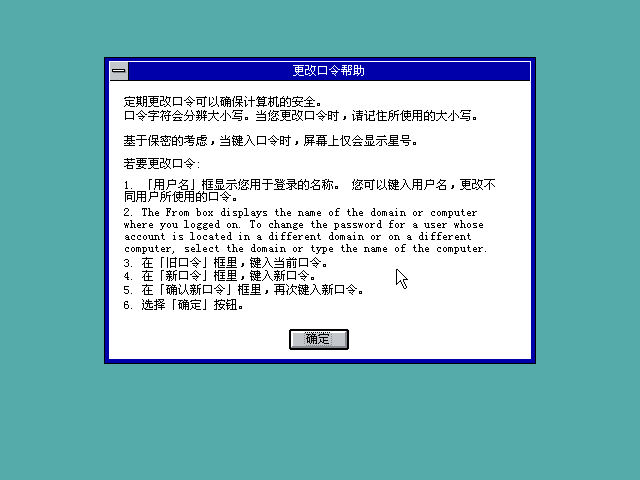 [ Last edited by xkai2010 on 2010-8-14 at 09:53 ] |
|
| 1 2 Next |
|
[ Contact the Union admin team -
中国DOS联盟 -
Standard version ] Sponsored by ifanr Inc | © 2001–2023 |