
China DOS Union
-- Unite DOS · Advance DOS · Grow DOS --Union site: www.cn-dos.net Forum site: www.cn-dos.net/forum
|
China DOS Union-- Unite DOS · Advance DOS · Grow DOS --Union site: www.cn-dos.net Forum site: www.cn-dos.net/forum |
| Guest | Log in | Register | Members | Search | China DOS Union |
|
中国DOS联盟论坛 The time now is 2026-10-25 13:05 |
47,815 topics / 349,928 posts / today 0 new / 48,288 members |
| DOS启动盘 & LOGO技术 (启动盘室) » There are three problems in modifying the DOS boot disk. Paste the relevant files and ask experts for help. |
| Printable Version 2,208 / 2 |
| Floor1 aries215 | Posted 2010-03-10 09:14 |
| 初级用户 Posts 46 Credits 29 | |
|
I downloaded two DOS boot disks from http://ms-dos7.hit.bg/, one is the standard boot disk, and the other is the Super MS-DOS Boot Disk by the forum administrator Wengier. I want to use them for PE systems, to boot GHOST, DISKPART, and GDISK, while also wanting to retain and savor the powerful extended functions of DOS. Functionally, the Super MS-DOS Boot Disk suits my心意, but now it's not the DOS era, and I don't need so many boot dialog boxes. I just want a powerful DOS environment, with as direct a boot as possible. I can remove the LOGO and reduce the dialog boxes, but I can't get rid of GRUB, and even setting timeout to 0 still seems redundant. I want to add and replace most of the functional components in the standard DOS boot disk to transform it into something similar to the Super MS-DOS Disk. But some of the boot commands have been modified incorrectly, when running in a virtual machine, the following three problems occurred, as shown in the screenshots: 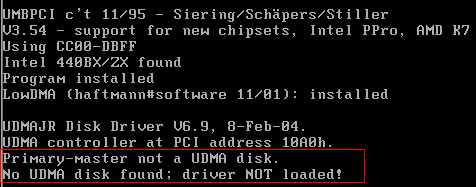 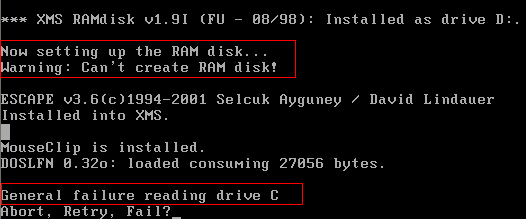 AUTOEXEC.BAT CONFIG.SYS All files in the DOS.IMG I modified:
Thank you! |
|
| Floor2 goli2008 | Posted 2010-03-10 20:00 |
| 中级用户 Posts 97 Credits 252 | |
|
LZ, the question you raised is not clear, so it's difficult to solve the problem directly. It is suggested:
1. Which menu item in the config.sys file does your problem occur in? (Is it au..bat or co..sys, during the process or after?) 2. Is the virtual machine started with an ISO or IMG? Or something else? 3. Can the virtual machine run normally? 4. The three problems can't occur at the same time. Which one occurs first and then what... To get help from others, you need to make the problem (process) clear. Not everyone has time, although many people are willing to help you. [ Last edited by goli2008 on 2010-3-10 at 20:01 ] |
|
| Floor3 aries215 | Posted 2010-03-10 22:42 |
| 初级用户 Posts 46 Credits 29 | |
|
I'm sorry, I thought you would understand if I circled it in the screenshot.
The prompt says that my main disk is not a UDMA DISK? What does that mean? What's going on? Is there an error? Is such information good or bad? I want to use XMSDSK.EXE to generate a larger virtual disk, but the prompt message seems to say that it can't be created, right? How to modify the configuration file? I selected menu 1 of config.sys (GHOST). In fact, most of the parts in front of several options are the same, and it hasn't reached the part of loading the target program at the end. Only this file has options, and the others are not set. The full name of my boot disk image is DOS71.IMG. I only tested it in a virtual machine but it's not very normal. I think if it's completely normal, there wouldn't be the prompt in the screenshot. And the GRUB4DOS boot menu on my actual machine is written incorrectly, and it always says something about C/H/S being problematic when booting the IMG, and I can't start it. The two screenshots were taken during the same boot process, because I added some "PAUSE" between commands, so they can be separated to rule out. The three problems appeared one after another, and I don't understand the reason. Maybe there's no necessary connection. By the way, was the loading of "CP936UNI.TBL" successful? At the beginning, removing the previous "/Z:" would show a full screen of help information, and after adding it back, there was no more. I don't know if it was successful. Thanks!!! [ Last edited by aries215 on 2010-3-10 at 22:45 ] |
|
|
[ Contact the Union admin team -
中国DOS联盟 -
Standard version ] Sponsored by ifanr Inc | © 2001–2023 |