
China DOS Union
-- Unite DOS · Advance DOS · Grow DOS --Union site: www.cn-dos.net Forum site: www.cn-dos.net/forum
|
China DOS Union-- Unite DOS · Advance DOS · Grow DOS --Union site: www.cn-dos.net Forum site: www.cn-dos.net/forum |
| Guest | Log in | Register | Members | Search | China DOS Union |
|
中国DOS联盟论坛 The time now is 2026-09-23 11:22 |
47,812 topics / 349,917 posts / today 0 new / 48,273 members |
| DOS批处理 & 脚本技术(批处理室) » [Original] The Real "Hacker": Black Screen Technology |
| Printable Version 17,769 / 22 |
| Floor1 qinchun36 | Posted 2009-07-09 09:34 |
| 高级用户 Posts 400 Credits 609 | |
|
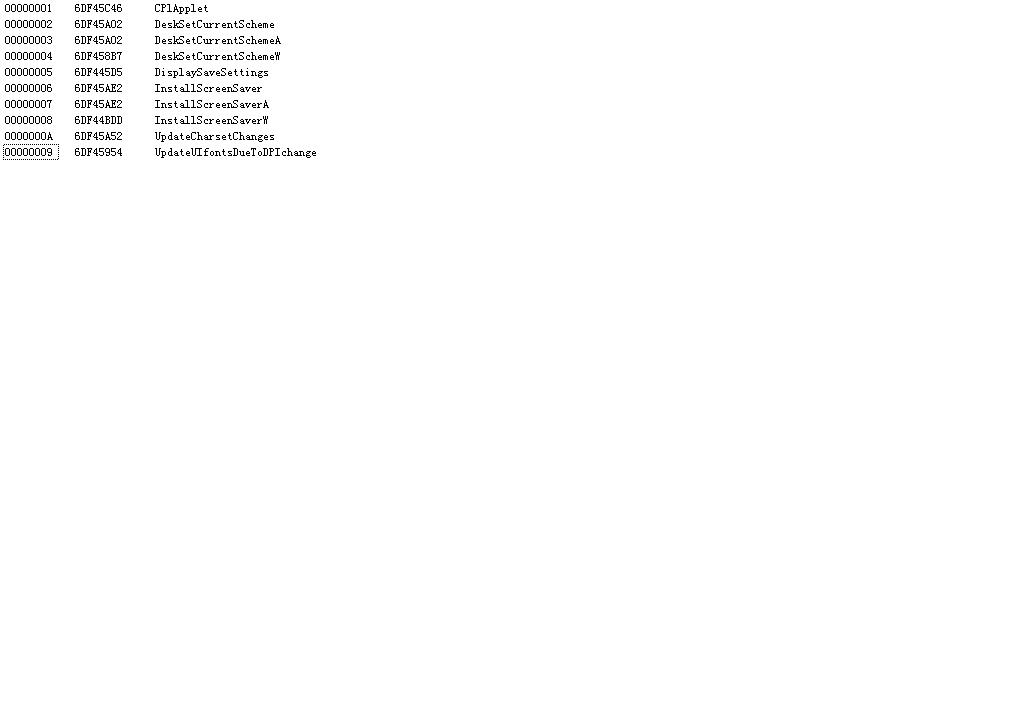
We already know that double-clicking the desk.cpl file in the system32 directory or using the command line
can open which dialog box for desktop properties settings. After changing the resolution, there will be a black screen for a while when applying. Hehe, imagine if we keep clicking "Apply", it will always be black. At this time, the person in front of the computer really becomes a blind man groping for an elephant! Unfortunately, we can't keep clicking... Today, I was bored and analyzed these files. I found that there are actually interfaces in desk.cpl like in dll! Since I don't know the specific parameters, I can only test one by one to see if there are any fun functions. Sure enough, perseverance pays off, and I found a few useful ones, including the black screen. Hehe, you can execute So, heh, I thought there seems to be a function of looping to do something in the program. Let's try a batch file: Wait, don't run this, otherwise you will only have to restart. The CPU will be exhausted. Scientific research has found that each black screen can last about a second or so. It is estimated that it also depends on the machine configuration. So don't torture the CPU too much, let it rest, and also let you have a chance to KILL this P process. You can set the interval to about 1 second: Hehe, with this, you can play a prank. Let others only have to choose to stare at the black screen or restart. If you can add it to the startup item, uh, it's too immoral... Of course, we have to prepare the antidote ourselves. Before executing, first enter in the run When it's dark, just press the WIN + R shortcut to switch to the run window and press Enter. But if you don't let the CPU rest, you will die... Here's a VBS version and VBE version. Double-click to have no window, good hidden effect Save as a.vbs file: Vbe file, preset interval time 999 ms. Since there is a TAB character that can't be pasted correctly, I can only upload the file. --------------------------------------------- There is another very cool and disgusting one. I haven't found a good solution yet. Please don't try it easily if you are not very familiar with operating the computer with the keyboard: [ Last edited by qinchun36 on 2009-7-9 at 10:05 ] Attachments OhYes.zip (268 bytes) |
|
| Floor2 czl1378 | Posted 2009-07-09 10:22 |
| 初级用户 Posts 114 Credits 161 | |
|
Lzoo! You're too... boring. But I like it... top it.
|
|
| Floor3 bluewaterx | Posted 2009-07-09 10:25 |
| 初级用户 Posts 68 Credits 132 | |
|
If one day I get hold of your computer... I mean, if.
|
|
| Floor4 willing | Posted 2009-07-09 11:22 |
| 中级用户 Posts 133 Credits 256 | |
|
Hehe, the LZ is very...
|
|
| Floor5 yishanju | Posted 2009-07-09 11:24 |
| 银牌会员 Posts 1,357 Credits 1,488 | |
|
Always spend so much thought on this kind of thing
|
|
| Floor6 s11ss | Posted 2009-07-09 17:32 |
| 银牌会员 Posts 566 Credits 2,098 | |
|
Use eXeScope to view desk.cpl:
Attachments 未命名.PNG (9.47 KiB) |
|
| Floor7 matlan | Posted 2009-07-09 23:23 |
| 初级用户 Posts 63 Credits 87 | |
Originally posted by qinchun36 at 2009-7-9 09:34: You can end the explorer process, but it seems that the font has become a bit larger~ |
|
| Floor8 pan597270718 | Posted 2009-07-10 00:48 |
| 新手上路 Posts 3 Credits 4 | |
|
This is good, I like it
|
|
| Floor9 qinchun36 | Posted 2009-07-10 09:03 |
| 高级用户 Posts 400 Credits 609 | |
Originally posted by matlan at 2009-7-9 11:23 PM: I feel it's unstable. Sometimes it becomes very large, causing the mouse to be unable to perform any operations. Sometimes the entire screen is filled with window title bars |
|
| Floor10 ccsflyjj | Posted 2009-07-29 00:55 |
| 新手上路 Posts 6 Credits 12 | |
|
This is how it looks in Vista
 |
|
| Floor11 lrbin50 | Posted 2009-07-29 02:30 |
| 新手上路 Posts 5 Credits 10 | |
|
This is all thought of by the owner, amazing.
|
|
| Floor12 cad55 | Posted 2009-07-30 03:27 |
| 高级用户 Posts 329 Credits 620 | |
|
This post should be a BAT prank,..., ending post
|
|
| Floor13 kaikai163 | Posted 2009-07-31 06:01 |
| 初级用户 Posts 60 Credits 107 | |
|
LZ, you're quite boring!! But I admire you!
|
|
| Floor14 hyh8100 | Posted 2009-08-04 11:18 |
| 新手上路 Posts 8 Credits 13 | |
|
It seems there might be some input errors. The original "够很 ,很不错" has unclear parts. If it's supposed to be "够狠,很不错" which means "tough enough, very good", then the translation would be "tough enough, very good". But based on the given text as is, maybe it's a bit messy. Let's assume it's "tough enough, very good" for now as a best guess.
|
|
| Floor15 acaigg | Posted 2010-12-28 20:22 |
| 初级用户 Posts 92 Credits 115 | |
|
Pretty good, very good
|
|
| 1 2 Next |
|
[ Contact the Union admin team -
中国DOS联盟 -
Standard version ] Sponsored by ifanr Inc | © 2001–2023 |