China DOS Union

-- Unite DOS · Advance DOS · Grow DOS --

Union site: www.cn-dos.net Forum site: www.cn-dos.net/forum
DOS stands for freedom, openness and progress. Let us work hard, learn from the openness and GNU spirit of FreeDOS and Linux, and together build and grow a free GNU GPL world!

中国DOS联盟论坛
The time now is 2026-08-11 16:48
中国DOS联盟论坛 » DOS批处理 & 脚本技术(批处理室) » [Help] How to use the SC CREATE command to create a process or service that cannot be terminated? View 1,680 Replies 6
Original Poster Posted 2009-03-16 21:32 ·  中国 广东 东莞 电信
银牌会员
★★★
Credits 1,179
Posts 442
Joined 2006-09-09 22:47
19-year member
UID 62249
Status Offline
The SC command in NT systems is very useful. But recently, when making an antivirus software NOD32, the original antivirus software cannot be ended using the Task Manager to end ekrn.exe after installation (it prompts that the system process cannot be ended), and the sc delete cannot be used to delete the service. However, the process I created myself using the command "%WINDIR%\SYSTEM32\SC.EXE" CREATE "ekrn" TYPE= INTERACT TYPE= OWN START= AUTO BINPATH= "%CD%\ekrn.exe" DISPLAYNAME= "Eset Service" can not only be ended using any manager but also the service can be deleted using sc delete.
Asking all the experts, is there any way to make the created process service not be able to be ended manually. Waiting online......
Floor 2 Posted 2009-03-16 21:56 ·  中国 广东 东莞 电信
银牌会员
★★★
Credits 1,179
Posts 442
Joined 2006-09-09 22:47
19-year member
UID 62249
Status Offline
I found a way to delete a service, which is to add permissions to the service using SETACL so that it can't be deleted.
Floor 3 Posted 2009-03-16 22:04 ·  中国 广东 东莞 电信
银牌会员
★★★
Credits 1,179
Posts 442
Joined 2006-09-09 22:47
19-year member
UID 62249
Status Offline
In addition, SETACL can also set the permissions of SRV. I don't know how to use it. Maybe this can also achieve the effect.
Floor 4 Posted 2009-03-16 23:05 ·  中国 广东 东莞 电信
银牌会员
★★★
Credits 1,179
Posts 442
Joined 2006-09-09 22:47
19-year member
UID 62249
Status Offline
Why is it so quiet today? Keep bumping.
Floor 5 Posted 2009-03-16 23:49 ·  中国 北京 联通
银牌会员
★★★★
[b]看你妹啊[/b]
Credits 1,488
Posts 1,357
Joined 2006-05-20 12:00
20-year member
UID 55770
Status Offline
It is obviously not related to SC at all. Then what is the function of the self-protection function of the antivirus software?

有问题请发论坛或者自行搜索,再短消息问我的统统是SB
Floor 6 Posted 2009-03-17 02:43 ·  中国 北京 联通
初级用户
★★
Credits 48
Posts 51
Joined 2009-03-03 23:23
17-year member
UID 140498
Gender Female
Status Offline
After closing 360, then deleting its folder, a prompt box pops up: as shown in the figure
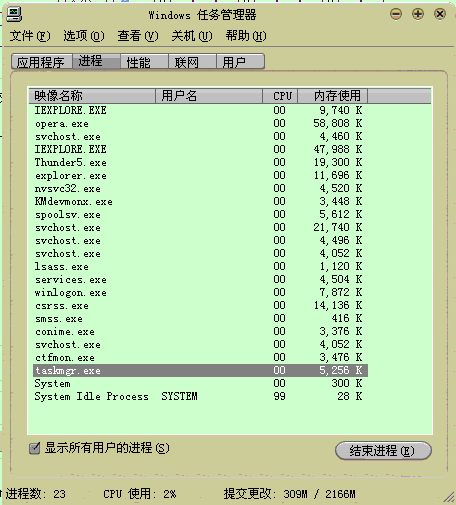
My process list is as shown in the figure:
Using unlocker shows that there is no locking operation, why is there still a prompt box?
How does 360 do it? How does it protect itself?

Floor 7 Posted 2009-03-18 05:56 ·  中国 广东 东莞 电信
银牌会员
★★★
Credits 1,179
Posts 442
Joined 2006-09-09 22:47
19-year member
UID 62249
Status Offline
Found the method. The idea is very simple, mainly the following points.

First, FailureActions: this is actually the operation after startup failure. After testing, it is also the operation after the service process ends (fails). This is the key. Without this operation, the process will not automatically restart the service after ending. The following FailureActions of mine cannot be ended no matter how you end it because it will be automatically generated.

Second, use setacl to set the registry permissions of the service to prohibit deletion, so that you cannot stop the process when using the service manager.

Third, use setacl to set the operation permissions of the service to read-only, so that users cannot stop the service.

The code is as follows: For details, you can refer to my BLOG: http://xbdsoft.kmip.net/article/gsoft/52.htm

SC CREATE "ekrn" TYPE= INTERACT TYPE= OWN START= AUTO BINPATH= "%CD%\ekrn.exe" DISPLAYNAME= "Eset Service"
REM SC failure ekrn reset= 60 actions= restart/60/restart/60/restart/60
REG ADD "HKEY_LOCAL_MACHINE\SYSTEM\CurrentControlSet\Services\ekrn" /v "FailureActions" /t REG_BINARY /d "3C000000000000000000000001000000000000000100000000000000" /f
NET START "Eset Service">NUL
set op=-ot reg -actn ace -ace "n:everyone;p:read;m:grant;w:dacl" -actn setprot -op "dacl:p_nc"
IF NOT "%WINDIR:~-2%"=="PE" setacl -on "HKEY_LOCAL_MACHINE\SYSTEM\CurrentControlSet\Services\ekrn" %op%
set svr=-ot srv -actn ace -ace "n:Everyone;m:grant;p:read;i:sc"


[ Last edited by HUNRYBECKY on 2009-3-18 at 06:02 ]
Forum Jump: