```batch
@echo off &title Dynamic Password Verification
::::******************************************************************
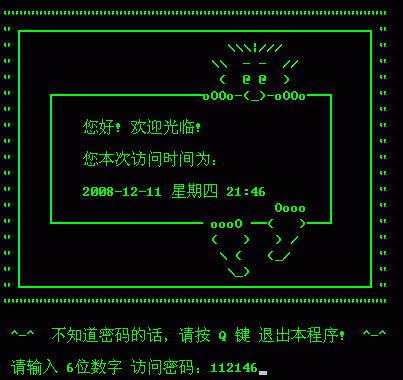
::::Explanation of getting the correct password:
::::If the displayed access time on the interface is Thursday, December 11, 2008, 21:13
::::Then the correct password is the day + hour + minute, that is, the six-digit number 112113!!!
::::******************************************************************
::::■〓■〓■〓■〓■ Program initialization starts ■〓■〓■〓■〓■
@mode con cols=101 lines=27
color 0a
:mum
call :xsp
call :fz
echo." ^-^ If you don't know the password, please press the Q key to exit this program! ^-^
echo.
set /p name= Please enter the 6-digit access password:
::::Judge whether to exit the program.
SET choice=%name:~0,1%
if /i "%choice%"=="Q" goto endd
::::---------------------------------
SET name=%name:~0,6%
::::Start verifying the password:::::::::
goto :pass
::::Password verification passed:::::::::
:aabbcc
::::::::::::::::::::::::::::::::::::::::::::::::::::::::::::::::::::::
::::The following can write the operation commands that can only be executed after passing the password verification.
::::::::::The following are some called procedures. That is, subroutines.
goto :eof
::::::::::::: This is the first interface when the program runs ::::::::::::::::
:xsp
cls
SET rq=%date:~0,16%
SET sj=%time:~0,5%
set mima=%rq% %sj%
call :mima %mima%
echo.
echo.
echo. """"""""""""""""""""""""""""""""""""""""""""""""
echo. "┏━━━━━━━━━━━━━━━━━━━━━┓"
echo. "┃ \\\|/// ┃"
echo. "┃ \\ - - // ┃"
echo. "┃ ( @ @ ) ┃"
echo. "┃ ┏━━━━━━━━━oOOo-(_)-oOOo━┓ ┃"
echo. "┃ ┃ ┃ ┃"
echo. "┃ ┃ Hello! Welcome! ┃ ┃"
echo. "┃ ┃ ┃ ┃"
echo. "┃ ┃ Your access time this time is: ┃ ┃"
echo. "┃ ┃ ┃ ┃"
echo. "┃ ┃ %mima% ┃ ┃"
echo. "┃ ┃ Oooo ┃ ┃"
echo. "┃ ┗━━━━━━━━━ oooO ━( )━┛ ┃"
echo. "┃ ( ) ) / ┃"
echo. "┃ \ ( (_/ ┃"
echo. "┃ \_) ┃"
echo. "┗━━━━━━━━━━━━━━━━━━━━━┛"
echo. """"""""""""""""""""""""""""""""""""""""""""""""
echo.
:::: pause
goto :eof
:::: Assign values to variables
:fz
set name=
set aa1=
set aa2=
set aa3=
set aa4=
set aa5=
set aa6=
goto :eof
:name
echo. %1
set pass=%1
set aa1=%pass:~0,1%
set aa2=%pass:~1,1%
set aa3=%pass:~2,1%
set aa4=%pass:~3,1%
set aa5=%pass:~4,1%
set aa6=%pass:~5,1%
echo. %aa1%-%aa2%-%aa3%-%aa4%-%aa5%-%aa6%
goto :eof
::::: Generate dynamic password ::::::::::::::::::::::
:mima
::::echo. %1 %2 %3
set pass1=%1
set pass2=%2
set pass3=%3
set aa1=%pass1:~8,1%
set aa2=%pass1:~9,1%
set aa3=%pass3:~0,1%
set aa4=%pass3:~1,1%
set aa5=%pass3:~3,1%
set aa6=%pass3:~4,1%
::::echo. %aa1%-%aa2%-%aa3%-%aa4%-%aa5%-%aa6%
set pass=%aa1%%aa2%%aa3%%aa4%%aa5%%aa6%
::::echo. %pass%
goto :eof
::::::Verify password::::::::::::::::::::::::::::::::
:pass
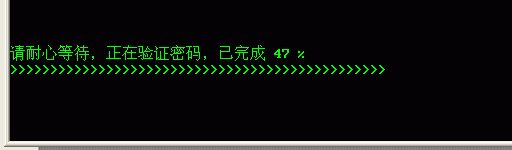
:::: =====Display password verification status with simulated progress bar=====
set a1=
set b1=
set c1=
::::■〓■〓■〓■〓■ Enable variable delay ■〓■〓■〓■〓■
setlocal enabledelayedexpansion
:::------------------------------------------------------
::::Here loop 100 times. The effect of calling subroutine:sub is to output 100 > to form >>>>>>>>>>
for /l %%n in (1 1 100) do call :sub
::::■〓■〓■〓■〓■ Disable variable delay ■〓■〓■〓■〓■
setlocal DISABLEDELAYEDEXPANSION
:::: =======================================
IF NOT "%pass%"=="%name%" goto :cw
call :zq
goto :aabbcc
goto :eof
::::::Display information for incorrect password verification result::::::::::::::
:cw
echo. Unfortunately, the access password you entered is invalid, please re-enter:
pause
goto :mum
goto :eof
::::::Display information for correct password verification result::::::::::::::
:zq
echo." ^-^ Congratulations! The password has passed verification!
pause
goto :eof
rem ■〓■〓■The following is the subroutine for simulating the progress bar■〓■〓■
:sub
rem --------------------------------------------
rem set /a c1= %c1% + 1 The command is abbreviated as follows:
set /a c1+=1
rem --------------------------------------------
set /a a1=%c1%
::::Clear the screen and output 20 blank lines.
cls && for /l %%n in (1 1 20) do echo.
echo.
echo Please be patient, verifying the password, completed !a1! %%
rem After enabling variable delay effect for variable b1, add the > symbol to the original value of variable b1 and then assign it to variable b1
set b1=!b1!^>&& echo !b1!
ping /n 1 127.0.0.1>nul
goto :eof
Trial download address of this batch processing http://upload.cn-dos.net/img/1185.rar
http://upload.cn-dos.net/img/1185.rar
::::
[ Last edited by lj249911023 on 2008-12-12 at 08:57 ]
```
@echo off &title Dynamic Password Verification
::::******************************************************************
::::Explanation of getting the correct password:
::::If the displayed access time on the interface is Thursday, December 11, 2008, 21:13
::::Then the correct password is the day + hour + minute, that is, the six-digit number 112113!!!
::::******************************************************************
::::■〓■〓■〓■〓■ Program initialization starts ■〓■〓■〓■〓■
@mode con cols=101 lines=27
color 0a
:mum
call :xsp
call :fz
echo." ^-^ If you don't know the password, please press the Q key to exit this program! ^-^
echo.
set /p name= Please enter the 6-digit access password:
::::Judge whether to exit the program.
SET choice=%name:~0,1%
if /i "%choice%"=="Q" goto endd
::::---------------------------------
SET name=%name:~0,6%
::::Start verifying the password:::::::::
goto :pass
::::Password verification passed:::::::::
:aabbcc
::::::::::::::::::::::::::::::::::::::::::::::::::::::::::::::::::::::
::::The following can write the operation commands that can only be executed after passing the password verification.
::::::::::The following are some called procedures. That is, subroutines.
goto :eof
::::::::::::: This is the first interface when the program runs ::::::::::::::::
:xsp
cls
SET rq=%date:~0,16%
SET sj=%time:~0,5%
set mima=%rq% %sj%
call :mima %mima%
echo.
echo.
echo. """"""""""""""""""""""""""""""""""""""""""""""""
echo. "┏━━━━━━━━━━━━━━━━━━━━━┓"
echo. "┃ \\\|/// ┃"
echo. "┃ \\ - - // ┃"
echo. "┃ ( @ @ ) ┃"
echo. "┃ ┏━━━━━━━━━oOOo-(_)-oOOo━┓ ┃"
echo. "┃ ┃ ┃ ┃"
echo. "┃ ┃ Hello! Welcome! ┃ ┃"
echo. "┃ ┃ ┃ ┃"
echo. "┃ ┃ Your access time this time is: ┃ ┃"
echo. "┃ ┃ ┃ ┃"
echo. "┃ ┃ %mima% ┃ ┃"
echo. "┃ ┃ Oooo ┃ ┃"
echo. "┃ ┗━━━━━━━━━ oooO ━( )━┛ ┃"
echo. "┃ ( ) ) / ┃"
echo. "┃ \ ( (_/ ┃"
echo. "┃ \_) ┃"
echo. "┗━━━━━━━━━━━━━━━━━━━━━┛"
echo. """"""""""""""""""""""""""""""""""""""""""""""""
echo.
:::: pause
goto :eof
:::: Assign values to variables
:fz
set name=
set aa1=
set aa2=
set aa3=
set aa4=
set aa5=
set aa6=
goto :eof
:name
echo. %1
set pass=%1
set aa1=%pass:~0,1%
set aa2=%pass:~1,1%
set aa3=%pass:~2,1%
set aa4=%pass:~3,1%
set aa5=%pass:~4,1%
set aa6=%pass:~5,1%
echo. %aa1%-%aa2%-%aa3%-%aa4%-%aa5%-%aa6%
goto :eof
::::: Generate dynamic password ::::::::::::::::::::::
:mima
::::echo. %1 %2 %3
set pass1=%1
set pass2=%2
set pass3=%3
set aa1=%pass1:~8,1%
set aa2=%pass1:~9,1%
set aa3=%pass3:~0,1%
set aa4=%pass3:~1,1%
set aa5=%pass3:~3,1%
set aa6=%pass3:~4,1%
::::echo. %aa1%-%aa2%-%aa3%-%aa4%-%aa5%-%aa6%
set pass=%aa1%%aa2%%aa3%%aa4%%aa5%%aa6%
::::echo. %pass%
goto :eof
::::::Verify password::::::::::::::::::::::::::::::::
:pass
:::: =====Display password verification status with simulated progress bar=====
set a1=
set b1=
set c1=
::::■〓■〓■〓■〓■ Enable variable delay ■〓■〓■〓■〓■
setlocal enabledelayedexpansion
:::------------------------------------------------------
::::Here loop 100 times. The effect of calling subroutine:sub is to output 100 > to form >>>>>>>>>>
for /l %%n in (1 1 100) do call :sub
::::■〓■〓■〓■〓■ Disable variable delay ■〓■〓■〓■〓■
setlocal DISABLEDELAYEDEXPANSION
:::: =======================================
IF NOT "%pass%"=="%name%" goto :cw
call :zq
goto :aabbcc
goto :eof
::::::Display information for incorrect password verification result::::::::::::::
:cw
echo. Unfortunately, the access password you entered is invalid, please re-enter:
pause
goto :mum
goto :eof
::::::Display information for correct password verification result::::::::::::::
:zq
echo." ^-^ Congratulations! The password has passed verification!
pause
goto :eof
rem ■〓■〓■The following is the subroutine for simulating the progress bar■〓■〓■
:sub
rem --------------------------------------------
rem set /a c1= %c1% + 1 The command is abbreviated as follows:
set /a c1+=1
rem --------------------------------------------
set /a a1=%c1%
::::Clear the screen and output 20 blank lines.
cls && for /l %%n in (1 1 20) do echo.
echo.
echo Please be patient, verifying the password, completed !a1! %%
rem After enabling variable delay effect for variable b1, add the > symbol to the original value of variable b1 and then assign it to variable b1
set b1=!b1!^>&& echo !b1!
ping /n 1 127.0.0.1>nul
goto :eof
Trial download address of this batch processing http://upload.cn-dos.net/img/1185.rar
http://upload.cn-dos.net/img/1185.rar
::::
[ Last edited by lj249911023 on 2008-12-12 at 08:57 ]
```