
China DOS Union
-- Unite DOS · Advance DOS · Grow DOS --Union site: www.cn-dos.net Forum site: www.cn-dos.net/forum
|
China DOS Union-- Unite DOS · Advance DOS · Grow DOS --Union site: www.cn-dos.net Forum site: www.cn-dos.net/forum |
| Guest | Log in | Register | Members | Search | China DOS Union |
|
中国DOS联盟论坛 The time now is 2026-10-23 11:57 |
47,815 topics / 349,927 posts / today 0 new / 48,287 members |
| DOS汉化世界 & 中文系统 (中文化室) » PC3000 V14 Simplified Chinese Version No-Card Crack Simplified Edition and USB Flash Drive Edition |
| Printable Version 65,888 / 40 |
| Floor1 xiaoyunwang | Posted 2008-11-20 12:41 |
| 高级用户 Posts 374 Credits 940 From 湖南张家界 | |
|
PC3000 V14 Simplified Chinese Version Without Card Crack Simplified Edition and USB Flash Drive Edition
It seems that the PC3000 search on this forum hasn't found relevant software. Below is the PC3000 Simplified Chinese Version Without Card Crack Simplified Edition extracted from my "Terminator Software Disc". It's strongly compressed and there's a 10 MB bootable.GZ compressed image. You can download it on the 2nd floor. Thanks to Yulu for helping with the upload. Of course, if your Russian is good enough, you can delete the Chinese character font display driver in vgaga.com in the image, and then it will be in Russian after startup. As for my nearly 90 MB Without Card Without Dongle USB Flash Drive Edition PC3000 V14 Chinese Cracked Version, please download it on the 16th floor. Thanks to Wang6610 for the upload help. This USB Flash Drive Edition is too large, and I only plan to integrate the simplified version onto my software disc. The principle of the simplified Chinese PC3000 purchased commercially on Taobao is similar to this. Don't spend冤枉 money and be deceived (Of course, those with plenty of money are an exception). c=320 h=4 s=36 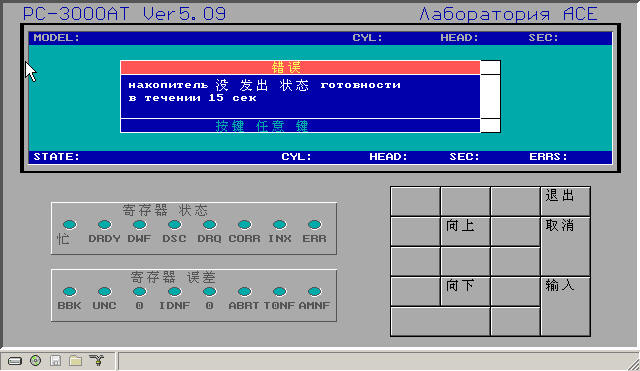 Software Detailed Information PC-3000 is a commercial professional hard disk repair comprehensive tool developed by the famous Russian hard disk laboratory - ACE Laboratory. It manages the hard disk from the internal software of the hard disk, and changes and repairs the original data of the hard disk. The operations that can be carried out: 1. Servo scan 2. Physical scan 3. LBA address scan 4. Shield as factory bad sectors (p-list) 5. Shield heads 6. Shield tracks 7. Shield bad sectors 8. Change BIOS words (parameters) 9. Change the size of LBA 10. Change the SN number 11. View or modify negative head information II. Main Uses of PC-3000 The software and hardware comprehensive tool "PC-3000" is mainly used to professionally repair various types of IDE hard disks with capacities from 20MB to 200GB. The hard disk manufacturers supported are: Seagate (Seagate), Western Digital (Western Digital), Fujitsu (Fujitsu), Quantum (Quantum), Samsung (Samsung), Maxtor (Maxtor), Conner, IBM, HP, Kalok, Teac, Daeyoung, and Xebec, etc. It is possible to repair 50-80% of defective hard disks using PC-3000. Such a high repair rate is achieved by using a special hard disk working mode (such as factory mode). In the special working mode, the following operations can be performed on the hard disk: Internal low-level formatting; Rewrite the internal microcode module (firmware) of the hard disk; Rewrite the hard disk parameter identification; Check defective sectors or defective tracks, and repair them by resetting, replacing or skipping and ignoring defects, etc.; Readjust internal parameters; Logically cut off (that is, prohibit use) defective heads; S.M.A.R.T parameter reset.... Among them, rewriting the internal microcode (Firmware) module has a special effect on data recovery in some cases, such as: Maxtor DiamondMax, GoldMax, StarMax series hard disks cannot be correctly recognized (no head noise) when powered on; Fujitsu MPG and MPF series hard disks have basically normal head seeking when powered on, but cannot be correctly detected; IBM腾龙 series has head seeking sound (no noise), but cannot be correctly recognized; Quantum hard disks can be detected but cannot be read or written; WD EB and BB series hard disks can be detected but cannot be read or written... These faults listed above generally do not belong to hardware faults. Through the operations of PC-3000, most similar faults can be solved, and most data is still intact. III. Basic Working Principle of PC-3000 Crack the instruction sets of special CPUs of various types of hard disks, interpret the Firmware (firmware) of various hard disks, thereby control the internal work of the hard disk, realize the reading and writing of the internal parameter module of the hard disk and the calling of the hard disk program module, and finally achieve the purpose of repairing various hard disk defects with software. The most professional functions are: rewrite the hard disk Firmware module; scan the internal defects of the hard disk in the factory mode and record them in the corresponding parameter module inside the hard disk; perform internal low-level formatting in the factory mode; change hard disk parameters, etc. After more than ten years of continuous research by ACE Laboratory, PC-3000 V12 (latest version) has been able to support most new and old types of IDE interface hard disks with capacities from 40MB to 200GB [ Last edited by xiaoyunwang on 2008-12-4 at 16:43 ] |
|
| Floor2 雨露 | Posted 2008-11-21 10:04 |
| 管理员 Posts 2,601 Credits 6,215 | |
| Floor3 tangtai | Posted 2008-11-21 10:30 |
| 等待验证用户 Posts 314 Credits 640 | |
|
What a great thing! Strongly support!
|
|
| Floor4 雨露 | Posted 2008-11-21 11:35 |
| 管理员 Posts 2,601 Credits 6,215 | |
|
If you download normally, the download speed is indeed slow. I am even slower than everyone. Everyone can try it at another time!
It may be that the server is limiting the speed. Only after logging in with the username and password can the upload and download be fast! About 500KB/s! |
|
| Floor5 xugaohui | Posted 2008-11-21 13:05 |
| 高级用户 Posts 293 Credits 774 From 湖北仙桃 | |
|
The download is too slow. Why not compress it?
The size after compression is 1,735,275 bytes Here is the re-compressed download address of the download file on the second floor: http://soft.5awb.com/pxedos/pc3000.rar http://users5.nofeehost.com/pxedos/pc3000.rar Maybe this software is not needed. Collect the good stuff first. Support sharing. [ Last edited by xugaohui on 2008-11-21 at 14:22 ] |
|
| Floor6 雨露 | Posted 2008-11-21 13:07 |
| 管理员 Posts 2,601 Credits 6,215 | |
| Floor7 julon | Posted 2008-11-21 14:21 |
| 中级用户 Posts 133 Credits 424 | |
|
Got it, 1.7m. Friend on the 5th floor has excellent compression skills!
|
|
| Floor8 xiaoyunwang | Posted 2008-11-21 22:48 |
| 高级用户 Posts 374 Credits 940 From 湖南张家界 | |
Originally posted by julon at 2008-11-21 02:21 PM: Why is the .ZIP or .GZ compressed to more than ten megabytes? Indeed, the .RAR is only 1.7 MB after compression. Unfortunately: if only grub or sysLinux's memdisk could directly support booting the .RAR compressed package. |
|
| Floor9 xiaoyunwang | Posted 2008-11-24 00:28 |
| 高级用户 Posts 374 Credits 940 From 湖南张家界 | |
Originally posted by xiaoyunwang at 2008-11-20 12:41 PM: If you plan to use memdisk to boot pc3000.gz, please first add any garbage files ranging from 100KB to 1000KB to pc3000.img after decompressing pc3000.gz, then delete the garbage files you added, expand the size of PC3000.IMG by 100KB to 1000KB, and then re-gzip it into pc3000.gz to provide some space for temporary files generated during the program's operation after using memdisk to start the compressed package. Otherwise, the phenomenon of A: not writable may occur. [ Last edited by xiaoyunwang on 2008-11-24 at 00:41 ] |
|
| Floor10 xugaohui | Posted 2008-11-24 11:13 |
| 高级用户 Posts 293 Credits 774 From 湖北仙桃 | |
|
Non-standard floppy disk images created with WinImage may have issues where some areas are not writable. Using other methods to create floppy disks completely resolves this.
|
|
| Floor11 xugaohui | Posted 2008-11-24 11:14 |
| 高级用户 Posts 293 Credits 774 From 湖北仙桃 | |
|
Non-standard floppy disk images created with WinImage may have issues where some areas are not writable. The same problem exists with expansion. The C/H/S values are not 100% correct. Using other methods to create the floppy disk completely solves the problem.
|
|
| Floor12 xiaoyunwang | Posted 2008-11-28 22:41 |
| 高级用户 Posts 374 Credits 940 From 湖南张家界 | |
|
I am referring to the post here:
Regarding the read-write issue of a:\ after booting the dos img via memdisk. http://bbs.znpc.net/viewthread.php?tid=5352&extra=page%3D1 |
|
| Floor13 xiaoyunwang | Posted 2008-11-29 09:56 |
| 高级用户 Posts 374 Credits 940 From 湖南张家界 | |
Originally posted by xugaohui at 2008-11-20 11:14 AM: After I first expanded it, I then used memdisk in esboot (actually bcdw->isolinux->memdisk) to boot a 27 MB .gz non-standard compressed package created with WinImage. The A drive is fully writable without any problems, and the principle is basically as described in the previous post. |
|
| Floor14 xugaohui | Posted 2008-11-29 10:51 |
| 高级用户 Posts 293 Credits 774 From 湖北仙桃 | |
|
There are many software for non-standard virtual floppy disks under Windows, no need to be so troublesome. After virtual floppy drive, save it as an image, this way it must work.
The image generated by the method above is different in size from a newly created image of the same capacity and compressed by software. There is a post in the forum that provides many large image downloads, which are generated by virtual floppy drive, so that it can be completely guaranteed to be written. grub4dos, memdisk have different C/H/S values for the same image. There has long been a simpler method to create non-standard floppy disk images in the forum. Versions of ultraiso 9.2 or above or diskgen 3.0 have such functions. [ Last edited by xugaohui on 2008-11-29 at 11:03 ] |
|
| Floor15 wang6610 | Posted 2008-11-29 17:17 |
| 银牌会员 Posts 488 Credits 1,246 | |
Originally posted by xugaohui at 2008-11-29 10:51 AM: Yes............... |
|
| 1 2 3 Next |
|
[ Contact the Union admin team -
中国DOS联盟 -
Standard version ] Sponsored by ifanr Inc | © 2001–2023 |