China DOS Union
-- Unite DOS · Advance DOS · Grow DOS --Union site: www.cn-dos.net Forum site: www.cn-dos.net/forum
|
China DOS Union-- Unite DOS · Advance DOS · Grow DOS --Union site: www.cn-dos.net Forum site: www.cn-dos.net/forum |
| Guest | Log in | Register | Members | Search | China DOS Union |
|
中国DOS联盟论坛 The time now is 2026-09-29 18:10 |
47,813 topics / 349,918 posts / today 0 new / 48,278 members |
| DOS批处理 & 脚本技术(批处理室) » [Help] How to modify the target of a shortcut |
| Printable Version 3,828 / 16 |
| Floor1 cad55 | Posted 2008-11-20 07:57 |
| 高级用户 Posts 329 Credits 620 | |
|
Often put some green small tools in the USB flash drive for use.
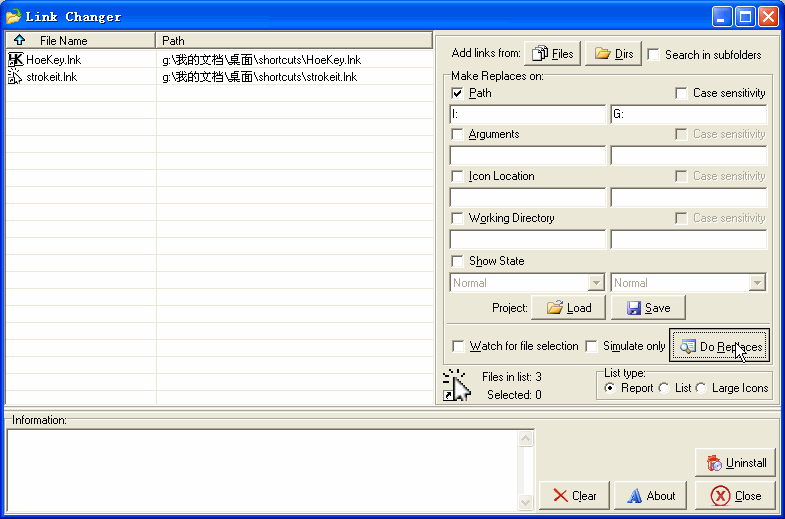
And created shortcuts (*.lnk) of these small tools in the USB flash drive. Because different computers have different drive letter settings for the USB flash drive, it is quite troublesome to use these shortcuts. You must modify the target of the shortcut again to use it. Now please ask experts to write a BAT that directly changes the target path of the shortcut. Requirements: 1. First retrieve the current drive letter where the USB flash drive is located. 2. Modify the target of the shortcuts in the current folder. (This BAT is placed in the same folder as the shortcuts) (Actually, just modify the drive letter ----- change I:\*\ to g:\*) |
|
| Floor2 tireless | Posted 2008-11-20 09:39 |
| 银牌会员 Posts 1,122 Credits 2,025 | |
|
You can use some USB flash drive "Start Menu" software, such as PSMenu
PSMenu - Portable Start Menu (Portable Start Menu) http://www.appinn.com/psmenu-portable-start-menu/ |
|
| Floor3 cad55 | Posted 2008-11-20 10:03 |
| 高级用户 Posts 329 Credits 620 | |
|
Thanked the software tried upstairs.
Not very easy to use. Not very convenient. Still want to use BAT to solve. Can you give an idea... (Just change the target path of a *.lnk) |
|
| Floor4 tireless | Posted 2008-11-20 10:08 |
| 银牌会员 Posts 1,122 Credits 2,025 | |
|
Change the target path of all shortcuts in a directory... ( Vbscript )
Change The Target Path Of All Shortcuts In A Directory... ( Vbscript ) |
|
| Floor5 tireless | Posted 2008-11-20 10:57 |
| 银牌会员 Posts 1,122 Credits 2,025 | |
|
Why not replace all shortcuts with batch scripts? This way, relative paths can be used.
start "" "tool\test.exe" |
|
| Floor6 zxjing | Posted 2008-11-20 17:54 |
| 新手上路 Posts 7 Credits 10 | |
|
I have also encountered this problem.
The temporary method is the same as the one above, and multiple folders and files can be opened simultaneously. start "" 工具\下载\FlashGet\FlashGet.exe start "" 工具\网络\Tencent\qq\QQ.exe start "" 文件\素材\MM相片\ start "" 工具\娱乐\MP3列表.m3u start "" http://www.google.com/ But this bat cannot search the upper - level directory. If you have many commonly used tools and it is inconvenient to put them in the root directory, you will definitely create a folder to put all the shortcuts. In this way: your shortcuts are in g:\Common Tool Shortcuts\ If you use bat to replace lnk, then the directory where your bat file is located is g:\Common Tool Shortcuts\ And the files you want to point to are in g:\Tools\QQ\QQ2008.exe g:\Music\Qianqian Quiet Listening.ttpl In this case, it cannot be searched. This is the first problem. The second problem is: then a bunch of bat files placed there are not very nice to look at. So it is best to use one bat to get it done. Looking forward to it... I just started learning bat the second day, hope to get more guidance. |
|
| Floor7 slore | Posted 2008-11-20 18:07 |
| 铂金会员 Posts 2,478 Credits 5,212 | |
|
XP seems to automatically search...
|
|
| Floor8 tireless | Posted 2008-11-20 18:09 |
| 银牌会员 Posts 1,122 Credits 2,025 | |
The directory where your bat file is located is Like this: start "" \Tools\QQ\QQ2008.exe . means the current directory |
|
| Floor9 zxjing | Posted 2008-11-20 18:13 |
| 新手上路 Posts 7 Credits 10 | |
|
New problem again,
My computer start "" 123.txt start + half-width space + "" + half-width space + program, file or folder path Can't search subdirectories now, actually. I remember it was okay yesterday What's going on? The error message is "Cannot find '123.txt' (quotes added by myself in the prompt) Adding "" to 123.txt doesn't work either start "" \123.txt doesn't work either It should be a problem with the computer, heh Frequent registry modifications today, did I accidentally change something Which registry entries might cause 123.txt to not be found, please Thanks! [ Last edited by zxjing on 2008-11-20 at 18:19 ] |
|
| Floor10 tireless | Posted 2008-11-20 18:20 |
| 银牌会员 Posts 1,122 Credits 2,025 | |
|
It will only first look in the current directory, then in the "environment variables", and will not look in other places.
|
|
| Floor11 zxjing | Posted 2008-11-20 18:51 |
| 新手上路 Posts 7 Credits 10 | |
|
Thank you everyone for your help, the problem has been solved.
Solution reference http://www.cn-dos.net/forum/viewthread.php?tid=41923&page=1&sid=TUH4wS#pid290700 The required tools all have links in this post. Thanks again to the enthusiastic tireless |
|
| Floor12 zxjing | Posted 2008-11-20 18:53 |
| 新手上路 Posts 7 Credits 10 | |
|
Use the link from post 11 in this thread. Use the code from post 10 and the attachment from post 1 in the linked post, then make some minor adjustments.
[ Last edited by zxjing on 2008-11-20 at 18:54 ] |
|
| Floor13 cad55 | Posted 2008-11-20 22:21 |
| 高级用户 Posts 329 Credits 620 | |
|
Thank you all again.
But if you just use BAT, there are no icons. Still not very good. I think of a stupid way. Make several shortcut icons with different paths (usually USB disks: I, H, G and other drive letters) Then, choose one of them, and it will be okay. Once again, please ask the experts for advice. What can be simplified or optimized in the above method with BAT... |
|
| Floor14 mountvol | Posted 2008-11-21 08:41 |
| 初级用户 Posts 117 Credits 186 | |
|
1. Change the target drive letter of all shortcuts to Z:
2. Create a BAT file with the content to map the current drive letter to Z: using subst Or use HTA to manage and make it similar to a toolbar style. |
|
| Floor15 tireless | Posted 2008-11-21 13:04 |
| 银牌会员 Posts 1,122 Credits 2,025 | |
| 1 2 Next |
|
[ Contact the Union admin team -
中国DOS联盟 -
Standard version ] Sponsored by ifanr Inc | © 2001–2023 |