
China DOS Union
-- Unite DOS · Advance DOS · Grow DOS --Union site: www.cn-dos.net Forum site: www.cn-dos.net/forum
|
China DOS Union-- Unite DOS · Advance DOS · Grow DOS --Union site: www.cn-dos.net Forum site: www.cn-dos.net/forum |
| Guest | Log in | Register | Members | Search | China DOS Union |
|
中国DOS联盟论坛 The time now is 2026-09-29 15:19 |
47,813 topics / 349,918 posts / today 0 new / 48,278 members |
| DOS批处理 & 脚本技术(批处理室) » [Share] Batch Calendar |
| Printable Version 2,879 / 11 |
| Floor1 huanbei | Posted 2008-11-05 21:29 |
| 初级用户 Posts 14 Credits 32 | |
|
Hello everyone, this is really a great place to learn DOS and batch.
I've been wanting to find a CAL command under DOS, similar to cal under Linux. Later, I found this batch calendar here http://www.cn-dos.net/forum/viewthread.php?tid=27739&fpage=1&highlight=%E6%97%A5%E5%8E%86&page=1 post. I've been using a computer for a long time, and now I want to understand batch a bit. It's through this article that I learned about batch under XP. Thanks to huzixuan and my3439955, I've been learning the code and digesting it. It took me a few days - I found myself really stupid. Now I've rewritten part of the code in that post for the following reasons: 1. There's a temporary file in the code, and I'm not happy with it. 2. The current general calendar sorting is: Sunday, Monday, Tuesday, Wednesday, Thursday, Friday, Saturday. 3. It's for learning, so I wanted to see if I could understand it, and I unknowingly changed it in the process. Why did I want to find a cal command? Because I usually log in to XP with USER, and the small calendar that comes with the system can only be opened (changed) by the administrator, which makes me very depressed. If there are any mistakes, please correct them for me. The code is as follows: The program has errors, and I've corrected it myself. [ Last edited by huanbei on 2008-11-6 at 00:53 ] |
|
| Floor2 yishanju | Posted 2008-11-05 22:14 |
| 银牌会员 Posts 1,357 Credits 1,488 | |
|
There are web - based calendars on the Internet, so why look for a command - line one.
|
|
| Floor3 yishanju | Posted 2008-11-05 22:21 |
| 银牌会员 Posts 1,357 Credits 1,488 | |
| Floor4 huanbei | Posted 2008-11-05 23:04 |
| 初级用户 Posts 14 Credits 32 | |
Originally posted by yishanju at 2008-11-5 22:14: 1. Learning DOS batch 2. Command-based is very useful. If your work environment can't access the internet, and you are a non-administrative user 3. It's compact and efficient 4. We have Windows, why use DOS? : ) |
|
| Floor5 HAT | Posted 2008-11-06 00:58 |
| 版主 Posts 5,017 Credits 9,023 | |
|
Saying such things in the batch processing room feels quite strange ^_^
|
|
| Floor6 BC | Posted 2008-11-06 13:22 |
| 中级用户 Posts 175 Credits 338 | |
|
There is a question, why not add a pause at the end...
|
|
| Floor7 huanbei | Posted 2008-11-06 19:00 |
| 初级用户 Posts 14 Credits 32 | |
Originally posted by BC at 2008-11-6 13:22: Is it not good to let the program automatically return to the DOS command prompt? I saw that the original program used pause>nul at the end, but what is the actual function of this for this program? After the display ends, you have to press the space bar again to return to the prompt. |
|
| Floor8 BC | Posted 2008-11-06 21:35 |
| 中级用户 Posts 175 Credits 338 | |
|
Oh... So that's how it is, please forgive my rashness, brother. It would be nice to have a DOS-compatible one...
|
|
| Floor9 huanbei | Posted 2008-11-06 21:59 |
| 初级用户 Posts 14 Credits 32 | |
|
Just now I read A Little Talk about Batch Processing Parameter Issues
http://www.cn-dos.net/forum/viewthread.php?tid=17785&fpage=1&highlight=%E5%8F%82%E6%95%B0 and learned something. Added parameters to the calendar. The effect is as follows: 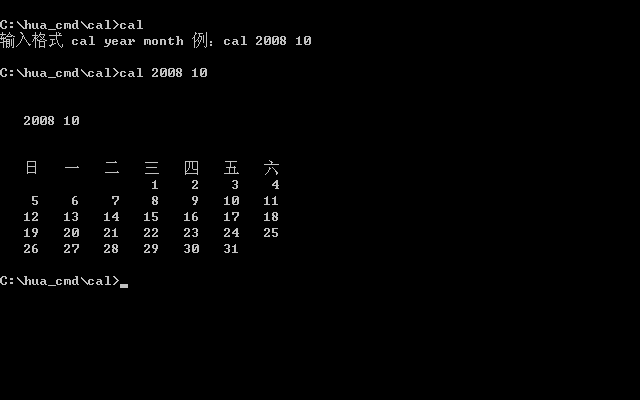 The new code is as follows: |
|
| Floor10 huanbei | Posted 2008-11-06 22:04 |
| 初级用户 Posts 14 Credits 32 | |
|
I find that post really in - depth in discussion. I really admire the research spirit of moderators Wunaike and willsort. I learn from it and apply it now.
|
|
| Floor11 ucdos12 | Posted 2008-11-07 15:13 |
| 新手上路 Posts 11 Credits 11 | |
|
Not bad, collect and use
|
|
| Floor12 yyyyyyyyy | Posted 2008-11-07 20:27 |
| 初级用户 Posts 85 Credits 137 | |
|
Polished and enhanced:
Avoid troublemakers inputting English Default to January @echo off setlocal enabledelayedexpansion :::::Add batch parameter functionality set year=%~1 set m=%~2 set /a year1=!year!+1-1 set /a m1=!m!+1-1 if not "!year!"=="!year1!" goto help if not "!m!"=="!m!" goto help if not defined m ( if not defined year ( goto :help ) else ( set m=1 goto :main ) ) :help @echo Input format: @echo cal year month @echo Example: cal 2008 10 @echo If no month is input, it defaults to January exit /b :main :::::::::::Define s1~s12, the number of days in each month for %%b in (31,28,31,30,31,30,31,31,30,31,30,31) do ( set /a y+=1 set s!y!=%%b ) :::::::::::Determine if the input year is a leap year, change the number of days in February set /a year_chk1=year%%400 set /a year_chk2=year%%4 set /a year_chk3=year%%100 if %year_chk1% equ 0 set s2=29 if %year_chk2% equ 0 if %year_chk3% neq 0 set s2=29 ::::::::::Input the month and calculate the number of days from the first day of the year to the end of the previous month set n=%m% set /a n-=1 for /l %%c in (1,1,%n%) do ( set /a day+=!s%%c!) ::::::::::Determine what day of the week the first day of this year is? Then determine what day of the week the first day of the month to be queried is? set /a yearflag=(%year%+(%year%-1)/4-(%year%-1)/100+(%year%-1)/400)%%7 if %m%==1 (set monthflag=%yearflag% ) else (set /a monthflag=%yearflag%+!day!%%7 ) if %monthflag% geq 7 (set /a monthflag-=7) echo. echo. echo %year% %m% echo. echo. echo Sun Mon Tue Wed Thu Fri Sat :::::::::Empty dates before the 1st of the input month for /l %%d in (1,1,%monthflag%) do ( set /p= <nul) :::::::::Find the date to wrap (the first one, then every 7 one wrap), display the current month's date and wrap set /a cl=7-%monthflag% for /l %%e in (1 1 !s%m%!) do ( if %%e lss 10 (set /p= %%e<nul) else (set /p= %%e<nul) if %%e==!cl! (echo.&set /a cl+=7) ) echo. |
|
|
[ Contact the Union admin team -
中国DOS联盟 -
Standard version ] Sponsored by ifanr Inc | © 2001–2023 |