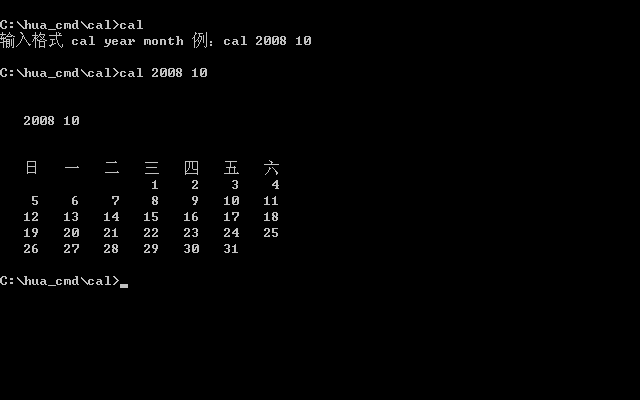
Hello everyone, this is really a great place to learn DOS and batch.
I've been wanting to find a CAL command under DOS, similar to cal under Linux.
Later, I found this batch calendar here http://www.cn-dos.net/forum/viewthread.php?tid=27739&fpage=1&highlight=%E6%97%A5%E5%8E%86&page=1 post. I've been using a computer for a long time, and now I want to understand batch a bit. It's through this article that I learned about batch under XP. Thanks to huzixuan and my3439955, I've been learning the code and digesting it. It took me a few days - I found myself really stupid. Now I've rewritten part of the code in that post for the following reasons:
1. There's a temporary file in the code, and I'm not happy with it.
2. The current general calendar sorting is: Sunday, Monday, Tuesday, Wednesday, Thursday, Friday, Saturday.
3. It's for learning, so I wanted to see if I could understand it, and I unknowingly changed it in the process.
Why did I want to find a cal command? Because I usually log in to XP with USER, and the small calendar that comes with the system can only be opened (changed) by the administrator, which makes me very depressed.
If there are any mistakes, please correct them for me.
The code is as follows:
The program has errors, and I've corrected it myself.
[ Last edited by huanbei on 2008-11-6 at 00:53 ]
I've been wanting to find a CAL command under DOS, similar to cal under Linux.
Later, I found this batch calendar here http://www.cn-dos.net/forum/viewthread.php?tid=27739&fpage=1&highlight=%E6%97%A5%E5%8E%86&page=1 post. I've been using a computer for a long time, and now I want to understand batch a bit. It's through this article that I learned about batch under XP. Thanks to huzixuan and my3439955, I've been learning the code and digesting it. It took me a few days - I found myself really stupid. Now I've rewritten part of the code in that post for the following reasons:
1. There's a temporary file in the code, and I'm not happy with it.
2. The current general calendar sorting is: Sunday, Monday, Tuesday, Wednesday, Thursday, Friday, Saturday.
3. It's for learning, so I wanted to see if I could understand it, and I unknowingly changed it in the process.
Why did I want to find a cal command? Because I usually log in to XP with USER, and the small calendar that comes with the system can only be opened (changed) by the administrator, which makes me very depressed.
If there are any mistakes, please correct them for me.
The code is as follows:
@echo off


setlocal enabledelayedexpansion


::::::::::: Define s1~s12, the number of days in each month

for %%b in (31,28,31,30,31,30,31,31,30,31,30,31) do (

set /a y+=1

set s!y!=%%b

)


::::::::::: Judge whether the input year is a leap year and change the number of days in February

set /p year=Which year to check?


set /a year_chk1=year%%400

set /a year_chk2=year%%4

set /a year_chk3=year%%100

if %year_chk1% equ 0 set s2=29

if %year_chk2% equ 0 if %year_chk3% neq 0 set s2=29


:::::::::: Input the month and calculate the number of days from the first day of the year to the end of the previous month

set /p m=Which month to check?

set n=%m%

set /a n-=1

for /l %%c in (1,1,%n%) do (

set /a day+=!s%%c!)


:::::::::: Judge what day of the week the first day of this year is? Then judge what day of the week the first day of the month to be queried is?

set /a yearflag=(%year%+(%year%-1)/4-(%year%-1)/100+(%year%-1)/400)%%7

if %m%==1 (set  monthflag=%yearflag% ) else (set /a monthflag=%yearflag%+!day!%%7 )


if %monthflag% geq 7 (set /a monthflag-=7)


echo    Sunday   Monday   Tuesday   Wednesday   Thursday   Friday   Saturday


::::::::: Input the empty dates before the 1st of the month

for /l %%d in (1,1,%monthflag%) do (

set /p=     <nul)

::::::::: Find the date to wrap (the first one, then every 7 one wrap), display the date of the current month and wrap

set /a cl=7-%monthflag%


for /l %%e in (1 1 !s%m%!) do (

if %%e lss 10 (set /p=    %%e<nul) else (set /p=   %%e<nul)

if %%e==!cl! (echo.&set /a cl+=7)

)

echo.
The program has errors, and I've corrected it myself.
[ Last edited by huanbei on 2008-11-6 at 00:53 ]
Recent Ratings for This Post
( 3 in total)
Click for details
用过DOS的人