中国DOS联盟论坛

China DOS Union

-- Unite DOS · Advance DOS · Grow DOS --
Union site: www.cn-dos.net Forum site: www.cn-dos.net/forum
Guest | Log in | Register | Members | Search | China DOS Union
中国DOS联盟论坛
The time now is 2026-08-10 05:51
47,811 topics / 349,897 posts / today 2 new / 48,255 members
DOS批处理 & 脚本技术(批处理室) » [Help]Problem with closing processes using ntsd?
Printable Version  2,286 / 19
Floor1 tempuser Posted 2008-10-27 14:40
高级用户 Posts 261 Credits 547
### Question 1:
The problem?
1, Suppose the PID of notepad.exe is 2328, I executed the following command successfully under DOS:
ntsd -c q -p 2328
But when I use it in a batch script like this, it fails:
@echo off
set /p closeprocess= Please enter the PID of the process you want to force close
ntsd -c q -p "%closeprocess%"
goto :eof
The error message is as follows:
Unable to find process '2328', HRESULT 0x80004002
"This interface is not supported"
ntsd: exiting - press enter ---
Why?

2. Also, ask about the specific usage of wmic process delete, is this delete also to force delete the process, including some system processes?

Waiting online......
Floor2 HAT Posted 2008-10-27 14:59
版主 Posts 5,017 Credits 9,023
```
@echo off
tasklist|findstr /i "notepad.exe"
echo.
set /p closeprocess=Please enter the PID of the process you want to force close
ntsd -c q -p %closeprocess%
```
Floor3 tempuser Posted 2008-10-27 15:37
高级用户 Posts 261 Credits 547
There is no error prompt after execution, but the process cannot be closed. Adding "%closeprocess%" with "%closeprocess%" has no effect.
Floor4 tempuser Posted 2008-10-27 17:00
高级用户 Posts 261 Credits 547
Why is that!

ntsd works well under DOS, but fails in batch processing?

Searched for a long time, got some insights on parameter understanding, but it just doesn't work!

ntsd -c q -pn
c :command
q :quit
p :pid
n :processname
Example:
ntsd -c q -pn notepad.exe
or
ntsd -c q -p 2696
Floor5 newsuper Posted 2008-10-27 23:17
新手上路 Posts 15 Credits 18
If ntsd doesn't work, try taskkill, it's very useful.
taskkill /pid xxx
Always use this.
Floor6 HAT Posted 2008-10-27 23:30
版主 Posts 5,017 Credits 9,023

Can you post your result for me to see?
This is mine:
Floor7 slore Posted 2008-10-27 23:47
铂金会员 Posts 2,478 Credits 5,212
Use taskkill to end the ntsd process ^

Sometimes when ending the ntsd process, the ntsd window may stay, and you need to close it to end it.
Floor8 newsuper Posted 2008-10-28 00:22
新手上路 Posts 15 Credits 18
It seems that taskkill can't be used in batch processing either. I only used it in the command line before.
Floor9 HAT Posted 2008-10-28 00:32
版主 Posts 5,017 Credits 9,023
Who did you hear it from? Or did you personally test it? Can you post your test code and results for us to see?
Floor10 newsuper Posted 2008-10-28 00:54
新手上路 Posts 15 Credits 18
I don't know if it's a problem with the computer or the program.
The following taskkill cannot be used in the for loop batch processing.
for /f "tokens=1,2" %%i in ('tasklist.exe') do if %%i ==notepad.exe taskkill /pid %%j
But if there is only this one: taskkill /im notepad.exe, it can be used, just not in the for loop.
There are others, it seems like taskkill doesn't support variables.
I hope an expert can give guidance.

Today I tested again and found that it's a problem with the program. It should be change %%i==notepad.exe to "%%i"=="notepad.exe", that is, add quotes.
The following is the test program, very simple.
@echo off
start /min notepad.exe
for /f "tokens=1,2" %%i in ('tasklist.exe') do if "%%i"=="notepad.exe" echo %%j
set /p cp=Please enter the PID of the process you want to end
taskkill /pid %cp%

[ Last edited by newsuper on 2008-10-28 at 19:10 ]
Floor11 tempuser Posted 2008-10-28 07:59
高级用户 Posts 261 Credits 547
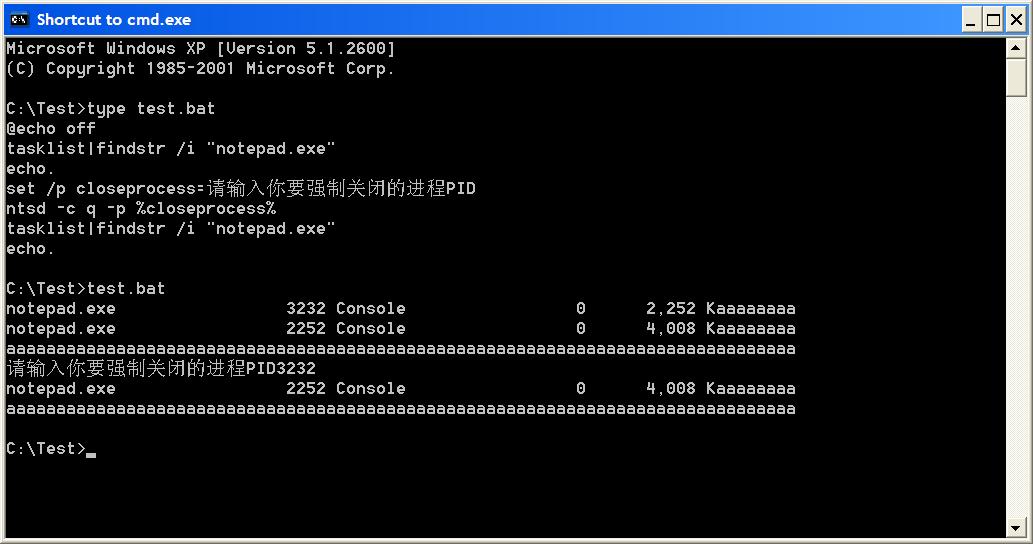
I have indeed tested many times, and I also took screenshots, but I don't know how to upload the pictures. Can you tell me how to do it?
I'll try the attachment! There are two pictures

Attachments
2.JPG (39.8 KiB)
Floor12 tempuser Posted 2008-10-28 08:04
高级用户 Posts 261 Credits 547
The 2nd one, because it kept prompting for the PID of notepad.exe that I needed to enter. There was no way, so I actively closed the CMD window.
Then re-enter CMD and execute
tasklist | findstr /i "notepad.exe"
And see that notepad.exe is still there, not closed. The notepad file I ran before the test is also well in the taskbar, not closed at all, so I said this segment of code of ntsd doesn't work.

The reason I didn't use tasklist to close the process is because I once saw some materials saying:
ntsd can close some processes that tasklist can't close.
Is this statement correct?

Attachments
4.JPG (38.48 KiB)
Floor13 newsuper Posted 2008-10-28 19:21
新手上路 Posts 15 Credits 18
I used ntsd to end the Notepad program.
The method is the same as my 10th floor, just changed the last line of taskkill to ntsd. I don't know what the results are for everyone?
@echo off
start /min notepad.exe
for /f "tokens=1,2" %%i in ('tasklist.exe') do if "%%i"=="notepad.exe" echo %%j
set /p cp=Please enter the PID of the process you want to end
ntsd -c q -p %cp%
Floor14 HAT Posted 2008-10-28 20:51
版主 Posts 5,017 Credits 9,023
Did you use the code from floor 6 in this screenshot?
Floor15 tempuser Posted 2008-10-29 10:49
高级用户 Posts 261 Credits 547
Reply to moderator HAT: Definitely used the code from floor 6, and the result is as my screenshot shows, can't close the process.

Ask newsuper: Can you post the screenshot of your testing process? I simply can't close the notepad.exe process?
1 2  Next
[ Contact the Union admin team - 中国DOS联盟 - Standard version ]
Sponsored by ifanr Inc | © 2001–2023