
China DOS Union
-- Unite DOS · Advance DOS · Grow DOS --Union site: www.cn-dos.net Forum site: www.cn-dos.net/forum
|
China DOS Union-- Unite DOS · Advance DOS · Grow DOS --Union site: www.cn-dos.net Forum site: www.cn-dos.net/forum |
| Guest | Log in | Register | Members | Search | China DOS Union |
|
中国DOS联盟论坛 The time now is 2026-10-02 07:46 |
47,813 topics / 349,918 posts / today 0 new / 48,279 members |
| DOS批处理 & 脚本技术(批处理室) » [Solved] The homepage is always being modified. How to set it so that it can be locked and not modified? |
| Printable Version 3,924 / 19 |
| Floor1 qwertl | Posted 2008-09-19 08:56 |
| 中级用户 Posts 243 Credits 461 | |
|
How to set it so that it can't be modified after being set, since the homepage is always being modified?
[ Last edited by HAT on 2008-10-22 at 10:46 ] |
|
| Floor2 tireless | Posted 2008-09-19 09:04 |
| 银牌会员 Posts 1,122 Credits 2,025 | |
|
Prevent modifying the IE homepage through "Internet Properties"
|
|
| Floor3 HAT | Posted 2008-09-19 09:46 |
| 版主 Posts 5,017 Credits 9,023 | |
|
If it can be locked, it can be unlocked, unless you monitor it in real time.
|
|
| Floor4 wxcute | Posted 2008-09-19 13:27 |
| 中级用户 Posts 211 Credits 458 | |
|
Setting read-only permissions for the registry entries in the second floor would be better, at least ordinary malicious websites can't change them. Completely change the browser (but it can't be absolutely safe because there is only relative safety.)
|
|
| Floor5 slore | Posted 2008-09-19 14:57 |
| 铂金会员 Posts 2,478 Credits 5,212 | |
|
Prohibited from modifying the IE homepage through "Internet Properties"
This is a restriction set manually. Directly modifying the registry, you still need to remove it and run a setting to set an empty homepage, which is troublesome for yourself. Modifying some keys, changing the homepage here is useless... You can add parameters to the IE shortcut in the quick launch to set your own homepage. I use the -nohome parameter |
|
| Floor6 cad55 | Posted 2008-09-19 15:05 |
| 高级用户 Posts 329 Credits 620 | |
|
It's caused by a virus or malware,
Using BAT is not powerful enough. |
|
| Floor7 tireless | Posted 2008-09-19 16:15 |
| 银牌会员 Posts 1,122 Credits 2,025 | |
|
Why not add a "Restore IE Home Page" button?
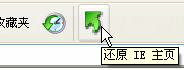 Clicking the button will modify the value of "Start Page" under "HKEY_CURRENT_USER\Software\Microsoft\Internet Explorer\Main". After running, right-click the toolbar → Customize, and find that button. |
|
| Floor8 For | Posted 2008-09-19 19:43 |
| 新手上路 Posts 14 Credits 18 | |
| Floor9 qwertl | Posted 2008-09-20 03:20 |
| 中级用户 Posts 243 Credits 461 | |
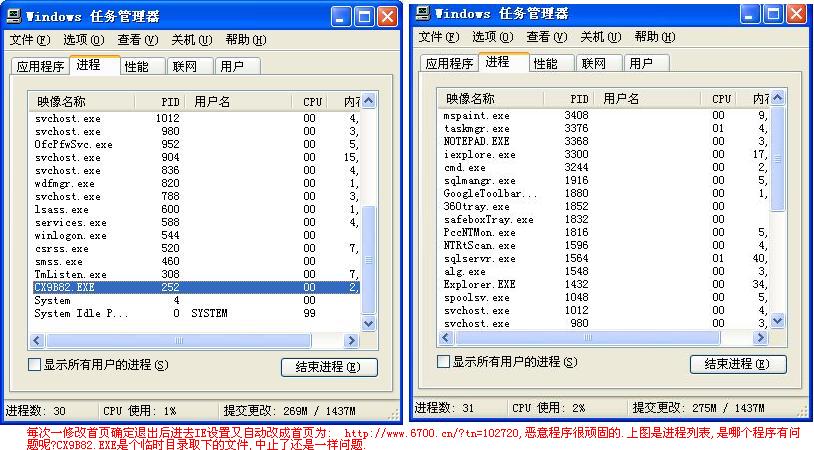  |
|
| Floor10 tireless | Posted 2008-09-20 08:35 |
| 银牌会员 Posts 1,122 Credits 2,025 | |
|
Check if there is this item:
HKEY_LOCAL_MACHINE\SOFTWARE\Microsoft\Windows NT\CurrentVersion\Image File Execution Options\IEXPLORE.EXE [ Last edited by tireless on 2009-1-20 at 18:52 ] |
|
| Floor11 tireless | Posted 2008-09-20 08:45 |
| 银牌会员 Posts 1,122 Credits 2,025 | |
|
-
[ Last edited by tireless on 2009-1-20 at 18:51 ] |
|
| Floor12 qwertl | Posted 2008-09-20 10:59 |
| 中级用户 Posts 243 Credits 461 | |
|
What does this mean if there is this entry?
|
|
| Floor13 HAT | Posted 2008-09-20 11:15 |
| 版主 Posts 5,017 Credits 9,023 | |
|
Google search "image hijacking"
|
|
| Floor14 qwertl | Posted 2008-10-22 10:21 |
| 中级用户 Posts 243 Credits 461 | |
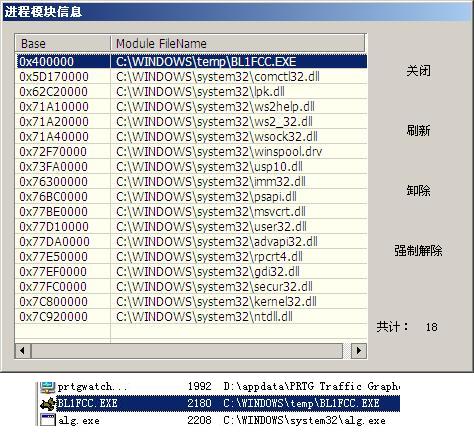 What process is this?? |
|
| Floor15 yishanju | Posted 2008-10-22 11:59 |
| 银牌会员 Posts 1,357 Credits 1,488 | |
| 1 2 Next |
|
[ Contact the Union admin team -
中国DOS联盟 -
Standard version ] Sponsored by ifanr Inc | © 2001–2023 |