
China DOS Union
-- Unite DOS · Advance DOS · Grow DOS --Union site: www.cn-dos.net Forum site: www.cn-dos.net/forum
|
China DOS Union-- Unite DOS · Advance DOS · Grow DOS --Union site: www.cn-dos.net Forum site: www.cn-dos.net/forum |
| Guest | Log in | Register | Members | Search | China DOS Union |
|
中国DOS联盟论坛 The time now is 2026-10-23 09:28 |
47,815 topics / 349,927 posts / today 0 new / 48,287 members |
| DOS汉化世界 & 中文系统 (中文化室) » Simplified Chinese MS DOS 7.10 Full Installation Version and All-Chinese MS-DOS 7.10 Enhanced Version |
| Printable Version 91,898 / 59 |
| Floor1 xiaoyunwang | Posted 2008-08-28 11:49 |
| 高级用户 Posts 374 Credits 940 From 湖南张家界 | |
|
MSDOS71X.IMG Simplified Chinese MS-DOS 7.10 standard boot disk enhanced version (1.44MB) using XZL Pocket Dragon Chinese character system
MSDOS71T.IMG Simplified Chinese MS-DOS 7.10 standard boot disk enhanced version (1.68MB) using TWAY Tianhui compatible Chinese character system MSDOS71G.IMG Simplified Chinese MS-DOS 7.10 standard boot disk enhanced version (1.68MB) with GRUB4DOS using XZL Dragon Chinese character system MSDOS71S.IMA Simplified Chinese MS-DOS 7.10 installation disk (two floppy disk IMG images merged into one, fully localized) (3.71MB) MSDOS71S.ISO The simplest CD image made with BCDW to boot the above MSDOS71S.IMA for easy burning to CD for installation (3.84MB) The MSDOS71G.IMG image with GRUB4DOS supports booting IMG (including GZ, ZIP compressed) from floppy disks directly from the hard disk, CD-ROM ISO images, and almost all operating systems. Thanks to the developers of GRUB4DOS, keep it up. 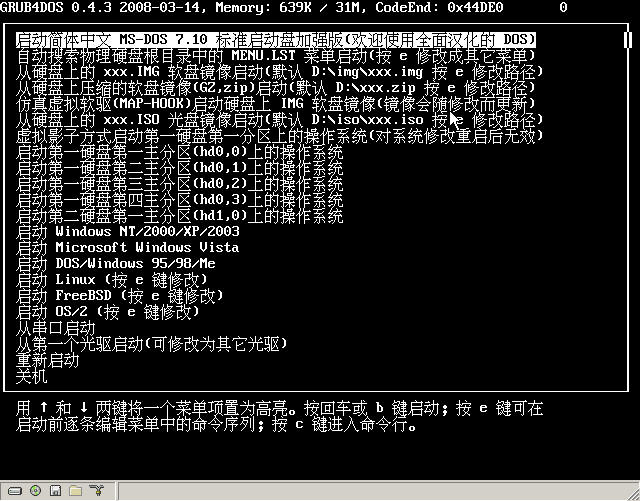 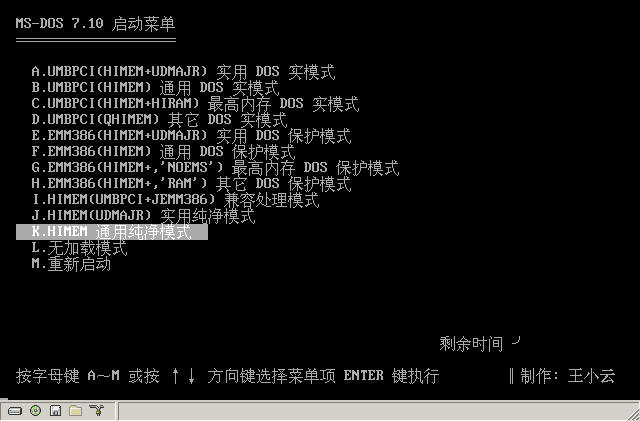 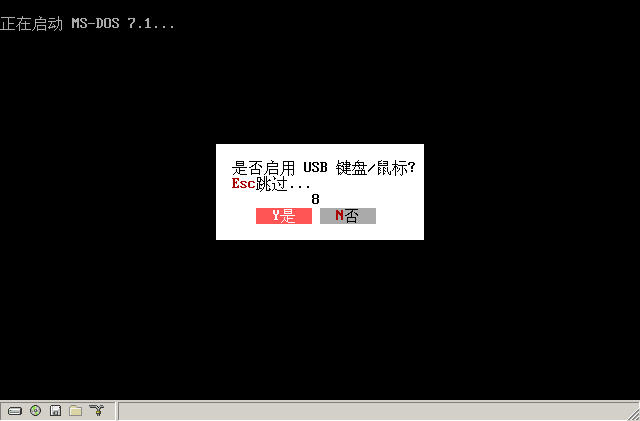 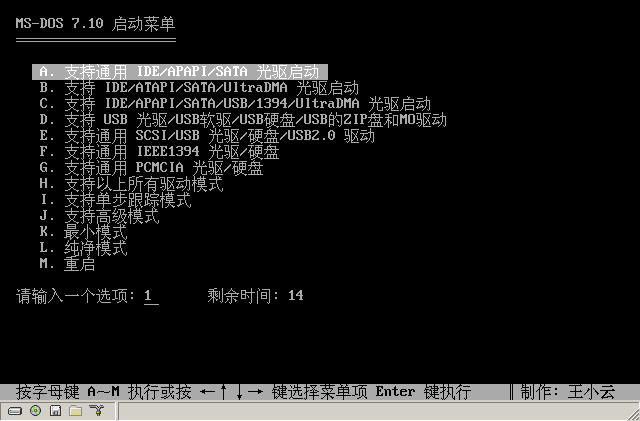 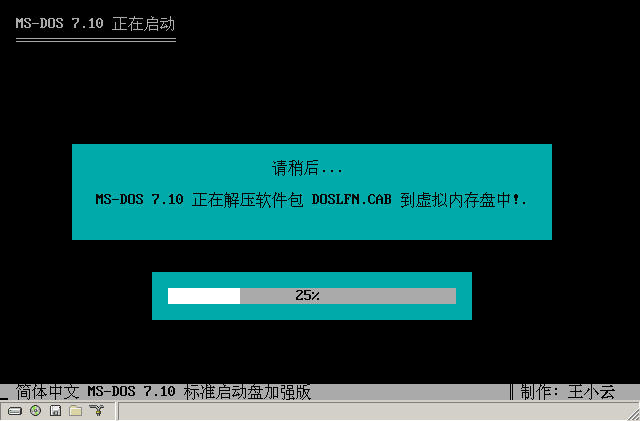 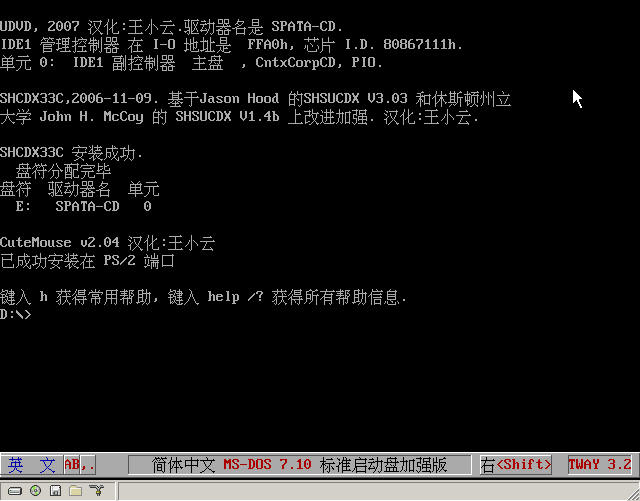 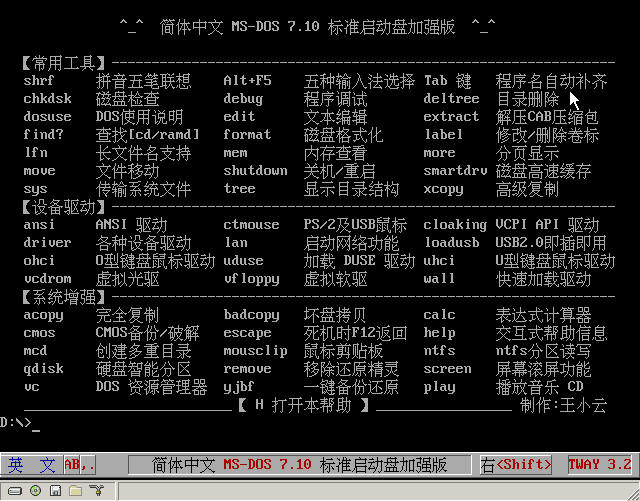 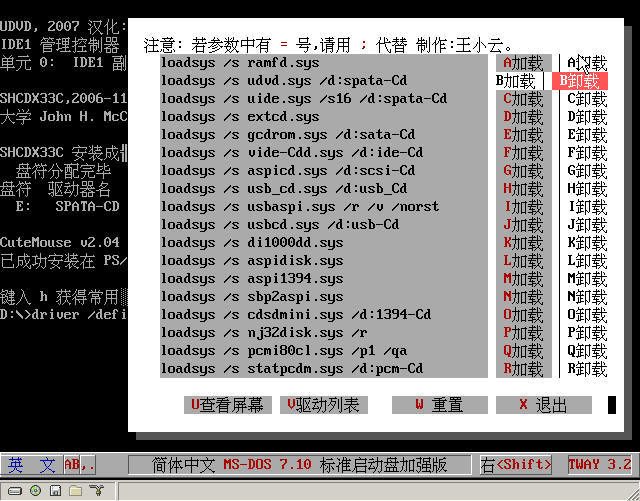 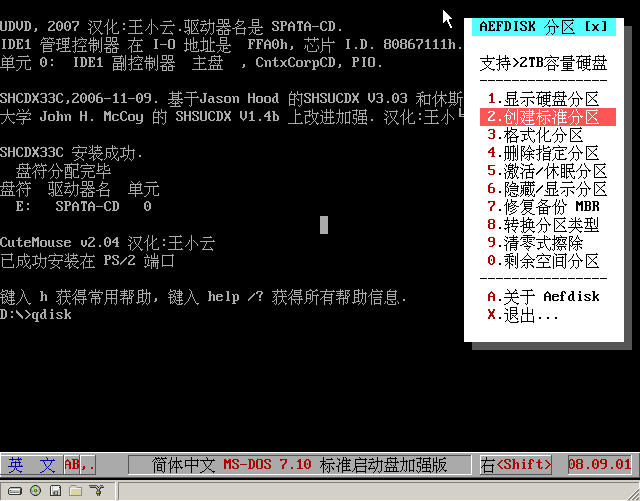 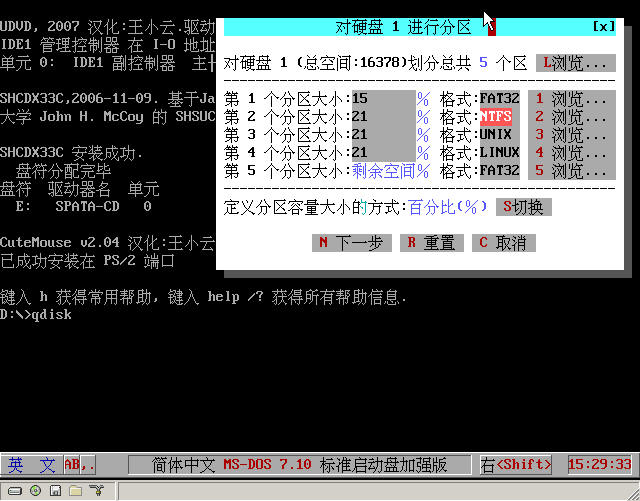 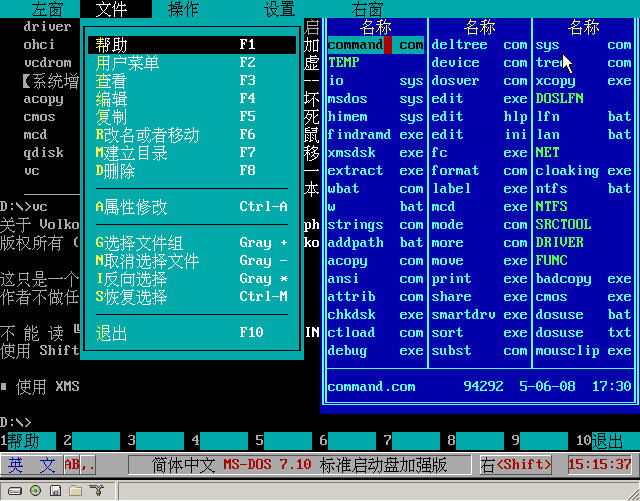 After playing with these Chinese boot disks, I'm exhausted. I also feel the warmth of my mother tongue. Let's carry forward the spirit of free, freedom, and openness. If you need any localized software, more than 200 localized programs are provided here (I originally wanted to share when the total number reached 300, but...). I hope you can luckyly extract the Chinese programs you need from these boot disks. Good luck. If you need other repair or processing tools such as PQ SERVER Simplified Chinese version, please pay attention to my "Terminator" software CD. The "Terminator DOS Toolbox" inside will include these advanced tools, and try to be in Chinese or have a graphical interface batch script to make it intelligent and simplify complexity. It will be the last all-in-one CD I make after learning and using DOS, GRUB, windows PE, etc. Welcome everyone to provide technical support (for example, I just learned GRUB for 8 hours, so the MSDOS71G.IMG above is relatively ugly. Thanks to lianjiang2004's GRUB tutorial, that image was made according to your tutorial) and use my CD. Explanation of the Simplified Chinese MS-DOS 7.10 Standard Boot Disk Enhanced Version Program Files ================================================= +-----------+ | General Introduction: | +-----------+ ---------------------------------------------------------------------------- (1) Multiple boot modes meet the needs of different users in different environments. MS-DOS 7.10 Boot Menu ══════════ A. UMBPCI (HIMEM + UDMAJR) Practical DOS Real Mode B. UMBPCI (HIMEM) General DOS Real Mode C. UMBPCI (HIMEM + HIRAM) Maximum Memory DOS Real Mode D. UMBPCI (QHIMEM) Other DOS Real Modes E. EMM386 (HIMEM + UDMAJR) Practical DOS Protected Mode F. EMM386 (HIMEM) General DOS Protected Mode G. EMM386 (HIMEM + 'NOEMS') Maximum Memory DOS Protected Mode H. EMM386 (HIMEM + 'RAM') Other DOS Protected Modes I. HIMEM (UMBPCI + JEMM386) Compatible Processing Mode J. HIMEM (UDMAJR) Practical Pure Mode K. HIMEM General Pure Mode L. No Loading Mode M. Restart The 13 startup menus from A to M at boot involve various configurations and memory allocation schemes such as UMBPCI Real Mode, EMM386 Protected Mode, and Pure Mode to meet the needs of different users in different operating environments. The new version of UDMAJR is used. In addition to this boot disk supporting 4GB large memory, it also supports hard disks with a capacity exceeding 2TB. (2) Support USB keyboard. To take care of friends using USB keyboards, the "Enable USB keyboard/mouse" dialog box popped up during the system boot process is defaulted to enabled. Of course, if you don't want to enable it, it means you are not using a USB keyboard, and you can press the Esc key on the keyboard to skip. If you only want to use a USB mouse, you can also skip this dialog box because the newly loaded version of CTMOUSE 2.04 later can support PS/2, serial port, and USB mice at the same time. (3) Highly free and flexible device driver loading method can reduce the probability of unsuccessful driver loading. Even transfer the initiative to the user himself. MS-DOS 7.10 Boot Menu ══════════ A. Support general IDE/APAPI/SATA CD-ROM boot B. Support IDE/ATAPI/SATA/UltraDMA CD-ROM boot C. Support IDE/APAPI/SATA/USB/1394/UltraDMA CD-ROM boot D. Support USB CD-ROM/USB floppy drive/USB hard disk/USB ZIP disk and MO driver E. Support general SCSI/USB CD-ROM/hard disk/USB2.0 driver F. Support general IEEE1394 CD-ROM/hard disk G. Support general PCMCIA CD-ROM/hard disk H. Support all the above driver modes I. Support single-step tracking mode J. Support advanced mode K. Minimum mode L. Pure mode M. Restart 1. In the boot menu for selecting device drivers, there are 14 selection schemes from A to M (13 options under protected mode) to meet the needs of driving different devices. More freedom and customization functions are provided here. For friends who don't understand device drivers very well, you only need to press Enter on the menus marked "general" to select the most general parameters or schemes to drive the specified device. For example, for most people's current SATA CD-ROM or IDE CD-ROM, just press the A key or Enter on the first option (SATA hard disk or IDE hard disk does not need to be driven). 2. Even if you choose "H. Support all the above driver modes", you can still successfully boot into DOS, but the boot time will be longer (including your USB 2.0 device is also successfully driven). 3. For users with special needs, selecting "I. Single-step tracking mode" can modify the default parameters step by step from the beginning or select to load/unload what drivers. The initiative of whether the driver is loaded successfully is in your hands. The program will mark this operation as "v" for success and "x" for failure. 4. If you are familiar with the driver program name or have special knowledge of drivers, selecting "j. Support advanced mode" allows you to play with the loading/unloading of each driver program in any order and any parameters, and the program will automatically mark "v" in front of the successfully loaded/unloaded driver program and "x" for failed operation. 5. Even if you do not load the driver at this time and select "k. Minimum mode" or "L. Pure mode", you can still run driver to load device drivers after entering DOS. Therefore, more freedom and flexibility are provided. (4) Support dynamic prompt for the decompressing software package without refreshing, dynamic progress bar and percentage display of the boot process, and free and flexible scalability. In addition to keeping 4 compressed packages starting with SYS (SYS DOS.CAB, SYS DRV.CAB, SYS FUNC.CAB, SYS W.CAB), users can delete all other compressed packages and replace them with their own CAB compressed packages. The program will automatically decompress these CAB compressed packages when booting, and automatically calculate the decompression time, support the progress bar and percentage display of the boot process. If there are folders in the user's CAB compressed package, the program will automatically add these directories to the search path PATH, and the user does not need to add them manually. (5) Strong system stability and universality. The multi-option customization function has even transferred this right to the user himself. You can immediately feel the effect of the configuration of this boot disk, including the success or failure of loading drivers, driving specific devices with specific parameters, etc. The KILLER anti-freeze master (not loaded in pure mode) will be automatically loaded after this boot disk is booted to automatically intercept illegal instructions to prevent freezing. Users can also load ESCAPE to turn passive into active, and can return to DOS mode by pressing the F12 key in any mode. The configuration of MSDOS.SYS and the automatic loading of IFSHLP.SYS can support booting WINDOWS 98. ---------------------------------------------------------------------------- +---------------+ | Main Function Introduction: | +---------------+ ---------------------------------------------------------------------------- (1) All application programs and driver programs are localized, and even IO.SYS is not spared. Fully Chinese command prompt and display. Very in line with the habits of our Chinese people. Support Chinese input method. Running dosuse can learn basic DOS knowledge and the handling method for the prompted Chinese error message. (2) All executable programs of this boot disk support the automatic completion function by entering the first few letters on the command line and then pressing the Tab key. For example, entering ct and then pressing the Tab key will automatically complete the command to ctmouse.exe, and the up and down arrow keys display the previous and next commands used (just like in Windows). (3) Support IDE/APAPI/SATA/UltraDMA, SCSI/ASPI CD-ROM/hard disk, IEEE1394 CD-ROM/hard disk, PCMCIA CD-ROM/hard disk, USB interface hard disk/CD-ROM/ZIP and MO floppy drive, USB keyboard/mouse/printer/game controller/scanner/USB flash drive/digital camera, etc. (4) Virtual CD-ROM function under DOS. Similar to the virtual CD-ROM software DAEMON-TOOLS under WINDOWS, it can be regarded as a DOS version of DAEMON-TOOLS. It can load an ISO image file and assign a drive letter to virtualize it as a CD-ROM, making it as convenient to use the ISO image file as using a physical CD-ROM. (5) Virtual floppy drive function under DOS. Similar to the virtual floppy drive software VFLOPPY under WINDOWS, this software can be regarded as a DOS version of VFLOPPY. It can first copy the data in the physical floppy drive (including the driven USB floppy drive) into the memory, and then you can take out your floppy disk. At this time, the data in A: will not be lost, and in fact, it has become a virtual floppy drive, and the data inside is still exactly the same as the data on the original physical floppy disk, making it as convenient to use the virtual floppy drive as using the physical floppy drive. In this way, one floppy disk can be used on multiple computers. (6) Mouse clipboard. After loading, select a section of text on the screen with the left mouse button and paste it with the right mouse button. For example, to enter a Chinese directory "I Love China", drag and select the four characters "I Love China" with the mouse or double-click to select, then right-click the CD and paste, and then press Enter. (7) Perfect NTFS partition read and write support. This NTFS read and write driver only occupies 6KB memory compared to NTFS4DOS, which eliminates the trouble of reporting insufficient memory when running other programs after loading the NTFS read and write driver. (Note: This NTFS cannot run in protected mode) (8) Support large hard disk partitions with a capacity of 2TB. Replaced FDISK, used Aefdisk partition software that supports any partition type and combined partitions. You can also directly run the GUI graphical interface script of Aefdisk (self-compiled) to complete operations such as "creating hard disk partitions, formatting partitions, deleting specified partitions, activating/sleeping partitions, repairing/backing up MBR, converting partition types, zero-style erasing, and partitioning remaining space" with just a few clicks of the mouse. And supports multiple hard disks. (9) CMOS backup/password cracking, removing various versions of restoration elves. Note: The remove for removing various versions of restoration elves is an official program, which runs without confirmation prompt. Do not try it on a machine with a restoration elf. (10) Screen scrolling function. Run SCREEN or run PERUSE with parameters. The NumLock key is the switch, and the up and down arrow keys can scroll up and down. So you don't have to worry about not seeing the content on the screen. (11) Provide Volkov Commander 4.99 DOS file manager similar to the DOS GUI interface. The original localized author of this software is Brother "Meng Liangde", but there are many phenomena of incomplete localization. Therefore, I have carried out a thorough localization on the basis of Brother "Meng Liangde"'s localization, and retained many shortcut keys, but still thank Brother "Meng Liangde" for his help. (12) System one-key backup and restore function. Similar to GHOST's one-key backup and restore. Just run YJBF or LYBW. (13) Provide network function and network copy support under DOS. With 3 representative network card drivers, Realtek RTL8139 Family PCI/Cardbus fast Ethernet interface card; D-Link DFE-530TX+ PCI fast Ethernet adapter network card; Intel Ether Express(tm) PRO/10 & PRO/100B PCI packet driver. And Netcopy. Run lan to centrally make selections. (14) Comprehensive support for Chinese and English long file names. This boot disk uses DOSLFN F version to drive the Chinese and English long file names under DOS. It occupies less memory compared to other versions (only 13KB, others occupy 28KB), and has comprehensive functions, directly supporting long file names on the CD-ROM. Thanks to the webmaster Wengier of "China DOS Union" (www.cn-dos.net) for correcting the BUG in this localized version (also added the automatic country code page recognition function). (15) This boot disk still belongs to the learning and daily application type, so it covers a large number of daily application tools and enhancement tools, such as acopy full copy, calc calculator, strings function enhancement program, etc. Just dir /w to see. This type of tool occupies the entire screen. If there are not many tools placed in other directories, I'm afraid the root directory can't be displayed on one screen. Therefore, more complex functions can be written on this basis, even more powerful than specialized programming languages, to cope with various different environments and demanding tasks. For example, sort all programs on a list, then search for these programs in each directory one by one and copy them to the specified directory, then give the sorted list and mark the location of each program in the original directory. Of course, if you want to do other things such as "hard disk maintenance, data recovery, etc.", please do not use this boot disk. Due to capacity limitations, these tools are not included in this boot disk. (16) Comprehensive Chinese input method, the following are some shortcut keys. Right shift Switch on/off Tianhui compatible Chinese character system (off means input English) When you need to input Chinese, press the right shift key again to display and call the Chinese input method. You can also press the right shift key to prevent conflicts with shortcut keys of some applications. Alt+F1 Locale input method Alt+F2 Wubi input method Alt+F3 Full Pinyin input method Alt+F4 Double Pinyin input method Alt+F5 Input method quick guide Alt+F10 English input method (you can also press the right shift key to hide the Chinese input method to input English) SHIFT+F9 Switch on/off association function SHIFT+F10 Tone selection state SHIFT+\ Enter special function Ctrl+F5 System control function Ctrl+F7 Turn off/on Tianhui Chinese character system Ctrl+F8 Upper/lower case switch Ctrl+F9 Full-width/half-width switch Ctrl+F10 System status setting Okay, that's all for the introduction. More tools and practical software are waiting for you to discover slowly. As long as you combine them appropriately, you can complete many arduous tasks and write more complex and changeable even intelligent batch scripts to help you complete daily demanding work. Finally, pay tribute to all the "engineers" who developed these excellent software! ---------------------------------------------------------------------------- +---------------+ | Disk File List: | +---------------+ ---------------------------------------------------------------------------- The disk volume on drive %ramdrive% is 微软-内存盘 List directory %ramdrive%\ ACOPY COM Completely copy files and directories, including their long file names and attributes ADDEV COM A tool to directly load device drivers under the DOS command line, which can be used with DELDEV ADDPATH BAT Add new path to the end of PATH path, improved based on Otto from Finland (Europe) in 1990 ANSI COM The best ANSI replacement program, used to control screen display, keyboard and cursor ATTRIB COM Display or change file attributes BADCOPY EXE CD-ROM bad file copy, version 2.0 DOS Treasure Box RLSOFT programming CALC BAT Mathematical expression calculator such as calculating 2e5+4*2^10-5/4+e*cos(pi/6) CHKDSK EXE Check disk and repair file system CLOAKING EXE Helix Cloaking virtual protected mode application program interface API driver CMOS EXE Clear/crack BIOS password/save COMOS information COMMAND COM MS-DOS 7.10 command interpreter localized version CTLOAD COM Directly load device drivers under the DOS command line CTMOUSE EXE Mouse driver CtMouse 2.04 version (supports PS/2, USB and serial port mice) DEBUG EXE Software testing and debugging utility DELDEV COM Delete the device driver loaded by ADDEV from memory, that is, cancel that driver program DELTREE COM A program to delete directories and all files and subdirectories under the directory DEVICE COM Directly load device drivers under the DOS command line (cannot load block devices) DEVLOAD COM A very good program to directly load device drivers under the DOS command line (feels better than device) DOSKEY COM Provide command history, macro definition, automatic completion and other function enhancement version (Tab key automatically completes commands) DOSUSE BAT Used to view the following dosuse.txt document, press Ctrl+C to stop scrolling. DOSUSE TXT Excerpt from the wonderful posts about DOS usage from China DOS Union (www.cn-dos.net) DOSVER COM A small and practical tool to freely set the DOS version number DRIVER BAT Load device drivers under pure DOS, can be single-step tracked or use advanced customization functions DUSE EXE USB hard disk, CD-ROM, floppy disk, MO, ZIP interface driver (can be loaded with duseldr below) DUSELDR COM A program that can directly load the above DUSE driver program in the command line EDIT EXE MS-DOS 7.10 emergency Chinese text editor main program EDIT HLP MS-DOS 7.10 emergency Chinese text editor help document EDIT INI MS-DOS 7.10 emergency Chinese text editor configuration file ESCAPE EXE Enable pressing the F12 key at any time to return to the DOS command line to prevent freezing EXTRACT EXE A tool to decompress CAB format compressed packages FC EXE Compare two files and display the differences, generally used as access progress, and modify game save files FIND EXE Text string search program FINDCD EXE Self-compiled practical program to find CD-ROM drive letter (author: Wengier) FINDRAMD EXE Practical tool to find virtual memory disk drive letter FORMAT COM MS-DOS 7.10 built-in disk formatting tool H BAT Quick help HELP BAT All help information of this boot disk HELP TXT Quick help text HIMEM SYS PTS DOS HIMEM 3.12 (c) Paragon 1995-2005 XMS memory management program IO SYS Optimized logo-free anti-hard disk logical lock system core file KEY COM Chinese input method (pinyin, Wubi and association word library) installation program KILLER EXE Can automatically intercept illegal instructions to prevent freezing LABEL EXE A program to create, modify or delete disk volume labels LAN BAT Start network function under DOS (with Dlkpkt.com, E100bpkt.com, Rtspkt.com network cards) LFN BAT Start Chinese and English long file name support under DOS (including support for CD-ROM) LIST TXT List of all executable commands and external application programs on this boot disk LOADSYS EXE A powerful (not generally powerful) program that can freely load and unload device drivers LOADUSB EXE USB4DOS, can drive almost all USB devices (my USB 2.0 Sony USB flash drive is normally driven) MCD EXE Can create multiple directories at one time and switch to the new directory, support long file names MEM EXE Microsoft memory viewing program (displays the used and free memory status of the computer) MODE COM Configure system devices (including setting keyboard and display mode) MORE COM Split screen display output software MOUSCLIP EXE Mouse clipboard (select a word by dragging or double-clicking with the left mouse button, paste with the right mouse button...) MOVE EXE A program to move directories or files to the specified location and rename directories MSDOS SYS MS-DOS 7.10 system startup configuration file NTFS BAT Perfectly read and write NTFS partitions (only occupies 6 KB memory compared to NTFS4DOS, disabled in protected mode) OHCI EXE O-type USB keyboard, USB mouse and other USB device drivers. Built-in in Norton Ghost 2002 PERUSE COM Screen scrolling tool (NumLock key is the switch, up and down arrow keys can scroll up and down) PLAY EXE Music CD player under DOS PRINT EXE Print command, print text file when using other MS-DOS commands QDISK BAT GUI script of AEFDISK for hard disk intelligent partitioning, with comprehensive functions and simple operation README TXT Explanation of the Simplified Chinese MS-DOS 7.10 Simplified Chinese Enhanced Version REMOVE COM The official one that can remove restoration elves of various versions (please use with caution, no prompt) SCREEN BAT A batch file for screen scrolling tool to select whether the allocation buffer is in EMS or XMS SHARE EXE File locking and sharing tool to start programs that require file sharing SHCDX33C COM CD-ROM expansion interface driver program (comprehensive of SHSUCDX by Jason Hood and John H.McCoy) SHRF BAT Load pinyin Wubi input method and association word library under DOS, if loaded, display shortcut key help. SHUTDOWN BAT Soft shutdown and restart program under DOS, can also pop up/close CD-ROM, reset screen SMARTDRV EXE Disk cache program built-in in MS-DOS 7.10 SORT EXE Very small sorting software STRINGS COM Very powerful batch command line enhancement tool such as character, file, memory operation (localized correction) SUBST COM Very small program to set virtual drive SYS COM Transfer system files and make the disk a boot disk TREE COM Display the directory structure of the drive or specified path in tree graph TW BAT Load Tianhui compatible Chinese character system and mouse driver, can prevent conflicts between them TWAY EXE Tianhui compatible Chinese character system 3.2 pocket improved version main program TWAY INI Tianhui compatible Chinese character system 3.2 pocket improved version Chinese configuration file (already configured, in line with habits) UDUSE BAT Load DUSE USB interface hard disk, CD-ROM, ZIP and MO floppy drive and other driver programs under DOS UHCI EXE U-type USB keyboard, USB mouse and other USB device drivers. Built-in in Norton Ghost 2002 USB20 BAT USB 2.0 plug and play driver (can drive USB scanners/game controllers/printers/digital cameras, etc.) USBLINK BAT USBLink, including OHCI.EXE and UHCI.EXE, which are OHCI and UHCI type USB interface drivers respectively VC BAT Start DOS file manager (powerful, can be said to be the graphical interface of DOS) VCDROM BAT DAEMON-TOOLS virtual CD-ROM GUI script under DOS (virtual ISO image as a CD-ROM) VFLOPPY BAT VFLOPPY virtual floppy drive under DOS, after loading, you can use it without the disk and the content in A: remains unchanged W BAT A batch processing to save and pass intermediate variables to the WBAT.COM dialog tool WALL BAT A batch processing to take over Autoexec.bat to load device drivers (can also directly load drivers) WBAT COM A very powerful and practical batch processing dialog designer, supporting mouse operation XCOM COM Microcomputer remote communication software (supports multiple access and transmission methods) XCOPY EXE Enhanced copy program, can copy the entire directory and all files and subdirectories under it XMSDSK EXE The best virtual memory disk tool, very convenient and practical, and only occupies very little memory YJBF BAT A very small one-key backup/restore software similar to GHOST ZENO EXE A very good screen display acceleration software 85 files List directory %ramdrive%\AEFDISK AEFDISK EXE Disk partitioning software, supports all partition types and any combined partitions, supports 2TB capacity hard disk AEFFAQCN TXT AEFDISK hard disk partitioning FAQ feedback document CLS_MBR An empty file containing 512 bytes for HDSECT to clear the partition table HDSECT EXE Hard disk master boot record and sector backup and restore tool 4 files List directory %ramdrive%\DATA LX LX Input method association function driver PY MB Pinyin input method driver WB MB Wubi input method driver 3 files List directory %ramdrive%\DOSLFN CP437UNI TBL English code page of DOSLFN, used for English long file name support CP936UNI TBL Simplified Chinese (GB) code page of DOSLFN, used for Chinese and English long file name support DOSLFN COM Chinese and English long file name driver program of DOSLFN F version (the version with the least memory occupied) LFNXLAT 386 Provide long file name support under Windows 3.x for DOSLFN 4 files List directory %ramdrive%\DRIVER ASPI1394 SYS ASPI 1394-Firewire device driver program ASPICD SYS General SCSI/ASPI CD-ROM driver program ASPIDISK SYS Drive letter assignment (can assign multiple drive letters, for compatibility consideration, if not, use DI100DD below) CDSDMINI SYS Driver program required for IEEE1394 CD-ROM DI1000DD SYS Drive letter assignment (cannot assign multiple drive letters but has stronger compatibility and universality than ASPIDISK above) EXTCD SYS Dell's drive that can drive SATA/USB/IDE/1394 DMA and other CD-ROMs (poor compatibility, my computer freezes) GCDROM SYS General SATA CD-ROM driver NJ32DISK SYS Drive letter assignment (cannot assign multiple drive letters, for compatibility consideration, use the above two if not) PCMI80CL SYS Driver program required for PCMCIA interface driver RAMFD SYS The driver program of Panasonic Japan to drive USB floppy drive in virtual floppy drive mode SBP2ASPI SYS Driver program of IEEE1394 device driver STATPCDM SYS Driver program required for notebook PCMCIA CD-ROM UDVD SYS General SATA/IDE/APAPI CD-ROM driver UIDE SYS SATA/UltraDMA/IDE/ATAPI CD-ROM driver USBASPI SYS The driver program of Panasonic Japan to mirror USB devices as SCSI/ASPI interface to drive USB devices USBCD SYS SCSI/ASPI CD-ROM driver (can drive USB CD-ROM after mirroring USB CD-ROM with USBASPI above) USB_CD SYS USB CD-ROM driver program VIDE-CDD SYS A relatively general IDE/ATAPI CD-ROM driver of BenQ 18 files List directory %ramdrive%\FUNC ADDPATH BAT Add new path to the end of PATH path, improved based on Otto from Finland (Europe) in 1990 APATH COM A convenient and practical program to delete the search path in PATH and add new path to the front of PATH CALC387 COM A small mathematical expression calculator in the command line CHOICE COM Select command, after execution, return the ErrorLevel value according to the prompted option DREADY COM Judge the status of the drive, such as read-only, whether writable, whether there is a CD-ROM in the CD-ROM drive EL! COM A tool that can freely set the initial value of the return value Errorlevel to facilitate program testing FUNC EXE Function enhancement program, such as displaying drive list, CD-ROM judgment, shutdown and restart, screen reset, etc. GO BAT A supplementary batch processing for GO + path and GO * usage for GO.EXE GO EXE Can jump to any specified path of any drive at any time HEXC EXE Text string and hexadecimal replacement program LEVEL BAT Used to test the Errorlevel value returned after a DOS command or application is executed LMOD COM Can directly process text files and use delimiters and redirectors in batch processing NSET COM Get variables from output to set, for example: FINDCD -a|NSET CDROM=$1 POPPATH BAT Used to restore the temporarily saved PATH search path below PUSHPATH PUSHPATH BAT Temporarily save the current PATH search path STRINGS COM Very powerful batch command line enhancement tool such as character, file, memory operation VAR BAT A file for calling varset or varget program and creating intermediate variables VARGET COM A tool used to extract and directly set environment variables from an INI file VARSET COM Set and create environment variables through CALL VAR SET.. with enhanced functions W BAT A batch processing to save and pass intermediate variables to the WBAT.COM dialog tool WBAT COM A very powerful and practical batch processing dialog designer, supporting mouse operation XFIND COM A small and practical tool to find specified strings from a group of files, supporting long file names 21 files List directory %ramdrive%\NET DLKPKT COM D-Link DFE-530TX+ PCI fast Ethernet adapter packet driver program E100BPKT COM Intel EtherExpress(tm) PRO/10 & PRO/100B PCI packet driver program NETCOPY COM Network copy software developed by Nanjing Yuanzhi Information Technology Development Co., Ltd. RTSPKT COM Realtek RTL8139 Family PCI/Cardbus fast Ethernet interface card driver 4 files List directory %ramdrive%\NTFS NTFS D32 NTFS read and write driver call file (requires CLOAKING driver) NTFSDRV EXE NTFS read and write driver program (requires CLOAKING, do not run in protected mode) 2 files List directory %ramdrive%\SRCTOOL SRCBOOT COM A small tool to save/restore/compare the boot sector of the disk in command line mode SRCFAT COM A small tool to save/restore/compare the file allocation table (FAT) of the disk in command line mode SRCMBR COM A small tool to save/restore/compare the main boot record (MBR) of the disk in command line mode 3 files List directory %ramdrive%\TEMP 0 files List directory %ramdrive%\VC FORMAT MNU Volkov Commander 4.99 floppy disk formatting menu VC COM Main program of Volkov Commander 4.99 (the most thoroughly localized version) VC MNU Menu file of Volkov Commander 4.99 VC OVL Most of the calls of the main program of Volkov Commander 4.99 are here VCEDIT EXT Edit attribute extension file of Volkov Commander 4.99 5 files List directory %ramdrive%\VCDROM SHSUCDHD EXE SHSU-CDH virtual CD-ROM software under DOS (version 2.0) 1 file List directory %ramdrive%\YJBF HIDE COM Something used to hide partitions mainly for the following LYBW call LYBW COM A very small one-key backup and restore software similar to GHOST 2 files ------------------------------------------------------------------- Thank you for using! 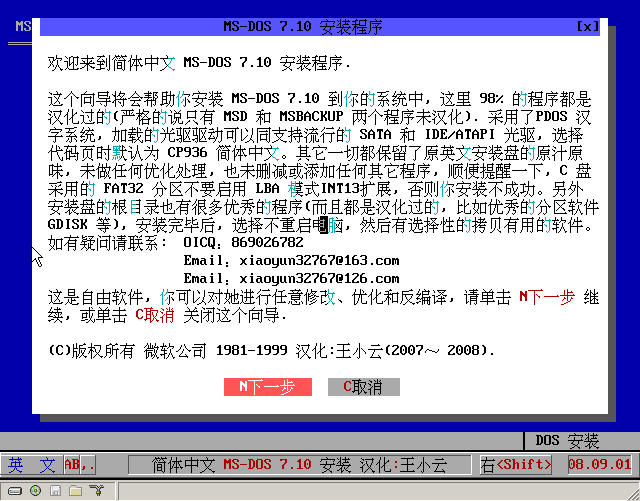 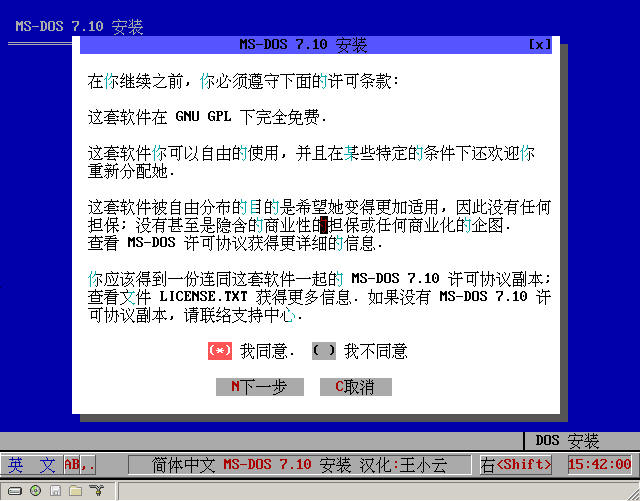 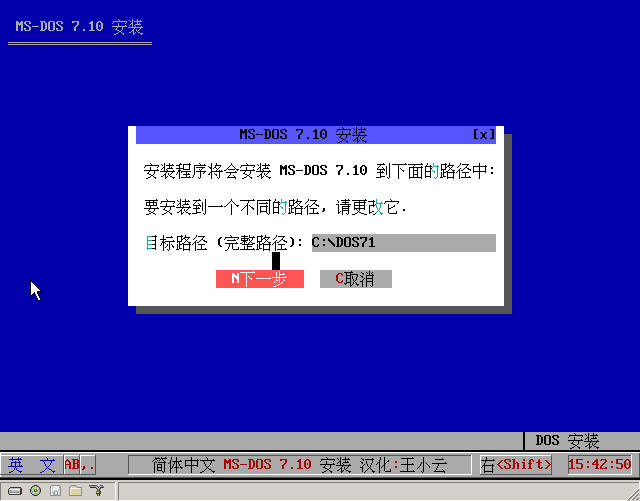 |
|
| Floor2 wang6610 | Posted 2008-08-29 10:17 |
| 银牌会员 Posts 488 Credits 1,246 | |
|
Simplified Chinese MS-DOS 7.10 Standard Boot Disk Enhanced Version (XZL Chinese Character System, with GRUB) The img can't be used?
|
|
| Floor3 xiaoyunwang | Posted 2008-09-02 19:21 |
| 高级用户 Posts 374 Credits 940 From 湖南张家界 | |
|
I'm very sorry, I didn't have time to check. In the startup disk using the Tianhui Chinese character system, tw /u can't exit the Chinese character system normally. When using qdisk to partition the hard disk, on a computer with only one hard disk, it reports the error "The hard disk is not connected properly". The main problem with the disk error in other startup disks has now been completely corrected, and it has been re-uploaded. It has been updated on the first floor. Friends who have downloaded it in advance please re-download. In addition, for some reason, the nearly 4 MB simplified Chinese installation disk still couldn't be uploaded in the end. It's very regrettable. It seems there's no way to upload it.
|
|
| Floor4 wang6610 | Posted 2008-09-02 21:23 |
| 银牌会员 Posts 488 Credits 1,246 | |
Originally posted by xiaoyunwang at 2008-9-2 07:21 PM: Send to ¥¥¥¥8@####。###, I'll help you send it. [ Last edited by wang6610 on 2008-9-4 at 08:26 AM ] |
|
| Floor5 zxwx2002 | Posted 2008-09-03 01:07 |
| 新手上路 Posts 1 Credits 2 | |
|
Thanks to the LZ for sharing such a great thing!!!
Additionally, may I ask if it can be installed to a USB flash drive to make a USB bootable disk? |
|
| Floor6 wang6610 | Posted 2008-09-03 18:20 |
| 银牌会员 Posts 488 Credits 1,246 | |
|
Got it, I'll upload it when I have time.
|
|
| Floor7 wang6610 | Posted 2008-09-04 08:25 |
| 银牌会员 Posts 488 Credits 1,246 | |
|
It's a pity that I uploaded 7 or 8 times last night and this morning, and I also tried volume splitting, but it didn't succeed.
Also, please ask xiaoyunwang to block my email in the sixth floor, thank you! |
|
| Floor8 wang6610 | Posted 2008-09-04 12:23 |
| 银牌会员 Posts 488 Credits 1,246 | |
|
M S D O S7 1 S . I—S—O has been transmitted here:
Need the rain and dew大侠 to pass it on! http://help.cn-dos.net/soft/MSDOS71S.RAR [ Last edited by wang6610 on 2008-9-5 at 06:34 PM ] |
|
| Floor9 雨露 | Posted 2008-09-05 13:06 |
| 管理员 Posts 2,601 Credits 6,215 | |
|
The last file MSDOS71S.ISO has been uploaded to the space for you. The address is:
http://help.cn-dos.net/soft/MSDOS71S.RAR "The download address for 'MSDOS71S.IMA Simplified Chinese MS-DOS 7.10 installation disk (two floppy disk IMG images have been combined into one, fully localized) (3.71MB)' was not found!!! [ Last edited by 雨露 on 2008-9-5 at 01:10 PM ] |
|
| Floor10 driver1998 | Posted 2008-09-05 13:48 |
| 高级用户 Posts 373 Credits 740 From 中国,广东 | |
|
Admirable, admirable. Hope the installation of Windows 3.2 can be successful!
|
|
| Floor11 xiaoyunwang | Posted 2008-09-05 14:04 |
| 高级用户 Posts 374 Credits 940 From 湖南张家界 | |
Originally posted by Yulu at 2008-9-5 01:06 PM: First, extract MSDOS71S.RAR with WinRAR to get MSDOS71S.ISO, then use UltraISO to extract MSDOS71S.IMA from MSDOS71S.ISO. |
|
| Floor12 driver1998 | Posted 2008-09-06 10:45 |
| 高级用户 Posts 373 Credits 740 From 中国,广东 | |
|
Your installation disk is well-made, but there are a few issues:
1. The running speed is extremely slow. For example, it takes 2-30 seconds to start DOSSHELL, EDIT, etc. Although I know it's due to the Chinese character system slowing it down, once I exit the Chinese character system, everything becomes garbled. Hope you can optimize the performance. (I installed it under VPC2004, and the virtual machine memory is 32M) 2. You said in the instructions that there are additional software, but I can't find them after searching for a long time. Were they deleted? Hope to get a reply. 3. Hope to add MEMMAKER. Whether it's Chinese or not is fine, hope to add it in. (I often use it in 6.22, o(∩_∩)o...) |
|
| Floor13 xiaoyunwang | Posted 2008-09-06 15:59 |
| 高级用户 Posts 374 Credits 940 From 湖南张家界 | |
Originally posted by driver1998 at 2008-9-6 10:45 AM: I just checked: 1. The two 1.44 MB floppy disks do not have MEMAKER. To maintain the original flavor of the contents of those two floppy disks, no programs were added or removed; it was simply combined into two and Chineseized, without any optimization, including the order of loading drivers was not changed. 2. Because PDOS95 Chinese system is used, the Chinese system startup includes 5-6 actions such as loading input methods executed when >NUL, so when starting, the screen has no scrolling and takes a few seconds. In addition, PDOS95 compatibility is not very good, not as good as TW, but the input method of PDOS95 feels good. Once I went to a supermarket and found that a certain cashier system in the supermarket also used PDOS95, so this time I tried to use PDOS95 Chinese system (but I don't know if it's good). 3. ADDONS was not found. Some ADDONS such as DOSSHELL have been included and combined in one IMA image. The system installation will also install these parts of ADDONS at the same time. Unless you have a third ADDONS floppy disk, otherwise when the user installs, the checkbox ADDONS should be canceled. 4. Because COMMAND.COM has been Chineseized, so quit exited the Chinese system, and the display is garbled. In response to the above situations, the following methods are suggested for handling. 1. Cancel the selected default boot display LOGO during installation, 2. Use TW Tianhui Chinese system or CCDOS Chinese system to replace PDOS95 Chinese system, 3. For the garbled display after exiting the Chinese system, it can be solved like this: (1) Replace COMMAND.COM in the English version with COMMAND.COM Chinese version in the installation disk. (2) When using TW Tianhui Chinese system, don't forget that Store.dat file or when using CCDOS Chinese system, don't forget CCDOS.DAT file, should be packaged together, they are for instant Chineseization prompt information, then write the call batch and ZIP compression replace PDOS.ZIP file in this installation disk. (3) After completing the above two steps, you load the Chinese system to display Chinese, and exit the Chinese system to display English. 4. As for optimization, not displaying LOGO when starting will be much better. This difference is very obvious in the startup disk relying on the Chinese system. Press killer, zeno, doskey in Autoexec and then other orders are not bad. Finally: This is free software, welcome to modify or add or delete the programs you need or don't need by yourself, completely under your own control. Welcome to secondary processing and modification. [ Last edited by xiaoyunwang on 2008-9-6 at 04:19 PM ] |
|
| Floor14 tianxingren | Posted 2008-09-06 19:04 |
| 初级用户 Posts 49 Credits 110 | |
|
Thank you, LZ.... Sharing such a great thing!!! You've worked hard!!!
|
|
| Floor15 driver1998 | Posted 2008-09-08 13:21 |
| 高级用户 Posts 373 Credits 740 From 中国,广东 | |
Originally posted by xiaoyunwang at 2008-9-6 03:59 PM: Thank you for your explanation. I will consider porting DOS 6.22's MEMMAKER over, and I wonder if the ADDONS from the webmaster's DOS 7.10 CD version can be used. |
|
| 1 2 3 4 Next |
|
[ Contact the Union admin team -
中国DOS联盟 -
Standard version ] Sponsored by ifanr Inc | © 2001–2023 |