
China DOS Union
-- Unite DOS · Advance DOS · Grow DOS --Union site: www.cn-dos.net Forum site: www.cn-dos.net/forum
|
China DOS Union-- Unite DOS · Advance DOS · Grow DOS --Union site: www.cn-dos.net Forum site: www.cn-dos.net/forum |
| Guest | Log in | Register | Members | Search | China DOS Union |
|
中国DOS联盟论坛 The time now is 2026-10-12 21:07 |
47,815 topics / 349,922 posts / today 0 new / 48,286 members |
| 其它操作系统综合讨论区 » What character is this? |
| Printable Version 3,578 / 17 |
| Floor1 DOSforever | Posted 2008-08-25 07:05 |
| 金牌会员 Posts 2,239 Credits 4,639 | |
|
Download a file, the file name contains "・" (red indicates) this character. At first glance, it looks very similar to the Chinese "·" (blue indicates) symbol, which is often used as the separator between foreign given names and surnames. Now it may not be distinguishable here, but sometimes it can be seen in the text editor. The separator is full-width, and this unknown symbol (at least it seems) is half-width. But why do I say sometimes it can be seen? Another strangeness is here: the separator sometimes seems to be half-width? Just like seen in this post. Let's get back to the main topic. I put these two together and enlarge them, maybe we can see a slight obvious difference "・·"
For this character, Windows seems to be able to operate normally. In Windows Explorer, you can see it, and you can copy, move, delete files, and also remove this character when renaming. In the command line, you can also copy, move, delete, rename, but dir cannot display this character, and a "blank" is displayed at the position of this character. Then is this "blank" exactly a space? Moreover, for file names with this character, many applications do not recognize them and cannot operate on them. When opening, it says the file is not found and so on. For text files containing this character, many plain text editors cannot save them normally, and after saving, the character at that position becomes "?" which is the Western question mark. If you save it with Windows Notepad, it will prompt you that this file contains Unicode format characters, and if you save it as an ANSI encoded file, it will be lost. Then it seems that this character is a Unicode character? But I am curious that since Windows XP can handle Unicode characters, why can't dir display it normally? Why can't those plain text editors that can handle Unicode encoding normally save it? According to the Unicode little endian encoding, the encoding of this character is FB 30 |
|
| Floor2 stockghost | Posted 2008-08-25 09:47 |
| 中级用户 Posts 105 Credits 215 | |
|
Just now I used UEStudio to copy and edit, but found only a '?'
SlickEdit is the same Copied to the editor under DOS, found to be displayed correctly, only one character, code 0xFA |
|
| Floor3 stockghost | Posted 2008-08-25 09:49 |
| 中级用户 Posts 105 Credits 215 | |
|
Is it a coding issue?
|
|
| Floor4 DOSforever | Posted 2008-08-25 22:48 |
| 金牌会员 Posts 2,239 Credits 4,639 | |
|
The following is the encoding and performance of this character under different code pages and different encoding environments in the command line environment (Why does this sound a bit awkward? Who can rephrase it.)
It can be seen that in the environment of the Simplified Chinese code page, this character is converted to the corresponding ANSI/ASCII code value of 0x3F, and the corresponding character is "?", so is this question mark supposed to correspond to the question mark indeed, or is everything that does not know what character it should correspond to converted to a question mark? In the environment of the Western US code page, this character is converted to the corresponding ANSI/ASCII code value of 0xFA, and the corresponding character cannot be displayed normally here. This character does display a dot in the middle, which can be regarded as a Western interpunct. It can be considered that the conversion is correct here. Regardless of the code page environment, the Unicode encoding is always the same. It seems that it is indeed Universal. Under the CP936 environment, the dir cannot display this character normally, and a "blank" is displayed there. Under the CP437 environment, the dir can display this character correctly. I am curious that since Windows XP can handle the Unicode character set, why have I never encountered such a problem before? So can it be said so far that the conversion of characters in the Unicode character set to characters corresponding to different code pages is not perfect? Or, what settings do I need to make in Windows? |
|
| Floor5 DOSforever | Posted 2008-09-13 03:44 |
| 金牌会员 Posts 2,239 Credits 4,639 | |
|
Then I encountered two similar characters again. The operations in Windows Explorer and the command line are the same as the previous ones. This character 「」 and the full-width Chinese symbol 「」 look very similar at first glance. Moreover, unlike full-width Chinese characters, they occupy half-width. If this character is copied and saved in ANSI encoding, it all becomes?. The Unicode codes of these two characters are 0x62FF and 0x63FF respectively.
It seems there are many similar Unicode Chinese characters? So it seems that Unicode-encoded Chinese characters (so to speak) cannot all be correctly converted to corresponding ANSI-encoded Chinese characters? |
|
| Floor6 tigerpower | Posted 2008-09-15 21:49 |
| 中级用户 Posts 99 Credits 377 | |
|
Because various character sets are not from the same organization, so they are in an intersecting relationship. Most character sets include ASCII, and Unicode includes all character sets.
Windows XP stores all file names as Unicode, so you can see these characters in file names. In the Chinese version of Windows XP, the command line cmd.exe runs with GBK encoding by default (that is, cp936). So those characters not in the GBK encoding cannot be seen. A plain text editor that can handle Unicode encoding normally cannot save characters not in the character set if it is not opened with Unicode encoding. We can take a look at what characters the building-block owner has found: Open Notepad, copy those 6 characters and put them in, one per line, File -> Save As -> Encoding: Unicode big endian, File name: c:\ch.txt Then open the command line and run: echo d 100 l 22 | debug c:\ch.txt This command views the hexadecimal format of ch.txt, and the result is similar to: -d 100 l 22 0B67:0100 FE FF 30 FB 00 0D 00 0A-00 B7 00 0D 00 0A FF 62 ..0............b 0B67:0110 00 0D 00 0A FF 63 00 0D-00 0A 30 0C 00 0D 00 0A .....c....0..... 0B67:0120 30 0D 0. Then Start -> Accessories -> System Tools -> Character Map Select font Arial Unicode MS, select "Advanced View" below, Character set: Unicode, Group: All Fill in the four red characters above (such as 30FB) in the "Go to Unicode" box, Then find the character, and there is the name of the character at the bottom. These 6 characters are in sequence:
Middle dot Half-width left angle bracket Half-width right angle bracket Left angle bracket Right angle bracket [ Last edited by tigerpower on 2008-9-16 at 08:35 PM ] |
|
| Floor7 DOSforever | Posted 2008-09-16 03:53 |
| 金牌会员 Posts 2,239 Credits 4,639 | |
|
I'm using the English version of Windows XP. In the Character Map, there's no Arial Unicode MS in the font selection; only Arial and Arial Black are available. The only one related to Unicode is Lucida Sans Unicode. But the character displayed when I entered 30fb isn't the original character. Since I'm choosing the Unicode character set, why does it matter which font I choose?
Generally, in applications, when you choose a character set, Unicode just means Unicode little endian. Big endian and UTF-8 are specified separately. Then why did you initially think to look at its Unicode big endian encoding? Why does the Character Map also let you enter big endian encoding? |
|
| Floor8 tigerpower | Posted 2008-09-16 21:32 |
| 中级用户 Posts 99 Credits 377 | |
|
If you don't have Arial Unicode MS, choose MS Mincho or MS Gothic. As for Lucida Sans Unicode, although it is a font encoded with Unicode, it doesn't support Japanese, so the Japanese character (30FB) can't be found.
Windows XP itself is designed in Little Endian structure. Friends who have modified games all know that looking for 1000 in money in 4 bytes (3E8 in hexadecimal) is E8 03 00 00 in memory, which is called Little Endian. And most programs in Windows XP are almost Little Endian, so you see that some programs use Little Endian by default for UTF-16. But this is just the rule in Windows. According to Unicode official, when UTF-16 doesn't indicate whether it is BE or LE, it defaults to BE. Specifically, it needs to be judged according to the BOM (Byte Order Mark) in the file header. As for how I thought of looking at its Unicode big endian encoding, I also figured it out : ) |
|
| Floor9 DOSforever | Posted 2008-09-17 01:18 |
| 金牌会员 Posts 2,239 Credits 4,639 | |
|
Hehe he he...... You kid still remember playing games
 After reading, I'm still a bit confused. Since those fonts that don't specify Unicode can have Unicode characters, why is that? In an application, choosing which font might not affect saving, but why doesn't it affect display? For example, the default font in my Notepad is Lucida Console instead of Lucida Sans Unicode, nor MS Mincho or MS Gothic. The corresponding 0x30FB encoding is not this "katakana middle dot" but some other character, but why does it still display correctly? By the way, ask another question: the T character in front of the font name represents a TrueType font. What does the O character mean? |
|
| Floor10 tigerpower | Posted 2008-09-17 22:17 |
| 中级用户 Posts 99 Credits 377 | |
|
Some fonts that don't indicate Unicode are also encoded in Unicode, such as the two Japanese fonts mentioned last time.
Notepad looks for another font to display characters that are not in the default font. Lucida Console has no Chinese characters at all. It can display Chinese characters because there is SimSun in the system. As for what rules and order it uses to find fonts, I don't know (In Notepad in Chinese Windows XP, it seems to look for SimSun for characters it can't find). But not all can be found. The second line in the blue box below is the Tibetan writing of the six-syllable mantra. Paste it into Notepad and usually it can't be displayed (If the browser can't display it normally, install Arial Unicode MS font). Also, those with the O are OpenType fonts. 六字大明咒:唵嘛呢叭咪吽 |
|
| Floor11 DOSforever | Posted 2008-09-19 02:54 |
| 金牌会员 Posts 2,239 Credits 4,639 | |
|
My browser indeed can't display normally, and different browsers show different performances for the characters that can't be displayed normally.
IE and browsers with IE as the core show square boxes one by one, but Opera which is also non-IE core shows square boxes too 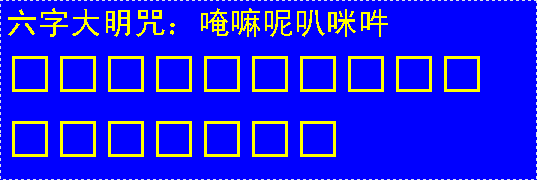 NetScape Navigator and K-Meleon which are non-IE core show question marks one by one  The best one I think is Firefox, it displays the encoding of the characters that can't be displayed correctly  But I don't know whether this is big endian or little endian or UTF-16? Also, what I don't understand is that you said six characters, but from the encoding displayed by this Firefox, why are there 17 characters? Also, where can I download the font alone, from the Microsoft website? |
|
| Floor12 tigerpower | Posted 2008-09-19 20:48 |
| 中级用户 Posts 99 Credits 377 | |
| Floor13 DOSforever | Posted 2008-09-20 02:05 |
| 金牌会员 Posts 2,239 Credits 4,639 | |
|
Hehe, not bad, it can be displayed correctly.
The original six characters mentioned refer to translating into Chinese characters as six characters, and the original Tibetan text is 17 characters 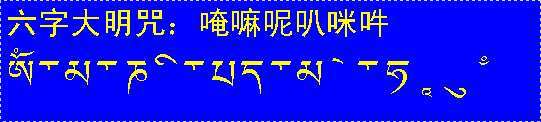 |
|
| Floor14 fujianabc | Posted 2008-09-20 21:14 |
| 金牌会员 Posts 1,616 Credits 3,467 | |
Originally posted by DOSforever at 2008-9-20 02:05 AM: The Tibetan text is 6 characters. It seems that your display is problematic, as you have separated the phonetic elements of each Tibetan character. What I see displayed in IE 7 on Vista is 6 characters (each character separated by an inverted triangle symbol) [ Last edited by fujianabc on 2008-9-21 at 11:46 AM ] Attachments 5o2V6I63_ysamN7Yvq4HK[1].png (2.79 KiB) |
|
| Floor15 DOSforever | Posted 2008-09-21 01:52 |
| 金牌会员 Posts 2,239 Credits 4,639 | |
|
I don't know if this is a problem with my own system, or a difference between Windows XP and Vista, or a difference between IE6 and IE7? Is the display under Windows XP + IE6 the same as mine with tigerpower?
|
|
| 1 2 Next |
|
[ Contact the Union admin team -
中国DOS联盟 -
Standard version ] Sponsored by ifanr Inc | © 2001–2023 |