
China DOS Union
-- Unite DOS · Advance DOS · Grow DOS --Union site: www.cn-dos.net Forum site: www.cn-dos.net/forum
|
China DOS Union-- Unite DOS · Advance DOS · Grow DOS --Union site: www.cn-dos.net Forum site: www.cn-dos.net/forum |
| Guest | Log in | Register | Members | Search | China DOS Union |
|
中国DOS联盟论坛 The time now is 2026-10-23 12:39 |
47,815 topics / 349,927 posts / today 0 new / 48,287 members |
| DOS汉化世界 & 中文系统 (中文化室) » Chinese DOS Union forum content translation: Chinese text: "汉化的 strings.com func.exe lmod.com gdisk.exe 智能分区下载1" Translation: "Localized strings.com func.exe lmod.com gdisk.exe intelligent partitioning download 1" |
| Printable Version 10,066 / 19 |
| Floor1 xiaoyunwang | Posted 2008-07-16 21:17 |
| 高级用户 Posts 374 Credits 940 From 湖南张家界 | |
|
Download:
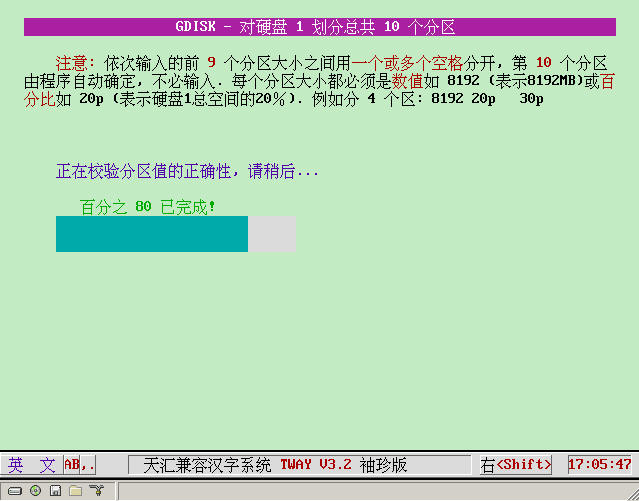
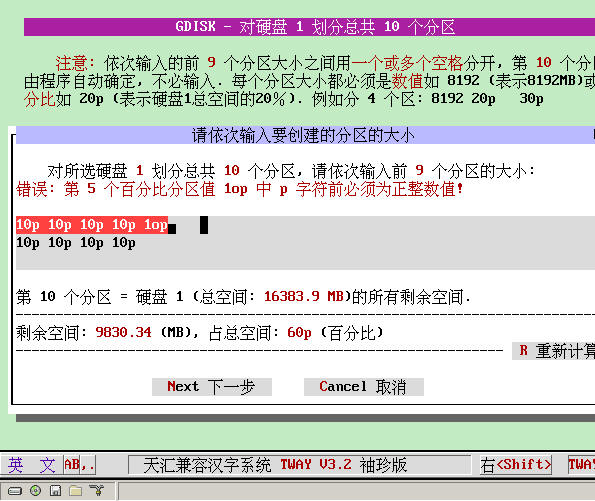
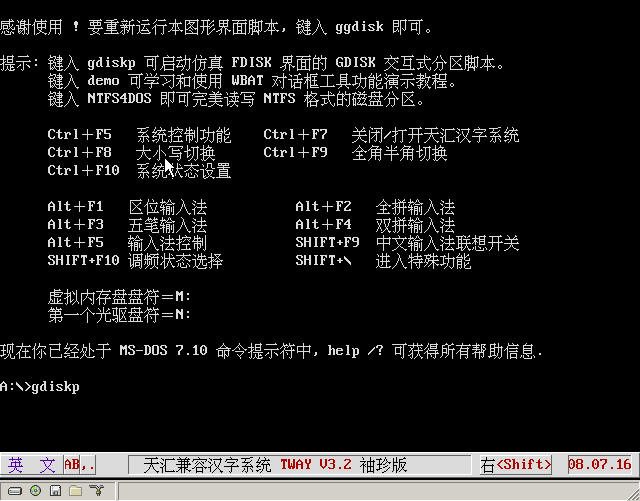
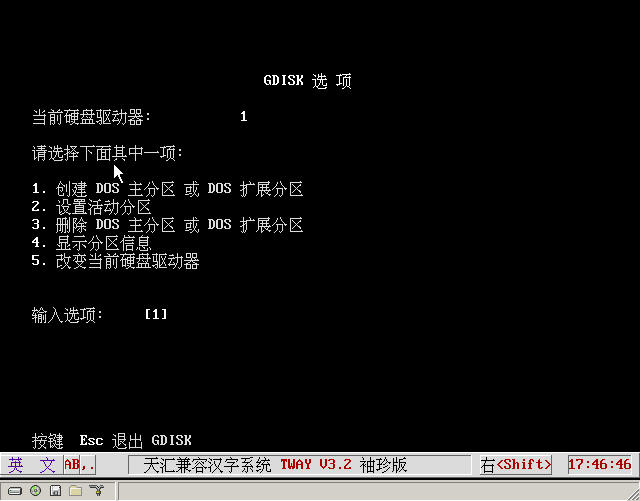
ggdisk.img Floppy Version ggdisk.iso CD Version Today is unlucky. Finally got online, but the forum can't upload. Next time I edit this document, I'll put down a simple text description first, and post pictures and upload programs next time. GDISK - Intelligent Hard Disk Partitioning =============================== +--------+ | Introduction | +--------+ *-------------------------------------------------------------------------- Based on the "Simplified Chinese MS-DOS 7.10 Standard Boot Disk" I made, so the functions of this boot disk are not particularly powerful, but relatively practical. All the localized programs can make you learn and use DOS commands happily in a familiar mother tongue environment. I hope you can like it. (1). Using the localized UDVD.SYS, it can support IDE/APAPI optical drives and SATA optical drives at the same time. (2). Entering NTFS4DOS can perfectly read and write NTFS formatted disk partitions. (3). Running GDISKP can open a more powerful emulated FDISK command line interface. (4). Running GGDISK can re-open the "GDISK Intelligent Hard Disk Partitioning" graphical script interface. (5). Running DEMO can learn and use all function demonstrations of "WBAT Dialog and Menu Design". Here, I would like to express my gratitude to netizen hnfeng. My "Perfect Localized and Modified Version of WBAT Dialog Tool" did have many problems. After his final modification, it became a truly "perfect localized and modified version". Overview of GDISK - Intelligent Hard Disk Partitioning Graphical Script Interface (enter GGDISK at the command line to open): GDISK is a more practical tool than FDISK. It completely replaces the FDisk and Format programs. With it, you can create multiple primary partitions, extended partitions and logical drives... + Quick formatting. + Hide and show partitions. This function allows more than one primary DOS partition, and the operating systems on each partition have different versions. The ability to hide partitions makes the computer accustomed to booting to the selected bootable partition and ignoring the installation of the same operating system in other hidden partitions. + Comprehensive partition report. + Highly secure disk erasure. Provides disk erasure options that meet or exceed the U.S. Department of Defense standards. + Different from FDisk which uses an interactive menu, GDisk is command line driven. This provides the ability to configure disk partitions faster and define GDisk operations in batch files. + Tip: If your hard disk cannot be partitioned (such as FDISK, PQ, etc.) and even reports an I/O error, you may as well try it. + gdisk /? to view Chinese help information. +------------------+ | Using Chinese Input Method | +------------------+ *-------------------------------------------------------------------------- Related shortcut keys for using Chinese input method in the Simplified Chinese MS-DOS 7.10 boot disk: Right shift Bring up/hide Tianhui compatible Chinese character system (when hidden, it is input in English) When you need to input Chinese, press the right shift key again to bring up and call the Chinese input method. You can also press the right shift key to prevent conflicts with shortcut keys of some applications. Alt+F1 Locale input method Alt+F2 Wubi input method Alt+F3 Quanhun input method Alt+F4 Shuangpin input method Alt+F5 Input method quick guide Alt+F10 English input method (you can also press the right shift key to hide the Chinese input method to input English) SHIFT+F9 Switch the association function SHIFT+F10 Tone selection state SHIFT+\ Enter special functions Ctrl+F5 System control function Ctrl+F7 Turn off/turn on Tianhui Chinese character system Ctrl+F8 Upper/lower case switch Ctrl+F9 Full-width/half-width switch Ctrl+F10 System status settings +----------------+ | Program File Description | +----------------+ *-------------------------------------------------------------------------- All the following programs have been localized, and you can copy and use them freely. Directory file PATH list A:. AUTOEXEC.BAT System startup batch loading file COMMAND.COM MS-DOS 7.10 command interpreter (specially localized) CONFIG.SYS System startup configuration file ebd.cab MS-DOS 7.10 boot disk applicable tool compressed package file EXTRACT.EXE Microsoft CAB compressed package file decompression program FINDRAMD.EXE Practical tool to find the drive letter of the virtual memory disk ggdisk.cab GDISK intelligent hard disk partition graphical interface script compressed package file HIMEM.SYS The tool provided in MS-DOS 7.10 to provide XMS memory, supporting large memory IFSHLP.SYS Provide enhanced VFAT system driver support for Win9x (required when booting Win9x) IO.SYS Optimized logo-free anti-hard disk logical lock system core file (specially localized) MSDOS.SYS System startup configuration file of MS-DOS 7.10 START.EXE Display text screen Chinese characters before the AUTOEXEC.BAT loads the Chinese character system XMSDSK.EXE The best virtual memory disk tool, very convenient and practical, and takes very little memory %RAMDRIVE%. │ ANSI.COM The best ANSI replacement program, used to control screen display, keyboard and cursor │ ATTRIB.COM Display or change file attributes │ CHKDSK.EXE Check the disk and repair the file system │ CHOICE.COM Choice command, after execution, return the ErrorLevel value according to the prompted option │ COMMAND.COM Localized version of MS-DOS 7.10 command interpreter │ CP437UNI.TBL DOSLFN English code page, used for English long filename support │ CP936UNI.TBL DOSLFN Simplified Chinese (GB) code page, used for Chinese and English long filename support │ CTLOAD.COM Directly load device drivers at the DOS command line │ CTMOUSE.EXE Mouse driver CtMouse 2.04 version (supports PS/2, USB and serial mice) │ DEBUG.EXE Software testing and debugging utility │ DELTREE.COM Program to delete a directory and all files and subdirectories under it │ DOSKEY.COM Enhanced version that provides command history, macro definition, auto-complete and other functions │ DOSLFN.COM DOSLFN F version Chinese and English long filename driver (occupies the least memory) │ DOSVER.COM Practical tool to freely set DOS version number │ EDIT.EXE MS-DOS 7.10 emergency Chinese text editor main program │ EDIT.HLP MS-DOS 7.10 emergency Chinese text editor help document │ EDIT.INI MS-DOS 7.10 emergency Chinese text editor configuration file │ EXTRACT.EXE Tool to extract CAB format compressed package │ FDISK.EXE Hard disk partitioning program built into MS-DOS 7.10, supporting large hard disks │ FIND.EXE Text string search program │ FINDCD.EXE Self-compiled practical program to find the optical drive letter │ FINDRAMD.EXE Practical tool to find the drive letter of the virtual memory disk │ FORMAT.COM Built-in disk formatting tool of MS-DOS 7.10 │ G-Active.BAT Batch processing to activate or deactivate the primary partition of the specified hard disk (cannot be run directly) │ G-Create.BAT Batch processing to partition and format the specified hard disk (cannot be run directly) │ G-Delete.BAT Batch processing to delete the specified partition or all partitions of the specified hard disk (cannot be run directly) │ G-Dsplay.BAT Batch processing to display all partition information of the specified hard disk (cannot be run directly) │ G-HD.BAT Batch processing to list all hard disks in the current computer (cannot be run directly) │ G-Help.BAT Batch processing about the usage parameters and help of the localized GDISK (cannot be run directly) │ G-Hide.BAT Batch processing to hide or unhide the specified partition of the specified hard disk (cannot be run directly) │ G-Mbr.BAT Batch processing to repair MBR or safely erase all data on the hard disk (cannot be run directly) │ G-PAR.BAT Batch processing to list the partition information of the specified hard disk in the computer (cannot be run directly) │ GDISK.EXE GDISK hard disk partitioning program of Symantec (Symantec) Company in the United States │ GDISKP.EXE GDISK hard disk partitioning program script with stronger simulation FDISK interface function │ GGDISK.BAT Batch processing script of GDISK intelligent hard disk partitioning with graphical interface │ GGDISK.DIC Dictionary file used by GDISK intelligent hard disk partitioning with graphical interface │ HELP.BAT Batch processing to help the Simplified Chinese MS-DOS 7.10 boot disk │ KEY.COM Chinese input method (pinyin, Wubi and association word library) installation program │ KILLER.EXE Can automatically intercept illegal instructions to prevent死机 │ LABEL.EXE Program to create, modify or delete disk volume labels │ LFNXLAT.386 Provide long filename support under Windows 3.x for DOSLFN │ list.txt Description of all executable commands on this boot disk │ MEM.EXE Microsoft memory viewing program (displays the used and free memory status in the computer) │ MODE.COM Configure system devices │ MORE.COM Software to display output in pages │ MOVE.EXE Program to move a directory or file to a specified location and rename the directory │ NTFS4DOS.EXE Program to perfectly support reading and writing NTFS partitions on the disk under DOS │ readme.txt This instruction file │ SHCDX33C.COM Enhanced and improved version of the optical drive expansion interface driver program │ SHUTDOWN.COM DOS command line ATX power soft restart/soft shutdown program │ SMARTDRV.EXE Disk cache program built into MS-DOS 7.10 │ SYS.COM Transfer system files and make the disk a boot disk │ TREE.COM Display the directory structure of the drive or specified path in a tree graphic │ TW.EXE Tianhui compatible Chinese character system 3.2 pocket improved version │ UDVD.SYS Universal IDE/ATAPI/SATA serial and parallel port optical drive driver program │ W.BAT Batch processing to save and pass intermediate variables to the WBAT.COM dialog tool │ WBAT.COM A very powerful and practical batch processing dialog designer that supports mouse operation │ WBAT.INI WBAT.COM dialog tool configuration file │ XCOPY.EXE Copy enhancement program, can copy the entire directory and all files and subdirectories under it │ XMSDSK.EXE The best virtual memory disk tool, very convenient and practical, and takes very little memory │ ZENO.EXE Good screen display acceleration software │ ├─DATA │ LX.LX Input method association function driver │ PY.MB Pinyin input method driver │ WB.MB Wubi input method driver │ ├─FUNCTION │ CALC387.COM Small mathematical expression calculator in the command line │ DREADY.COM Determine the status of the drive, such as read-only, writable, whether there is a disc in the optical drive │ FUNC.EXE Function enhancement program, such as displaying drive list, optical drive judgment, shutdown and restart │ HDSECT.EXE Hard disk master boot record and sector backup and recovery tool │ LMOD.COM Can directly process text files and use delimiters, redirection characters in batch processing │ MBR Empty file containing 512 bytes for HDSECT to clear the partition table │ STRINGS.COM Very powerful batch processing command line enhancement tool such as character, file, memory operation │ └─WBAT COLORS.BAT Foreground color, background color and highlight attributes comparison in WBAT dialog layout D-COMM.BAT Various commands used in WBAT dialog batch processing D-CONTRL.BAT WBAT dialog form control D-HANDLE.BAT Keyboard and mouse operation in WBAT dialog D-LAYOUT.BAT WBAT dialog, menu, text layout design D-SETUP.BAT WBAT dialog tool settings D-TOUR.BAT General overview of WBAT dialog tool functions DEMO.BAT All function and usage demonstration file of WBAT dialog tool ECHECK.BAT Check whether the environment variables required to run the DEMO function demonstration file are sufficient ESPACE.TXT Support information when the environment variables required to run the DEMO function demonstration file are insufficient FILE_ID.DIZ Simple description of the function characteristics of this version of WBAT.COM Fill-all.bat WBAT dialog color filling effect preview NTCOLORS.BAT Color matching values of WBAT dialog in Win NT/2000 PAL.INI WBAT dialog palette setting file SANSERIF.FNT WBAT dialog specified font setting setbug.zip Compressed package containing free setting of Errorlevel value and test file wbat.txt Dictionary file similar to that required when performing WBAT function demonstration +--------------+ | Localization and Production | +--------------+ *-------------------------------------------------------------------------- You can freely copy and use all the Simplified Chinese programs in this boot disk. More programs are being localized... Currently, my "Terminator" software CD is being produced. "Terminator" is all in Chinese. More than 90% of the application programs are Simplified Chinese or localized. "Terminator" is not only powerful, but also reflects a concept. Whether from the low-end world of DOS to the disc system based on Windows and Linux kernels and its huge network functions, to a large extent, you don't need to learn relevant knowledge specially. The computer will tell you how to operate. Therefore, "foolish" and "intelligent" have become a major feature. Therefore, it is a powerful assistant for personal PC users, network managers, and computer hackers. Welcome everyone to use it when it is available. I'll make an "advertisement" first ^_^ Produced by: Wang Xiaoyun July 2008 ============================================= Description of all executable commands: ANSI Set screen display, keyboard and control cursor movement. ATTRIB Display or change file attributes. BREAK Set or clear extended CTRL+C detection. CALC387 Calculate mathematical expressions in the command line and get the result. CALL Call another batch file or program from a batch file. CD Display the current directory name or change the current directory. CHCP Display or set the active code page number. CHDIR Display the current directory name or change the current directory. CHKDSK Check the disk status and display the status report, and can also correct disk errors. CHOICE In the batch program, prompt the user to make a choice. CLS Clear screen command. After clearing the screen, only the command prompt and cursor appear on the screen. COMMAND Start a new MS-DOS command interpreter. COPY Copy one or more files to the specified path. CTLOAD Directly load device drivers at the DOS command prompt. CTMOUSE Mouse driver CtMouse 2.04 version (supports PS/2, USB and serial mice). CTTY Change the terminal device used to control the computer. DATE Display the date and prompt to modify the date as needed. DEBUG Start the Debug program to test and debug executable files. DEL Delete one or more files. DELTREE Delete a directory and all files and subdirectories under it. DEMO WBAT batch processing dialog and menu design function demonstration. DIR Display the list of files and subdirectories in the directory. DOSKEY Edit the command line, callback MS-DOS commands, create and run macros. DOSLFN Enable or disable Chinese and English long filename (LFN) support. DOSVER Set the DOS version number, which can automatically or manually set the DOS version number. DREADY Determine the status of the drive, such as read-only, writable, whether there is a disc in the optical drive, etc. ECHO Display information, or turn on or off command echo. EDIT Start the MS-DOS editor to create, edit, save and print ASCII files. ERASE Delete one or more files. EXIT Exit the COMMAND.COM program (command interpreter) or the current batch script FDISK Microsoft hard disk partitioning program to configure the hard disk used. FIND Find the specified text string in one or more files. FINDCD Self-compiled practical program to find the optical drive letter. FINDRAMD Find the drive letter of the created virtual memory disk and assign it to the variable RAMDRIVE. FOR Run each command one by one for a group of files. FORMAT Format the disk to make the disk usable. FUNC Expand and enhance functions, such as displaying drive list, optical drive judgment pop-up and close, shutdown and restart. GDISK GDISK hard disk partitioning main program of Symantec (Symantec) in the United States. GDISKP Run the GDISK hard disk partitioning program with a stronger simulated FDISK interface. GGDISK Start the GDISK intelligent hard disk partitioning graphical interface script of Symantec (Symantec) in the United States. GOTO In the batch file, direct MS-DOS to the line specified by the label. HDSECT Backup and restore the hard disk master boot record and sectors HELP Provide complete, interactive MS-DOS command help information. IF Conditional judgment statement in the batch program. Only execute the statement below the condition when the condition is true. KEY Chinese input method (pinyin, Wubi and association word library) installation and uninstallation. KILLER Anti-deadlock killer, can automatically intercept illegal instructions to prevent死机. LABEL Create, modify or delete a disk volume label. LFNFOR Enable or disable long filename support when processing the FOR command. LH Load the program into the upper memory UMB area. LMOD Can directly process text files and use delimiters, redirection characters in batch processing LOADHIGH Load a program into the upper UMB memory area. LOCK Lock a drive so that the application can directly access the disk. MD Create a directory. MEM Display the amount of used and free memory in the computer. MKDIR Create a directory. MODE Configure system devices, display, change and reconfigure ports or devices. MORE Display output information in pages, can read standard input from pipeline or redirected files and display in pages. MOVE Move one or more files to the specified location. It can also change file and directory names. NTFS4DOS Provide perfect read and write support for NTFS partition disks for MS-DOS. PATH Display or set the path for MS-DOS to search for executable files. PAUSE Pause the execution of the batch program and display a message prompting to press any key to continue... PROMPT Change the MS-DOS command prompt, such as including current directory information, time, date, and version. RD Delete a directory. Before deleting the directory, all its files and subdirectories must be deleted. REM Add comments or descriptions in batch files or CONFIG.SYS. REN Change one or more file names. RENAME Change one or more file names. RMDIR Delete a directory. Before deleting the directory, all its files and subdirectories must be deleted. SET Display, set or delete MS-DOS environment variables. SHCDX33C Enhanced and strengthened version of the optical drive expansion interface driver program. SHIFT Change the position of replaceable parameters in the batch program. SHUTDOWN Shutdown (requires an ATX power supply) or restart your computer. SMARTDRV Disk cache program to speed up disk reading and writing under DOS. STRINGS Batch processing/command line enhancement tools such as character operation, file operation, memory operation, etc. SYS Transfer MS-DOS system files and command interpreter to the specified disk to make the disk bootable. TIME Display the system time or set the internal clock of the computer. TREE Display the directory structure of a drive or path in a tree graphic. TRUENAME Display the real path name of the current directory. TW Tianhui compatible Chinese character system 3.2 pocket improved version. TYPE Display the content of the text file. UNLOCK Unlock a drive and prohibit direct disk access by the application. VER Display the version number of MS-DOS. VERIFY Specify MS-DOS to check whether the file is correctly written to the disk and display the check status. VOL Display disk volume label and serial number. WBAT Write batch processing dialog and menu design under DOS. XCOPY Copy directory and its subdirectory tree and files (excluding files with hidden attributes and system attributes). XMSDSK Automatically or create a virtual memory disk with the specified drive letter. HELP Display this help file list. HELP /? displays all help information. ZENO Accelerate the screen display speed. * ------------------------------------------------------- Produced by: Wang Xiaoyun Function Enhancement Program and Description ================== DREADY.COM Determine the status of the drive, such as read-only, writable, whether there is a disc in the optical drive, and whether the floppy disk is write-protected FUNC.EXE Function enhancement program, such as displaying drive list, optical drive judgment pop-up and close, shutdown and restart WBAT.COM Very powerful and practical simulated Windows interface dialog and menu design tool that supports mouse operation STRINGS.COM Very powerful batch processing/command line enhancement tool such as character operation, file operation, memory operation, etc. EL!.COM Set the return value of errorlevel to a preset value for if errorlevel judgment and call CALC387.COM Small mathematical expression calculator in the command line LMOD.COM Can directly process text files and use delimiters, redirection characters in batch processing LEVEL.BAT Used to calculate the errorlevel value returned after the program executes the command ------------------------------------------------------------------------------ dready /? DREADY <drive> Version 2.2 Horst Schaeffer Localized by: Wang Xiaoyun Option /W test: Is the drive writable? errorlevel 0: available, 1: read-only (requires /W option), 2: not ready, 255: invalid ------------------------------------------------------------------------------ func /? Usage: FUNC <option> PK Doctor Mail:[email protected] Localized by: Wang Xiaoyun Options: These functions return errorlevel values 1~26 (numerical) or 255 (error): -a<type> type=6 or 9 (including optical drive); display drive list These functions return errorlevel 0 (success) or 255 (failure): -e drive=A to Z ; eject CDROM optical drive (eject the first optical drive by default) -l drive=A to Z ; close CDROM optical drive (close the first optical drive by default) -x drive=A to Z ; automatically eject/close CDROM optical drive (default first optical drive) -j Find MENU.INI on CDROM optical drive -v Reset video mode to 80x25 normal text mode -m Initialize mouse and set cursor in the center of the screen -n Initialize mouse and set cursor at the top-left corner coordinates (0,0) of the screen -r Restart the computer -s Shut down the computer These functions return errorlevel 0 (true) or 100 (false): -d<drive> drive=A to Z ; check whether the drive is a CDROM optical drive. -i<variable> Check whether this variable (maximum length=8) is a number -f<variable> Check whether this variable (maximum length=8) is a correct file name -w<seconds> seconds=0 to 9999 ; wait for this number of seconds. Return the ASCII code value of the key pressed ?<string> Display this string and do not wrap lines ------------------------------------------------------------------------------ strings /? STRINGS 2.5 Copyright 1991-1993, 1995 Douglas Boling First released in PC Magazine on December 29, 1992 Localized by: Wang Xiaoyun. This is a list of all available subcommands. LEFT RIGHT MID LENGTH FIND FINDC LOWER UPPER CHAR VAL FILEDRIVE FILEDIR FILENAME FILEEXT PARSE ADDCOMMAS REPEAT READ WRITE FILESIZE LINESIZE TRUENAME FILEDATE FILETIME VER ASK INWIN 2FCHECK ENVFREE ENVSIZE MASTERVAR LOCALVAR TRUEVER FILES LASTDRIVE CODEPAGE COUNTRY BIOSDATE GETKEY LOCALENV MASTERENV ADD SUB MUL DIV AND OR XOR NOT CONVERT PEEK POKE IN OUT INTERRUPT SCAN DAY MONTH DATE TIME MEMTOTAL MEMFREE XMSTOTAL XMSFREE XMSVER EMSTOTAL EMSFREE EMSVER UMBLARGE STRINGSVER INSTALLED HELP To get help for a specified subcommand, type: STRINGS HELP subcommand name ------------------------------------------------------------------------------- lmod /? LMOD 1.3 (C) Horst Schaeffer Localized by: Wang Xiaoyun Syntax: LMOD option string and token Options: /Ln Select line range from line n to (default is the first non-empty line) /L* All lines starting from /E Include empty lines (default: do not output empty lines) /S.. Extract the delimiter of the string, used to replace the default (,;=) and spaces /B.. Same as /S parameter, but refuse to use space as delimiter /Nn Set the starting line number to n (used for the start of token ), default: /N001 Insert from the source line (the expression is in square brackets ): The default means all remaining lines p,l Extract the string starting from position p with length l (default: all remaining lines) $n Extract the nth word ("!" is the last word); optional ± offset value $n:m Extract the string from the nth word (the delimiter can be space) to the mth word U|L Convert to uppercase|lowercase letters Rn Align the output to the right at a position n characters away from the left boundary Other tokens: Insert CR+LF Ignore CR+LF in the final output Token line number (select Arabic numerals for options, default:3) tab to position n of the output line ASCII code n (decimal number) Quoted character/string (can be redirected to the target file with redirection symbols) 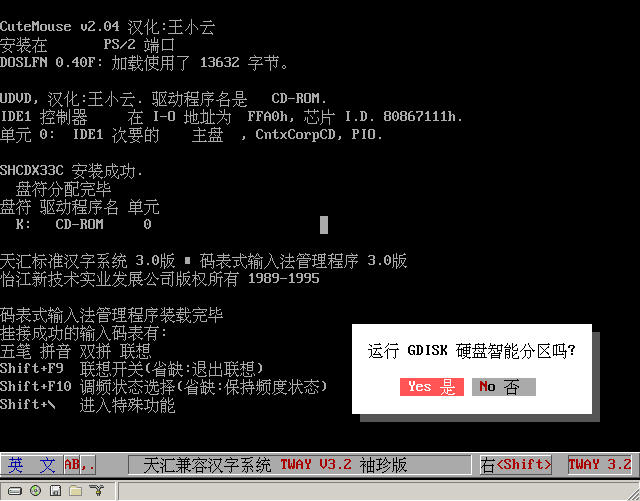 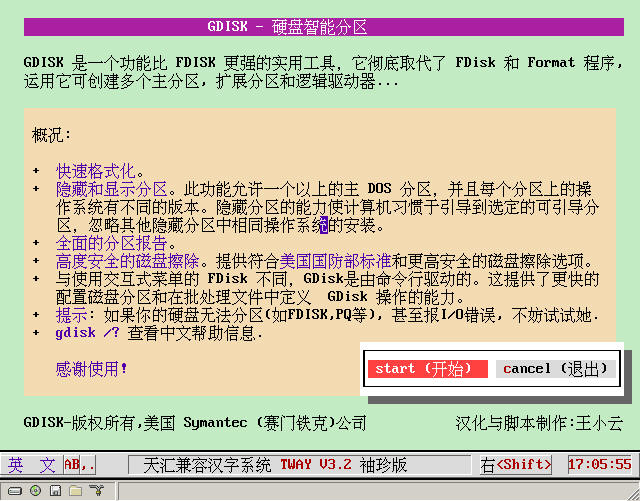 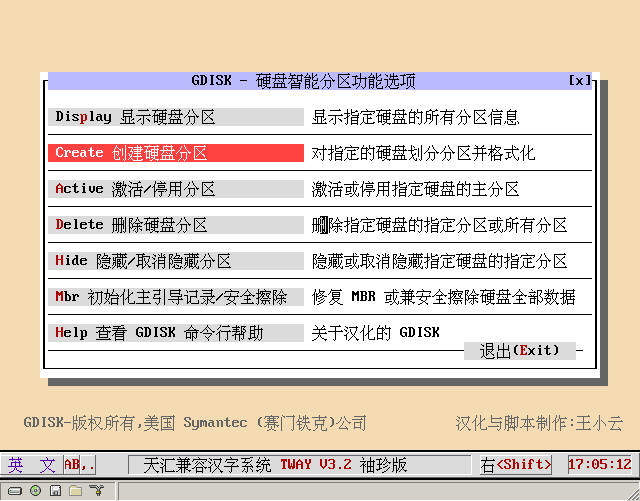 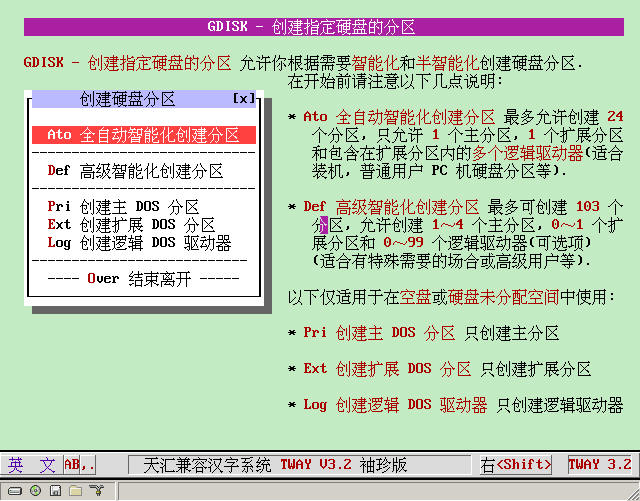 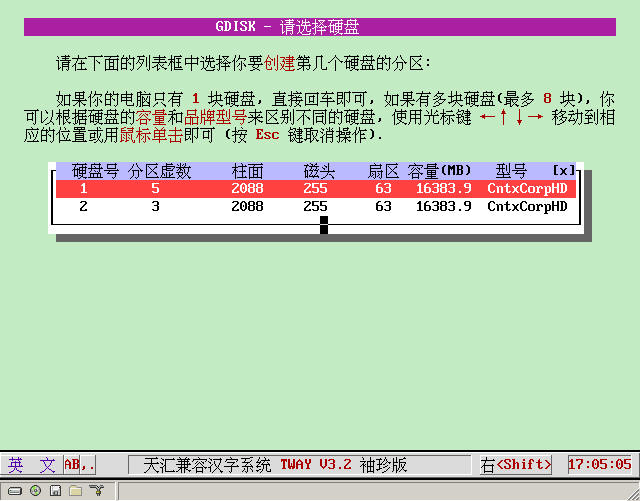 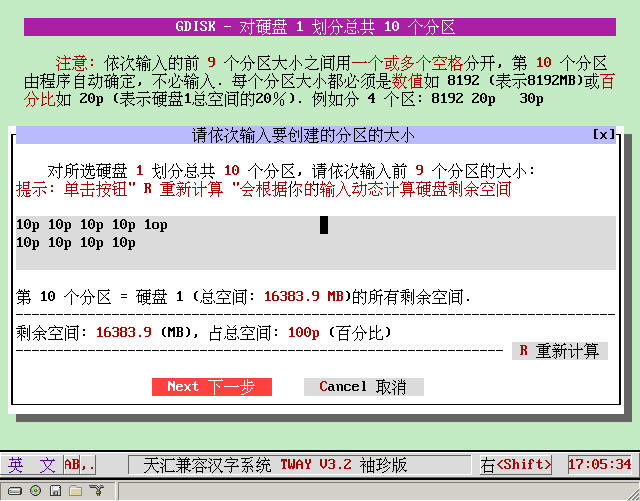 [ Last edited by 不得不爱 on 2008-12-23 at 11:07 ] |
|
| Floor2 xypcmac | Posted 2008-07-21 14:29 |
| 初级用户 Posts 80 Credits 167 | |
|
Support for localization... although it's not important to me!
|
|
| Floor3 xiaoyunwang | Posted 2008-07-23 21:24 |
| 高级用户 Posts 374 Credits 940 From 湖南张家界 | |
  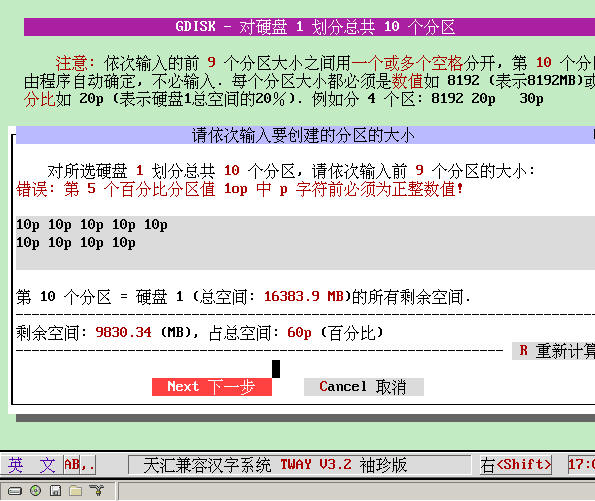 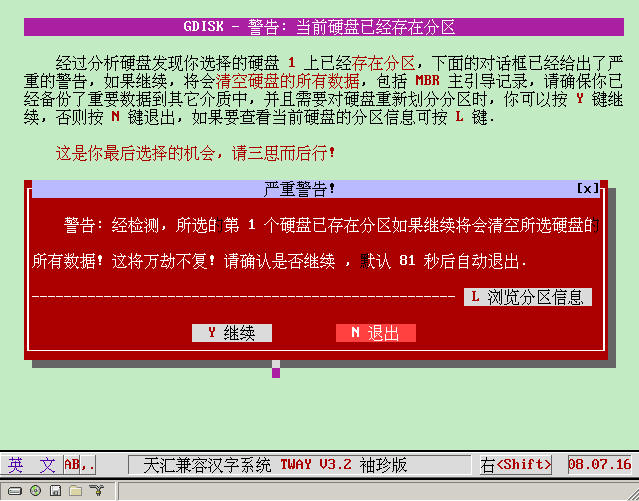 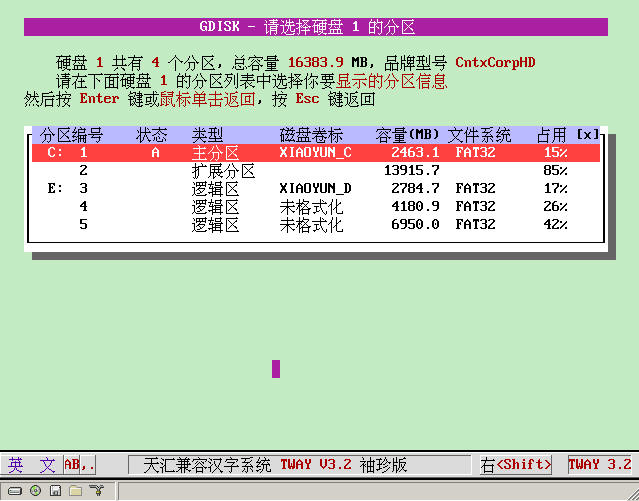 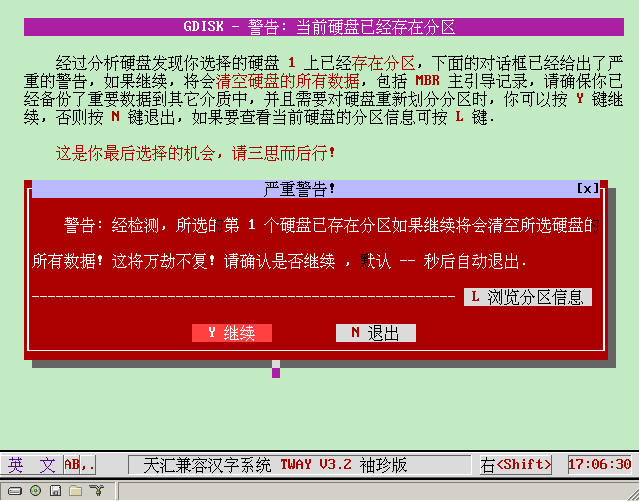 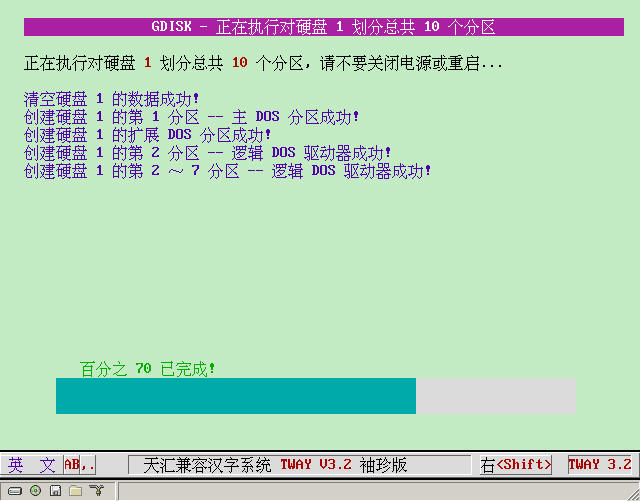 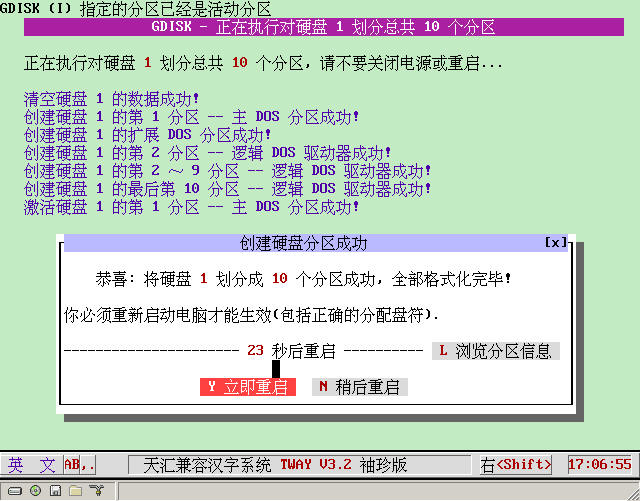 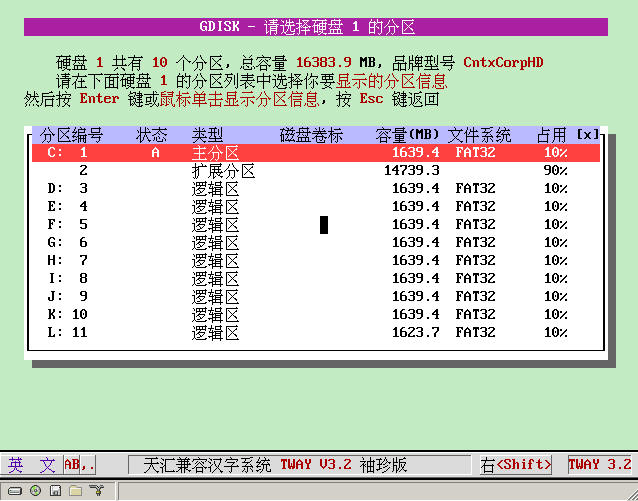 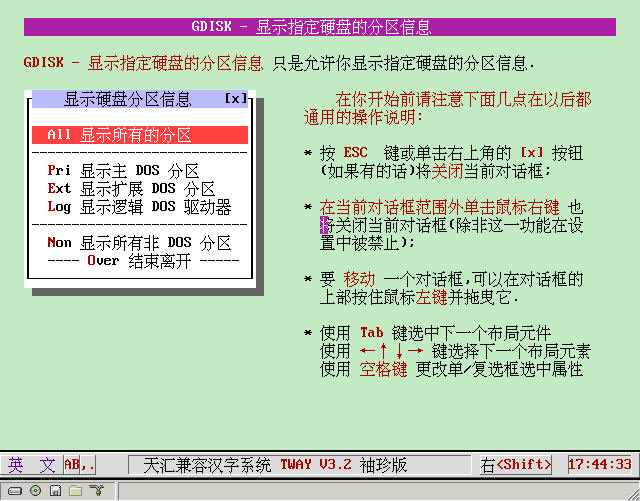 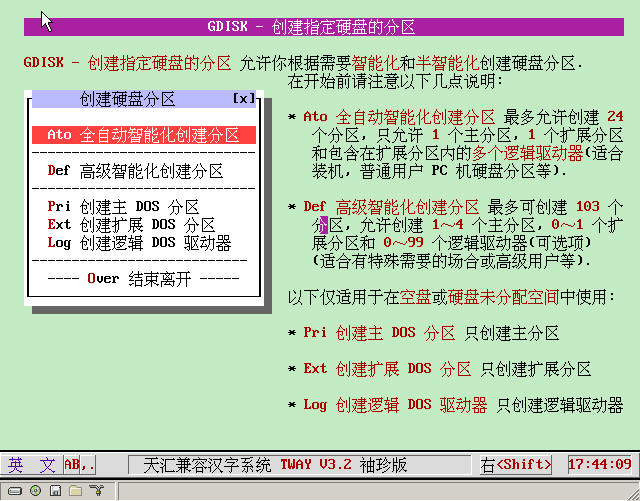 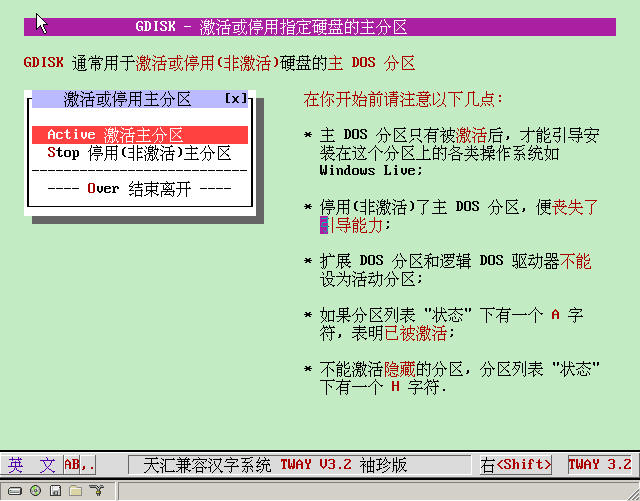 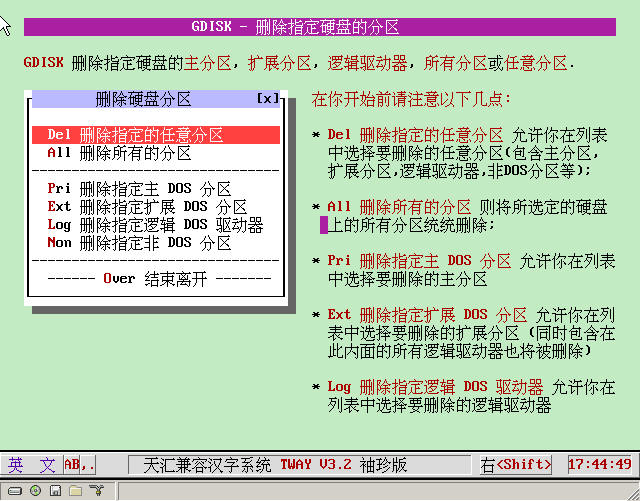 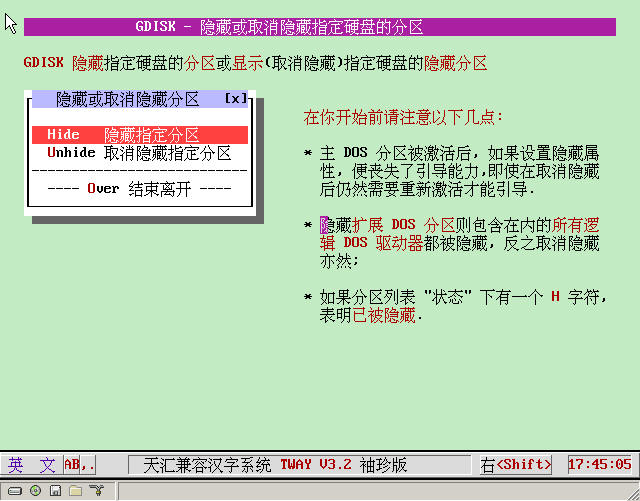 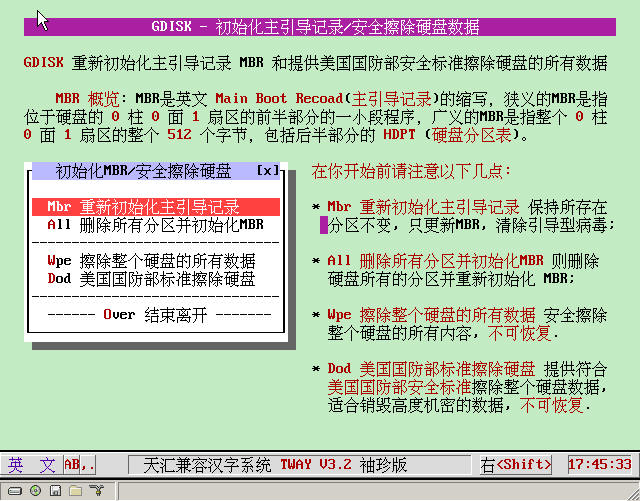 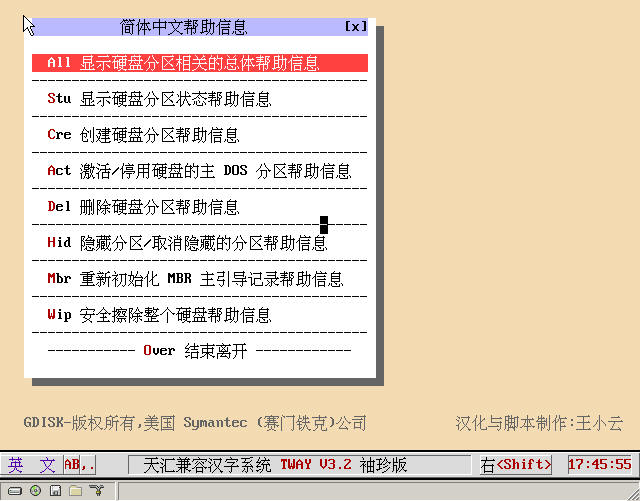 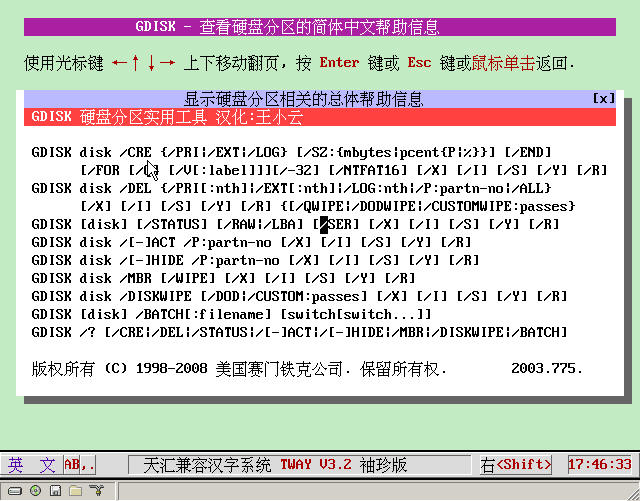 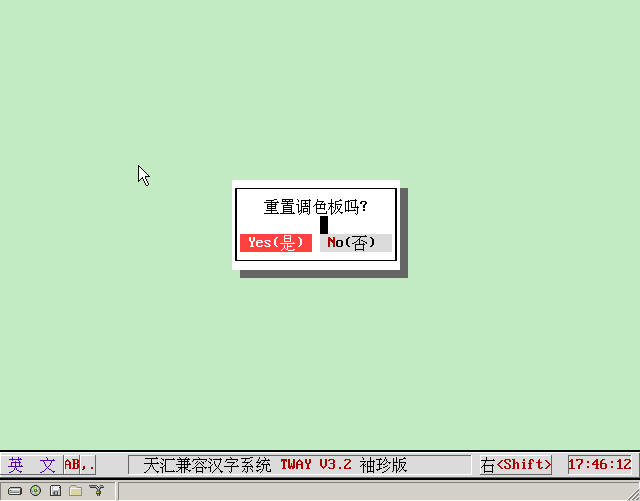   [ Last edited by 不得不爱 on 2008-12-23 at 10:10 ] |
|
| Floor4 vboy | Posted 2008-07-24 08:08 |
| 初级用户 Posts 18 Credits 38 | |
|
Thanks for sharing
Exactly what I need, going to study hard after localization, downloaded and saved |
|
| Floor5 dslz666 | Posted 2008-07-28 11:04 |
| 中级用户 Posts 117 Credits 233 | |
|
Thanks for sharing, it's very suitable for friends who don't understand English to use this partitioning software
|
|
| Floor6 ljb603 | Posted 2008-07-29 00:09 |
| 初级用户 Posts 49 Credits 112 | |
|
Thanks for sharing
|
|
| Floor7 ljb603 | Posted 2008-07-29 09:17 |
| 初级用户 Posts 49 Credits 112 | |
|
I used UltraISO to see that autoexec.bat is 3K, but when checking the content inside, it's blank. How can I see the content inside?
|
|
| Floor8 xiaoyunwang | Posted 2008-08-28 11:45 |
| 高级用户 Posts 374 Credits 940 From 湖南张家界 | |
|
I haven't done any hiding processing. All the source codes can be read and modified. You can try to extract that floppy disk version with WinImage and see what happens.
|
|
| Floor9 zch1366 | Posted 2008-09-03 23:23 |
| 中级用户 Posts 148 Credits 326 | |
|
Such a great creation, but so few people left messages!!!!!!
|
|
| Floor10 ice360 | Posted 2008-09-18 10:59 |
| 初级用户 Posts 10 Credits 20 | |
|
Not bad! Give a thumbs up! Hehe. Come on!
|
|
| Floor11 wangzhuoh8 | Posted 2008-12-20 21:58 |
| 新手上路 Posts 7 Credits 18 | |
|
You did a great job, I admire you. Let's work together.
|
|
| Floor12 wangzhuoh8 | Posted 2008-12-20 22:00 |
| 新手上路 Posts 7 Credits 18 | |
|
Brother, do you have the ISO version? I want to study it and make it into a CD. Use easyboot to make a CD.
|
|
| Floor13 wangzhuoh8 | Posted 2008-12-23 22:25 |
| 新手上路 Posts 7 Credits 18 | |
|
I downloaded your two gdisk disks and tested them with the VM virtual machine, but neither is usable. Can't enter the interface. Please give me some guidance. I also want to make one. I hope you can help. Thank you in advance, big brother.
|
|
| Floor14 xiaoyunwang | Posted 2008-12-23 22:30 |
| 高级用户 Posts 374 Credits 940 From 湖南张家界 | |
|
Download the CD in the signature below. It has been updated and improved inside and can be used...
|
|
| Floor15 wangzhuoh8 | Posted 2008-12-23 22:34 |
| 新手上路 Posts 7 Credits 18 | |
|
Brother, I downloaded the two files at the top of this page. One is 639, and the other is 640, which are img and iso respectively. Just testing in vm, I can't enter the DOS interface. It stops at the ctmouse part and can't move. Okay, brother, then I'll download another one at the following address.
|
|
| 1 2 Next |
|
[ Contact the Union admin team -
中国DOS联盟 -
Standard version ] Sponsored by ifanr Inc | © 2001–2023 |