
China DOS Union
-- Unite DOS · Advance DOS · Grow DOS --Union site: www.cn-dos.net Forum site: www.cn-dos.net/forum
|
China DOS Union-- Unite DOS · Advance DOS · Grow DOS --Union site: www.cn-dos.net Forum site: www.cn-dos.net/forum |
| Guest | Log in | Register | Members | Search | China DOS Union |
|
中国DOS联盟论坛 The time now is 2026-10-26 06:20 |
47,815 topics / 349,928 posts / today 0 new / 48,288 members |
| DOS启动盘 & LOGO技术 (启动盘室) » Zhongtian Hard Disk DOS System 2.0 |
| Printable Version 1,789 / 3 |
| Floor1 admiral | Posted 2008-07-06 10:09 |
| 初级用户 Posts 16 Credits 40 | |
|
Zhongtian Hard Disk DOS System 2.0 can install a pure DOS boot system on a computer without a floppy drive. After this DOS system is booted, it can automatically recognize USB drives and optical drives. Operations such as virus scanning, copying, and system restoration can be performed under this DOS, and it is not infected and damaged by viruses. The function is very powerful. Currently, it can only be used under operating systems such as Win2000, WinNT, WinXP, and Win003. It cannot be used under Win98 and Vista operating systems.
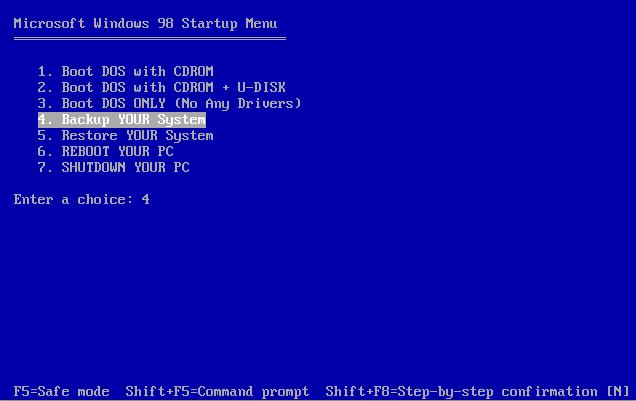 2.0 Update Instructions 1. Added the ghost program. After booting DOS, you can directly enter GHOST to start the backup or restore program. 2. Added the function of automatically backing up the system partition C. To back up partition C, just select "Zhongtian Hard Disk DOS Boot System" and then select "Backup YOUR System". 3. Added the function of automatically restoring the system partition C. To restore the previous backup of partition C, just select "Zhongtian Hard Disk DOS Boot System" and then select "Restore YOUR System". Note: If you want to use the function of automatically backing up the system partition C, be sure to ensure that there is a large remaining disk space in partition D (generally more than 2G of free space). The system partition backup package image file will be automatically saved in partition D. If you don't want to put it in partition D, please run the ghost program yourself for backup and restore. Thunder download: thunder://QUFodHRwOi8vc29mdC4zNjZ0aWFuLm5ldC8wMc+1zbO5pL7fLzA2z7XNs8bky/wv1tDM7ERPU8+1zbMyLjAucmFyWlo= [ Last edited by admiral on 2008-7-6 at 10:12 AM ] |
|
| Floor2 GaoWM | Posted 2008-07-08 14:14 |
| 新手上路 Posts 6 Credits 12 | |
|
Just passing through
|
|
| Floor3 #four# | Posted 2008-07-08 16:24 |
| 中级用户 Posts 34 Credits 209 | |
|
Good stuff, I'm looking for something with similar functions, thanks
|
|
| Floor4 xaxiao | Posted 2008-08-19 11:56 |
| 初级用户 Posts 22 Credits 46 | |
|
[ Contact the Union admin team -
中国DOS联盟 -
Standard version ] Sponsored by ifanr Inc | © 2001–2023 |