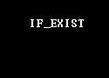
I wrote a DOS batch script to sort the playback order of MP3s. Please correct it.
Usually, the playback order is the same as the copying order. Therefore, controlling the copying order of song files to a USB flash drive or MP3 player can produce the effect of playing in the specified order. The order can be the reverse order of modification time, file size, file name, or extension. The sorting method is specified in the /O parameter of dir. /O-d will give priority to copying the files with the latest modification time. For more sorting methods, refer to the content of /O in dir /?.
In this sample batch script, the default drive letter of the USB flash drive (or MP3 player) is J:. There is a d:\music folder on D:, and the song files are in d:\music. The content of the sample batch script lcopy.bat is:
rem Batch file name: lcopy.bat
rem Function: Copy files in the specified order. The order can be the reverse order of modification time, file size, file name, or extension
rem The sorting method is specified in the /O parameter of dir. /O-d will give priority to copying the files with the latest modification time
rem Typical application: Copy MP3 files to the USB flash drive in the specified order. Usually, the copying order is the playback order
rem Parameter: The default drive letter of the USB flash drive is J:. There is a d:\music folder on D:, and the MP3 files are in d:\music
@echo Copy MP3 files to the USB flash drive in the specified order.............................................
d:
cd\music
if exist (lcopy.txt) del lcopy.txt
dir /o-d /b >lcopy.txt
FOR /F "delims=;" %%i in (lcopy.txt) do copy /y "%%i" j:\music
del lcopy.txt
@echo Copy completed...............................................................................
Usually, the playback order is the same as the copying order. Therefore, controlling the copying order of song files to a USB flash drive or MP3 player can produce the effect of playing in the specified order. The order can be the reverse order of modification time, file size, file name, or extension. The sorting method is specified in the /O parameter of dir. /O-d will give priority to copying the files with the latest modification time. For more sorting methods, refer to the content of /O in dir /?.
In this sample batch script, the default drive letter of the USB flash drive (or MP3 player) is J:. There is a d:\music folder on D:, and the song files are in d:\music. The content of the sample batch script lcopy.bat is:
rem Batch file name: lcopy.bat
rem Function: Copy files in the specified order. The order can be the reverse order of modification time, file size, file name, or extension
rem The sorting method is specified in the /O parameter of dir. /O-d will give priority to copying the files with the latest modification time
rem Typical application: Copy MP3 files to the USB flash drive in the specified order. Usually, the copying order is the playback order
rem Parameter: The default drive letter of the USB flash drive is J:. There is a d:\music folder on D:, and the MP3 files are in d:\music
@echo Copy MP3 files to the USB flash drive in the specified order.............................................
d:
cd\music
if exist (lcopy.txt) del lcopy.txt
dir /o-d /b >lcopy.txt
FOR /F "delims=;" %%i in (lcopy.txt) do copy /y "%%i" j:\music
del lcopy.txt
@echo Copy completed...............................................................................