
China DOS Union
-- Unite DOS · Advance DOS · Grow DOS --Union site: www.cn-dos.net Forum site: www.cn-dos.net/forum
|
China DOS Union-- Unite DOS · Advance DOS · Grow DOS --Union site: www.cn-dos.net Forum site: www.cn-dos.net/forum |
| Guest | Log in | Register | Members | Search | China DOS Union |
|
中国DOS联盟论坛 The time now is 2026-10-31 20:27 |
47,815 topics / 349,930 posts / today 0 new / 48,290 members |
| DOS软件下载 & 游戏分享 (下载室) » ★Find the software letassig.exe for changing drive letters under DOS ★ |
| Printable Version 7,480 / 7 |
| Floor1 ck0824 | Posted 2006-11-08 00:40 |
| 初级用户 Posts 17 Credits 145 | |
|
As the title says, I'm looking for the DOS - based drive letter changing software letassig.exe.
If you have this software, please help and send it to: [email protected] Thanks! |
|
| Floor2 redtek | Posted 2006-11-08 04:50 |
| 金牌会员 Posts 1,147 Credits 2,902 | |
|
http://free.ys168.com/index.aspx?wangsea
(In the myudisk.img in the disk wangsea download item, this tool is available) |
|
| Floor3 不得不爱 | Posted 2006-11-08 07:13 |
| 超级版主 Posts 2,044 Credits 5,310 From 四川南充 | |
|
I haven't really encountered changing drive letters under DOS before
|
|
| Floor4 ck0824 | Posted 2006-11-08 18:14 |
| 初级用户 Posts 17 Credits 145 | |
Originally posted by redtek at 2006-11-8 04:50 AM: Thanks to redtek for providing letassig.exe Sincerely wish you - all the best! |
|
| Floor5 ck0824 | Posted 2006-11-08 18:30 |
| 初级用户 Posts 17 Credits 145 | |
Originally posted by Must Love at 2006-11-8 07:13 AM: After booting a PC with a mobile hard drive, the C drive is the first partition of the mobile hard drive, and the original C drive then becomes the D drive. To install the system using a pre-packaged "universal" GHO file, you need to use letassig C=D: D=C:. |
|
| Floor6 xinhepc | Posted 2008-08-01 04:35 |
| 初级用户 Posts 40 Credits 90 From 广州 | |
|
Thanks
|
|
| Floor7 sou125 | Posted 2008-11-25 14:10 |
| 贫困用户 Posts 11 Credits -4 | |
|
Learning
|
|
| Floor8 雨露 | Posted 2008-11-26 08:11 |
| 管理员 Posts 2,601 Credits 6,215 | |
|
Download Letter Assigner V1.2.0 Chinese version from Skycn.com http://www.skycn.com/soft/8019.html and install it. In the directory, LETASSIG.EXE and SERNUM.EXE are the software under DOS.
Attached is the online instructions: Application in MS-DOS As the saying goes, "Although small, it has all the vital parts", Letter Assigner also thoughtfully prepares two application programs "LETASSIG.EXE" and "SERNUM.EXE" under the MS-DOS operating system, allowing users to easily modify and assign drive letters under DOS. The function of "Letassig.exe" is to assign drive letters. Its main command format is: LETASSIG X=mylabel or X=(nnnn-nnnn) or X=Y:. The meanings of which are (as shown in Figure 4 "Explanation of Letassig.exe command parameters"): 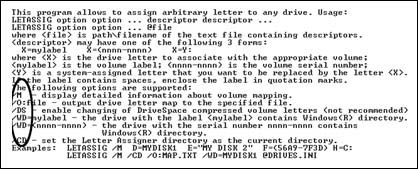 /M - Display mapped disk volume label information. /O:file - Output the drive letter list to a specified file. /CD - Virtually set the current directory as a hard disk drive letter. /nologo - Do not display its program name, version, and copyright information when running the program (Letassing.exe); X=mylabel - Assign the new drive letter X to the disk with the volume label (Label) of Mylabel. X=(nnnn-nnnn) - Assign the new drive letter X to the disk with the serial number (serial number) of nnnn-nnnn. X=Y: - That is, assign the new drive letter X to the disk with the current drive letter Y. For example, when you want to assign drive letter D to the disk with the label "LB2002D", assign drive letter E to the disk with the label "LB2002E", assign drive letter F to the disk with the serial number "58B9-7F3D", assign drive letter H to the disk "C:" that the system has already assigned a drive letter to, and display detailed mapped disk volume label information, the command to execute is: LETASSIG /M D= LB2002D E= LB2002E F=(58B9-7F3D)H=C:. It should be noted that Letassig.exe generally cannot change the drive letters of compressed drives, CD-ROMs, floppy drives, etc.  Figure 5 shows the serial number of the specified disk The function of "SERNUM.EXE" is to display the serial number of the specified disk (as shown in Figure 5) to help you identify each disk in DOS. Its command format is: sernum . For example, sernum D: 3F56-47E2. If you are still troubled by the problem of drive letter chaos, then hurry up and download Letter Assigner and give it a try! ^_^ |
|
|
[ Contact the Union admin team -
中国DOS联盟 -
Standard version ] Sponsored by ifanr Inc | © 2001–2023 |