Download Letter Assigner V1.2.0 Chinese version from Skycn.com
http://www.skycn.com/soft/8019.html and install it. In the directory, LETASSIG.EXE and SERNUM.EXE are the software under DOS.
Attached is the online instructions:
Application in MS-DOS
As the saying goes, "Although small, it has all the vital parts", Letter Assigner also thoughtfully prepares two application programs "LETASSIG.EXE" and "SERNUM.EXE" under the MS-DOS operating system, allowing users to easily modify and assign drive letters under DOS.
The function of "Letassig.exe" is to assign drive letters. Its main command format is: LETASSIG X=mylabel or X=(nnnn-nnnn) or X=Y:.
The meanings of which are (as shown in Figure 4 "Explanation of Letassig.exe command parameters"):
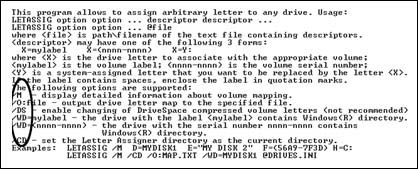
/M - Display mapped disk volume label information.
/O:file - Output the drive letter list to a specified file.
/CD - Virtually set the current directory as a hard disk drive letter.
/nologo - Do not display its program name, version, and copyright information when running the program (Letassing.exe);
X=mylabel - Assign the new drive letter X to the disk with the volume label (Label) of Mylabel.
X=(nnnn-nnnn) - Assign the new drive letter X to the disk with the serial number (serial number) of nnnn-nnnn.
X=Y: - That is, assign the new drive letter X to the disk with the current drive letter Y.
For example, when you want to assign drive letter D to the disk with the label "LB2002D", assign drive letter E to the disk with the label "LB2002E", assign drive letter F to the disk with the serial number "58B9-7F3D", assign drive letter H to the disk "C:" that the system has already assigned a drive letter to, and display detailed mapped disk volume label information, the command to execute is:
LETASSIG /M D= LB2002D E= LB2002E F=(58B9-7F3D)H=C:.
It should be noted that Letassig.exe generally cannot change the drive letters of compressed drives, CD-ROMs, floppy drives, etc.

Figure 5 shows the serial number of the specified disk
The function of "SERNUM.EXE" is to display the serial number of the specified disk (as shown in Figure 5) to help you identify each disk in DOS. Its command format is:
sernum . For example, sernum D: 3F56-47E2.
If you are still troubled by the problem of drive letter chaos, then hurry up and download Letter Assigner and give it a try! ^_^