
China DOS Union
-- Unite DOS · Advance DOS · Grow DOS --Union site: www.cn-dos.net Forum site: www.cn-dos.net/forum
|
China DOS Union-- Unite DOS · Advance DOS · Grow DOS --Union site: www.cn-dos.net Forum site: www.cn-dos.net/forum |
| Guest | Log in | Register | Members | Search | China DOS Union |
|
中国DOS联盟论坛 The time now is 2026-10-14 04:05 |
47,815 topics / 349,922 posts / today 0 new / 48,286 members |
| WinPE、PowerShell及其它命令行系统专区 » [Original] First Move of the Grand Ancestor's Fist in Learning PowerShell (First Form) |
| Printable Version 3,925 / 10 |
| Floor1 tigerpower | Posted 2006-05-14 12:01 |
| 中级用户 Posts 99 Credits 377 | |
|
The First Move in Learning PowerShell: The Foundational Moves First Move: The Strong Posture of the Founding Emperor In PowerShell, "shell" means "shell," which is relative to the "kernel" of the operating system. The File Explorer we usually use in Windows is a kind of shell. When we want to copy a file, the simple drag-and-drop action (or menu selection) we do in File Explorer will be transformed into a series of specific instructions of the kernel: Shell - File Explorer: Drag-and-drop to copy a file -> Kernel - Underlying operating system: Manipulate hardware (read the disk to load the file into memory, write the disk to copy it, and modify the corresponding file allocation table, etc.) The shell is not the operating system itself, but a user interface. So the same operating system can have different shells. On Windows XP, common ones for managing the file system are: 1. File Explorer (built-in with Windows, used every day:)  2. Command Prompt (built-in command-line tool Cmd.exe for Windows) 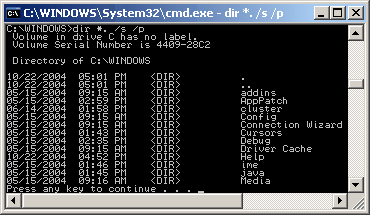 3. Total Commander (double-window structure for more convenient drag-and-drop)  4. PowerShell (next-generation Windows command line)  It is recommended to use graphical interface tools as much as possible. Most of the usual tasks are extremely simple tasks, which can be well completed with tools like Total Commander. Most of the time, using the graphical interface is relatively easy and enjoyable. Using the command line requires memorizing commands and their usages, which increases the user's burden, but the command line has two advantages: 1. Can easily repeat a certain operation. For example, if you need to copy a certain file 100 times, using the mouse to copy is relatively laborious. 2. Can automate some complex tasks. For example, automatically download the top 10 songs from "New Songs TOP100" from Baidu every week. If you click to download with the mouse in the browser, it is relatively time-consuming. The mental note for the first move: Judge whether to use the command-line tool PowerShell. [ Last edited by tigerpower on 2006-5-14 at 12:04 ] |
|
| Floor2 electronixtar | Posted 2006-05-14 19:48 |
| 铂金会员 Posts 2,672 Credits 7,493 | |
|
Bump
|
|
| Floor3 namejm | Posted 2006-06-09 08:06 |
| 荣誉版主 Posts 1,737 Credits 5,226 From 成都 | |
|
It has been almost a month, and the second part still hasn't come out. I'm eagerly calling out to the thread starter...
|
|
| Floor4 wl00560 | Posted 2006-06-13 16:17 |
| 银牌会员 Posts 709 Credits 1,384 | |
|
Using TC, still using the resource manager? Admire the LZ a bit...
|
|
| Floor5 lxmxn | Posted 2006-11-22 05:42 |
| 版主 Posts 4,938 Credits 11,386 | |
|
I'll also give it a thumbs up!!! The first move is great, looking forward to the "fierce attack" of the second move, hehe... Can automate some complex tasks, such as automatically downloading the top 10 songs from "Top 100 New Songs" on Baidu every week. It's time-consuming if you click to download with the mouse in the browser Can the landlord write some code to have a look? I want to learn~ Hehe~ |
|
| Floor6 electronixtar | Posted 2006-11-22 09:40 |
| 铂金会员 Posts 2,672 Credits 7,493 | |
|
It seems that the former moderator TigerPower is no longer in the union. It's depressing.
|
|
| Floor7 lxmxn | Posted 2006-11-22 11:53 |
| 版主 Posts 4,938 Credits 11,386 | |
|
Hey, yeah, another expert has left us, it's a pity... |
|
| Floor8 scriptor | Posted 2006-12-22 11:19 |
| 银牌会员 Posts 555 Credits 1,187 | |
|
It feels quite messy. How could it be this kind of output?? Oh my god!!~~
|
|
| Floor9 gne3 | Posted 2007-02-13 22:08 |
| 高级用户 Posts 252 Credits 526 | |
|
Looks like it got dropped halfway.
|
|
| Floor10 zhangtianjie | Posted 2007-02-23 02:19 |
| 初级用户 Posts 11 Credits 24 | |
|
Messy
|
|
| Floor11 lxmxn | Posted 2007-02-24 10:39 |
| 版主 Posts 4,938 Credits 11,386 | |
|
The help for Windows PowerShell nowadays is very detailed, with syntax, parameters, examples, references and so on. It's very convenient. For example, to get the detailed help for the for command, you can type "get-help for -detailed".
|
|
|
[ Contact the Union admin team -
中国DOS联盟 -
Standard version ] Sponsored by ifanr Inc | © 2001–2023 |