
China DOS Union
-- Unite DOS · Advance DOS · Grow DOS --Union site: www.cn-dos.net Forum site: www.cn-dos.net/forum
|
China DOS Union-- Unite DOS · Advance DOS · Grow DOS --Union site: www.cn-dos.net Forum site: www.cn-dos.net/forum |
| Guest | Log in | Register | Members | Search | China DOS Union |
|
中国DOS联盟论坛 The time now is 2026-10-27 13:34 |
47,815 topics / 349,928 posts / today 0 new / 48,289 members |
| DOS疑难解答 & 问题讨论 (解答室) » Why does the system not support USB drives when booting with the "Super DOS 7.10 Boot Disk"? |
| Printable Version 1,958 / 3 |
| Floor1 阿威 | Posted 2005-04-15 00:00 |
| 初级用户 Posts 4 Credits 111 | |
|
Hello everyone, I've been following DOS New Era for a long time and have been lurking. Today, when I used the Super DOS 7.10 boot disk, I found that it couldn't support my USB flash drive. I'll write down the symptoms for everyone and ask for your guidance.
1. I plugged the USB flash drive into the machine and booted with this DOS 710 disk. 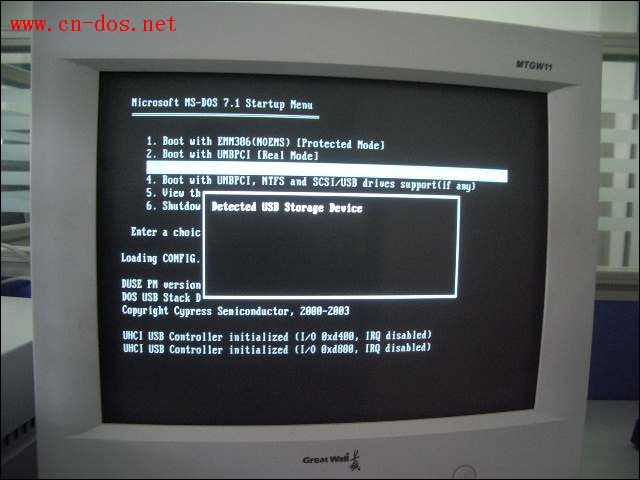 I selected the 4th option that supports USB and then pressed Enter. Soon, a prompt "Detected USB Storage Device" appeared. After waiting for a while, the following screen appeared, saying something like "UHCI USB Controller initialized ( I/O 0xd400, IRQ disabled), UHCI USB Controller initialized ( I/O 0xd800, IRQ disabled)". Then the screen just stayed here and didn't move anymore. 2. I didn't plug the USB flash drive into the computer first. Instead, I used this DOS 710 disk to boot the computer, selected the 4th option that supports USB. When the system files were all loaded and I could enter the command prompt operation mode, I then plugged the USB flash drive into the computer. 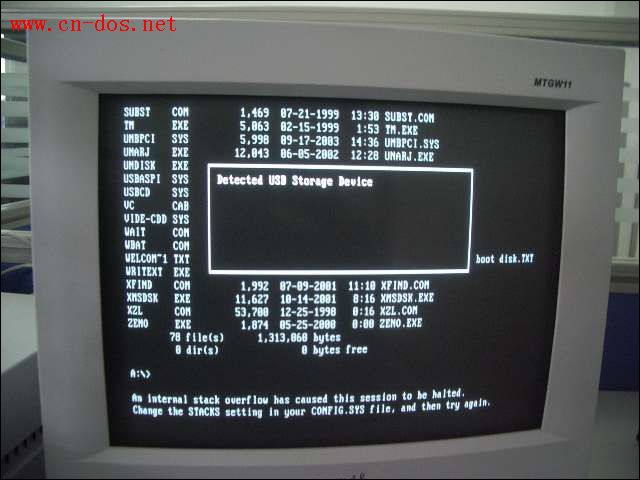 Soon, the prompt "Detected USB Storage Device" also appeared. Then after waiting for a long time, only two lines of text appeared on the screen: "An Internal stack overflow has caused this session to be halted. Change the STACKS setting in your CONFIG.SYS file, and then try again." The computer stopped here, didn't read the disk, and couldn't be restarted with CTR+ALT+DEL, only a cold boot was possible. My USB flash drive can be smoothly recognized on other machines with XP and has no problems.请问 how should I solve the problem of not being able to use the USB flash drive in DOS. Thanks a lot! 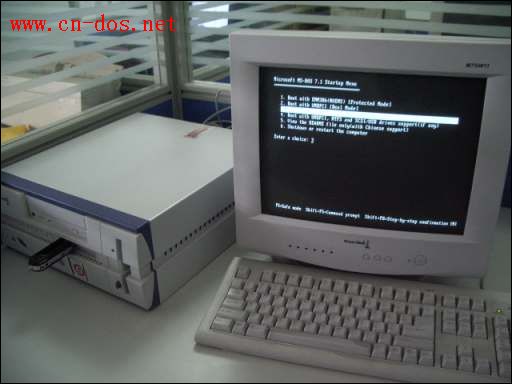 |
|
| Floor2 Wengier | Posted 2005-04-17 00:00 |
| 系统支持 Posts 10,521 Credits 27,736 | |
|
This disk hasn't been updated for a long time. Please manually delete the DUSE.EXE file inside it so that you can use the USBASPI inside to drive your USB flash drive.
|
|
| Floor3 iwaki | Posted 2005-05-19 00:00 |
| 初级用户 Posts 1 Credits 102 | |
|
Moderator, hello. There is a similar problem and I want to ask for advice. My computer is a Toshiba R100, no floppy drive, no optical drive. In order to be able to reinstall the system, I got an external floppy drive and optical drive, both USB ports. I used the Super MS-DOS 7.1 image copied to a floppy disk, and it can boot with 1 on a FAT16 computer. But on the Toshiba computer, when I select 3, it prompts that a few system files are missing, an A prompt appears, and it stops, unable to install. What should I do? Thanks
|
|
| Floor4 mynb | Posted 2005-08-24 12:28 |
| 新手上路 Posts 1 Credits 1 | |
|
Toshiba laptop, method of installing the operating system http://www.peijian.com.cn/bbs/viewthread.php?tid=9&fpage=1
I tried it and it worked. See if it can help you |
|
|
[ Contact the Union admin team -
中国DOS联盟 -
Standard version ] Sponsored by ifanr Inc | © 2001–2023 |