
China DOS Union
-- Unite DOS · Advance DOS · Grow DOS --Union site: www.cn-dos.net Forum site: www.cn-dos.net/forum
|
China DOS Union-- Unite DOS · Advance DOS · Grow DOS --Union site: www.cn-dos.net Forum site: www.cn-dos.net/forum |
| Guest | Log in | Register | Members | Search | China DOS Union |
|
中国DOS联盟论坛 The time now is 2026-10-23 09:28 |
47,815 topics / 349,927 posts / today 0 new / 48,287 members |
| DOS汉化世界 & 中文系统 (中文化室) » Config Chinese menu-driven Confect.sys (updated to version 4.3) |
| Printable Version 34,919 / 117 |
| Floor61 sanchuan | Posted 2009-01-06 16:49 |
| 初级用户 Posts 51 Credits 113 From 武汉 | |
Originally posted by wuchan at 2009-1-6 16:41: The earliest confect sub-item only had multiple selections. Which ones to select cannot use the Enter key, so...... |
|
| Floor62 yjd | Posted 2009-01-08 02:22 |
| 初级用户 Posts 76 Credits 156 | |
|
It's really powerful. Finally saw something super simple that is convenient for us to use. It even supports prompt information. It's really getting closer to the syslinux and grub4dos I use. The building楼主 worked hard.
|
|
| Floor63 hyt3d | Posted 2009-01-08 13:46 |
| 新手上路 Posts 5 Credits 10 | |
|
Got used to yaya's menu, is it possible to add the function of hidden menu?
|
|
| Floor64 xiaoyunwang | Posted 2009-01-09 14:49 |
| 高级用户 Posts 374 Credits 940 From 湖南张家界 | |
| Floor65 yjd | Posted 2009-01-10 02:26 |
| 初级用户 Posts 76 Credits 156 | |
|
Ask for advice:
; device=\dos\himem.sys /testmem  ff ffdevice=\dos\emm386.sys noems dos=high,umb,auto fcbshigh=4,0 fileshigh=30 buffershigh=30,0 lastdrivehigh=32 stackshigh=9,256 Can this common configuration be placed at the very beginning of config.sys? Or does it have to be placed at the very end? I saw that in the previous yaya's, it was all executed by placing it at the very beginning? Just now I paid attention to the reply. It turns out there was an explanation on the second page.  [ Last edited by yjd on 2009-1-10 at 05:50 ] |
|
| Floor66 yjd | Posted 2009-01-10 06:15 |
| 初级用户 Posts 76 Credits 156 | |
|
Ask about how many Chinese characters the next line of menu supports.
|
|
| Floor67 sanchuan | Posted 2009-01-10 09:27 |
| 初级用户 Posts 51 Credits 113 From 武汉 | |
Originally posted by yjd at 2009-1-10 02:26: The public configuration can be placed at the front or the back. However, is the end mark of the Confect menu and cannot be placed at the front. The Confect4.2 menu part can hold 96 unique Chinese characters, and the title and footer can hold 48 unique Chinese characters, totaling 144 Chinese characters. |
|
| Floor68 yjd | Posted 2009-01-10 14:23 |
| 初级用户 Posts 76 Credits 156 | |
|
Still not understanding the settings for autoexec.bat and config.sys -_-!!!. . . . .
config.sys: . . . . omitted set confect=auto, fully automatic network cloning; Tip: Network cloning fully automatic mode . . . . omitted rem autoexec.bat: . . . . omitted goto %confect% : echo Please wait.. md x:\ng echo Please wait.... call x:\ng\netgh.bat goto exit . . . . omitted Know the problem is with rem but don't understand how to set it Read the explanation on page four but still don't understand -_-!!! Execution is displayed as shown in the following figure: [ Last edited by yjd on 2009-1-10 at 14:25 ] Attachments snap013.jpg (3.28 KiB) |
|
| Floor69 sanchuan | Posted 2009-01-10 14:36 |
| 初级用户 Posts 51 Credits 113 From 武汉 | |
Originally posted by yjd at 2009-1-10 14:23: The problem is with the label in autoexec.bat. The correct label should be: :auto Not : |
|
| Floor70 yjd | Posted 2009-01-10 20:47 |
| 初级用户 Posts 76 Credits 156 | |
Originally posted by sanchuan at 2009-1-10 02:36 PM: I'm sorry. I made a mistake in writing it. My other menus are written in the format of :dos. But it still doesn't work. After reading the previous discussion, it was said that it must be in config.sys Such as: rem Do I need to add variables here as well? My config.sys menu is as follows: ----------------------------------------------------------------------------------------------- DEVICE=confect.sys /m rem set alHead=6 set align=8,1 set alNote=6 set shortcut=a,1 set color=2,8,8,8 set default=1,30,8 set heading= set heading= Common Maintenance Tools set heading==================================== set heading= set endnote=Use the ↑→↓ or ← keys to move the bright bar, or use keys like A, B, C... to select the main items set endnote=Set (or clear) options with number keys or space bar, and press Enter key to confirm. set confect=dos,DOS Toolbox; rem device=\soft\UMBPCI.SYS rem SHELL=command.com /P /E:640 DEVICE=a:\soft\HIMEM.SYS /TESTMEM:OFF dos=NOAUTO,high,umb files=80 stackshigh=9,256 lastdrive=z buffers=20,8 numlock=on ----------------------------------------------------------------------------------------------- autoexec.bat is as follows: ----------------------------------------------------------------------------------------------- SET CONFIG=%CONFECT% SET CONFECT= set EXPAND=YES a:\soft\xmsdsk 10240 x: /y >NUL a:\soft\FINDRAMD.EXE >nul path=a:\;a:\soft;x:\;x:\lan;x:\tmp >nul md x:\Tmp >nul md x:\soft >nul set temp=x:\Tmp set tmp=x:\Tmp goto %confect% :dos call m.bat goto exit Still getting the prompt: goto label not found [ Last edited by yjd on 2009-1-10 at 20:51 ] |
|
| Floor71 sanchuan | Posted 2009-01-10 21:04 |
| 初级用户 Posts 51 Credits 113 From 武汉 | |
Originally posted by yjd at 2009-1-10 20:47: Within the rem configuration block, variables are set as needed, not necessarily something that must be added. The main item in the confect menu actually contains a variable, for example: set confect=auto, ..... Note: The part before the comma is the standard variable In autoexec.bat, goto %confect% ,the system will automatically replace it with goto auto. |
|
| Floor72 yjd | Posted 2009-01-10 21:10 |
| 初级用户 Posts 76 Credits 156 | |
|
Thank you very much to the author for coming to answer. Then it means that my config.sys and autoexec.bat are written correctly. Why is there still a prompt that label not found. You said earlier that there was no selected sub-item. I only have a current main item here. I don't know why....
Also, the previous post wrote rem [dos] while in the 4.2 document you wrote ;[dos]. Which one is correct? Or are both for comments? |
|
| Floor73 sanchuan | Posted 2009-01-10 21:14 |
| 初级用户 Posts 51 Credits 113 From 武汉 | |
Originally posted by yjd at 2009-1-10 20:47: The problem is at the final goto exit —— the label :exit is not found After goto is a label for the exit. There should be a corresponding label in Autoexec.bat According to your situation, you should add a line at the end: :exit Below this line of label, you can add commands according to the situation, or you can write nothing Regarding rem and semicolon, in the config text, they mean the same thing, playing the role of comments; and confect is using this point to drive the custom menu. [ Last edited by sanchuan on 2009-1-10 at 21:20 ] |
|
| Floor74 yjd | Posted 2009-01-10 21:26 |
| 初级用户 Posts 76 Credits 156 | |
|
I don't know why it became like this... -_-!!!
It's solved. Saving the file again with Notepad is fine -_-!!!  [ Last edited by yjd on 2009-1-11 at 04:42 ] |
|
| Floor75 softmouse | Posted 2009-01-12 03:19 |
| 初级用户 Posts 8 Credits 20 | |
|
Strange phenomenon, can't figure it out all the time, please give guidance.
According to the instructions, I used the /m parameter to prepare to generate a small font (I understand that it is only the characters included in the menu, so that the space for starting the software can be greatly saved) DEVICE=DRV\CONFECT.SYS /m A:\HZK16 The result shows chaotic graphics, see the picture. Check the root directory, and there is no confect.dot file generated. Cancel this parameter, everything is normal. Is my understanding wrong? 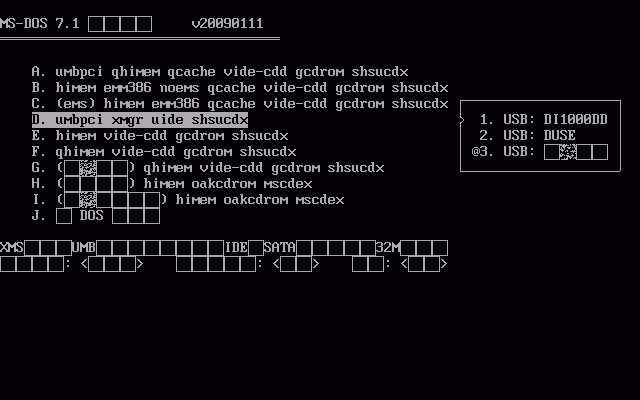 |
|
| Prev 1 … 2 3 4 5 6 7 8 Next |
|
[ Contact the Union admin team -
中国DOS联盟 -
Standard version ] Sponsored by ifanr Inc | © 2001–2023 |