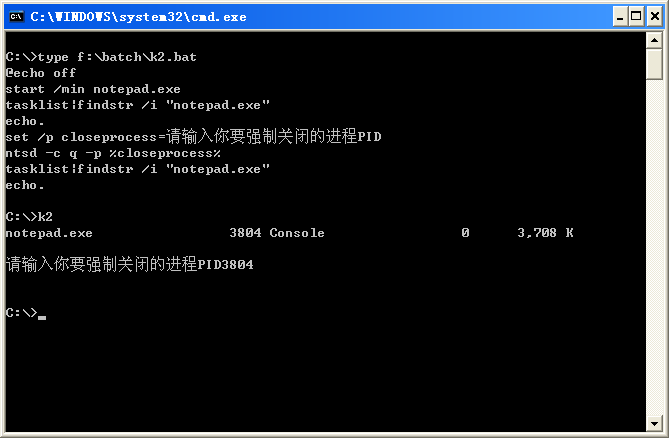
The NTSD debugging program requires the user to specify a process to connect to when it starts. Using TLIST or PVIEWER, you can obtain the process ID of an existing process, and then type NTSD -p pid to debug this process. The NTSD command line uses the following syntax:
NTSD [options] imagefile
where imagefile is the name of the image to be debugged, and options is one of the following options:
Table 1. NTSD image file options
Option Description
-2 Open a new window for debugging a character-mode application
-d Redirect output to the debugging terminal
-g Make execution pass through the first breakpoint automatically
-G Make NTSD exit immediately when the subroutine terminates
o Enable debugging of multiple processes, the default is one process forked by the debugger
-p Specify the process to be debugged identified by the process ID
-v Generate detailed output
For example, suppose the process ID of inetinfo.exe is 104. Typing the following command connects the NTSD debugger to the inetinfo process (IIS).
NTSD -p 104
You can also use NTSD to start a new process for debugging. For example, NTSD notepad.exe will start a new notepad.exe process and establish a connection with it.
Once connected to a process, you can use various commands to view the stack, set breakpoints, dump memory, etc.
Table 2. Common commands
Command Meaning
~ Display a list of all threads
KB Display the stack trace of the current thread
~*KB Display the stack traces of all threads
R Display the register output of the current frame
U Disassemble the code and display the procedure name and offset
D[type][<range>] Dump memory
BP[#] <address> Set a breakpoint
BC[<bp>] Clear one or more breakpoints
BD[<bp>] Disable one or more breakpoints
BE[<bp>] Enable one or more breakpoints
BL[<bp>] List one or more breakpoints
Let's do an experiment.
For example, if the system process 1234 is notepad.exe, execute ntsd -p 1234 to open the debugging window.
Type q.
NTSD exits, and the associated process also exits.
The processes that NTSD cannot terminate are those that do not allow connection or discard such requests at all. Also, at least administrator is needed to have an 80% guarantee to end the process you selected. The system permission大概会有95%, heh heh.
NTSD is actually a debug program. Closing the process uses the fact that when NTSD exits, it will terminate the program associated with it.
NTSD [options] imagefile
where imagefile is the name of the image to be debugged, and options is one of the following options:
Table 1. NTSD image file options
Option Description
-2 Open a new window for debugging a character-mode application
-d Redirect output to the debugging terminal
-g Make execution pass through the first breakpoint automatically
-G Make NTSD exit immediately when the subroutine terminates
o Enable debugging of multiple processes, the default is one process forked by the debugger
-p Specify the process to be debugged identified by the process ID
-v Generate detailed output
For example, suppose the process ID of inetinfo.exe is 104. Typing the following command connects the NTSD debugger to the inetinfo process (IIS).
NTSD -p 104
You can also use NTSD to start a new process for debugging. For example, NTSD notepad.exe will start a new notepad.exe process and establish a connection with it.
Once connected to a process, you can use various commands to view the stack, set breakpoints, dump memory, etc.
Table 2. Common commands
Command Meaning
~ Display a list of all threads
KB Display the stack trace of the current thread
~*KB Display the stack traces of all threads
R Display the register output of the current frame
U Disassemble the code and display the procedure name and offset
D[type][<range>] Dump memory
BP[#] <address> Set a breakpoint
BC[<bp>] Clear one or more breakpoints
BD[<bp>] Disable one or more breakpoints
BE[<bp>] Enable one or more breakpoints
BL[<bp>] List one or more breakpoints
Let's do an experiment.
For example, if the system process 1234 is notepad.exe, execute ntsd -p 1234 to open the debugging window.
Type q.
NTSD exits, and the associated process also exits.
The processes that NTSD cannot terminate are those that do not allow connection or discard such requests at all. Also, at least administrator is needed to have an 80% guarantee to end the process you selected. The system permission大概会有95%, heh heh.
NTSD is actually a debug program. Closing the process uses the fact that when NTSD exits, it will terminate the program associated with it.
49206C6F766520796F752067757973 54656C3A3133383238343036373837