China DOS Union

-- Unite DOS · Advance DOS · Grow DOS --

Union site: www.cn-dos.net Forum site: www.cn-dos.net/forum
DOS stands for freedom, openness and progress. Let us work hard, learn from the openness and GNU spirit of FreeDOS and Linux, and together build and grow a free GNU GPL world!

中国DOS联盟论坛
The time now is 2026-06-25 08:48
中国DOS联盟论坛 » DOS批处理 & 脚本技术(批处理室) » Third - party command - line tool collection post [Being added] DigestII View 83,048 Replies 91
Floor 16 Posted 2008-09-04 11:12 ·  中国 上海 浦东新区 电信
中级用户
★★
Credits 400
Posts 211
Joined 2007-09-30 18:02
18-year member
UID 98650
Gender Male
Status Offline
http://www.westmesatech.com/sst.html

This is a small collection of Win32 console programs (command-line utilities) to assist with Cmd.exe shell scripting in Windows NT 4.0 and later. Documentation is provided in PDF format.

Program Description
CCase Converts standard input to upper or lowercase, and writes to standard output.
ColorX Echoes the current screen colors的 current screen colors to standard output, or sets the colors for the next text to be written to standard output.
DateX Echoes the current date, a specified date, or an offset of either the current date or a specified date to standard output in a variety of formats.
DriveX Returns the drive type for the current or a specified drive as an exit code, or echoes drives of a specified type to standard output.
EchoX Echoes text to standard output in a specified color. Supports several escape characters and a formatting width and alignment.
FInfo Echoes information about one or more files to standard output.
IfX Case-insensitive string or numeric comparison of two arguments (not needed on WinNT).
LineX Counts the number of lines in standard input; prints a specific line, a range of lines, or a specified number of lines from the beginning or end of standard input. Can also output in reverse order.
S2V A real-mode MS-DOS program that reads the first line of standard input and stores it into an environment variable (non-functional, and not needed, on WinNT).
ShellEsc For each line of standard input, inserts a shell escape character (^) before each reserved shell character, and writes it to standard output.
SleepX Pauses a script for a specified period of曰a specified period of time. Can display a prompt, and can optionally be interrupted by a keystroke.
Str Counts characters in a string, echoes a string in upper or lowercase, and searches for one string in another.
Tee Writes each line of standard input to a file and to standard output simultaneously.
TempName Generates a temporary unique file or directory name.
Floor 17 Posted 2008-09-04 11:23 ·  中国 上海 浦东新区 电信
中级用户
★★
Credits 400
Posts 211
Joined 2007-09-30 18:02
18-year member
UID 98650
Gender Male
Status Offline
http://www.westmesatech.com/wast.html


FVER - FVER enables a shell script to perform version checks on a Win32 executable file, provided it contains version information.

ISADMIN ISADMIN checks whether the currently logged - on user is an administrator (Windows NT 4.0 and later). It works properly on Windows 9x/Me, where the current logged - on user is always an administrator.

ISMEMBER - ISMEMBER can check whether the currently logged - on user is a member of one or more groups you can specify on the command line, and it can also list group memberships. Requires Windows NT 4.0 or later.
MINWIN MINWIN minimizes the topmost window on the screen (useful in logon scripts).

NEEDBOOT - NEEDBOOT determines if there are pending file rename/move/delete operations for the next system boot. On Windows 9x/Me, it checks for the existence of any entries in the section of WININIT.INI; on the Windows NT platform, it checks for the existence of the PendingFileRenameOperations registry entry. It can also list the entries in the section or the contents of the registry entry.
NUPP NUPP allows you to temporarily map a drive letter, do some things, and then restore the mapping to its previous value.

OSTEST - OSTEST tests the current operating system to see if it meets one or more criteria. You can check if the current platform is Windows 9x/Me or NT, the version number, service pack number, and build number. It can also detect whether the current OS is running a 'home' edition, whether it's a server or workstation, and the Terminal Server mode (remote desktop or application server).

RASCONNS - RASCONNS allows a shell script to determine if one or more RAS connections are active. It can also list active RAS connections and determine if a named RAS connection is active.

WINMSG - WINMSG displays a Windows dialog box with a customizable message, buttons, and icon. A shell script can detect which button was pressed. You can also read the dialog box text from a text file and specify a timeout period.

[ Last edited by uiopuiop on 2008 - 9 - 12 at 02:11 PM ]
Floor 18 Posted 2008-09-04 18:27 ·  中国 广东 韶关 电信
高级用户
★★★
CMD感染者
Credits 691
Posts 383
Joined 2008-05-23 00:38
18-year member
UID 119451
Gender Male
Status Offline
Great! Thanks for sharing
Floor 19 Posted 2008-09-12 14:01 ·  新加坡
中级用户
★★
Credits 400
Posts 211
Joined 2007-09-30 18:02
18-year member
UID 98650
Gender Male
Status Offline
http://www.matcode.com/wol.htm

This small command line utility makes possible to switch on a computer from a second one by sending a "Magic Packet". Both of computers can be located on the same LAN or on the different LAN segments.

MC-WOL ethernet-address
Floor 20 Posted 2008-09-12 14:04 ·  新加坡
中级用户
★★
Credits 400
Posts 211
Joined 2007-09-30 18:02
18-year member
UID 98650
Gender Male
Status Offline
Floor 21 Posted 2008-09-12 14:10 ·  新加坡
中级用户
★★
Credits 400
Posts 211
Joined 2007-09-30 18:02
18-year member
UID 98650
Gender Male
Status Offline
http://www.tools4ever.com/products/free/command/

T4eWebPing
Gets the response time and header code for any input URL; great for testing scripts, execution times and 404 errors on your website.

T4eSQL
Connects to any ODBC database and executes a custom query, results can be written to a text file; useful for database monitoring (systables).


T4eDirSize
Gets the free and used space of any directory or share, also counts the number of special files (encrypted, readonly, hidden, system, etc); great for monitoring free space and file statistics.


T4ePortPing
Connects to any TCP/IP意义port and retrieves the response time and error code.


T4eRexec
This command line utility is similar to the Windows REXEC command, but accepts a password as input and can therefore run in unattended mode. To run commands on a REXEC compatible OS, such as Linux, the REXEC daemon has to be running on the target system.


T4eSSH
A secure implementation of the SSH protocol to get access to a UNIX/Linux operating system.


T4eUnixInfo
This tool uses the REXEC daemon to remotely execute several pre-defined scripts compatible with Linux, to get system specific information such as DISK, MEMORY, SWAP and CPU. This information is easily accessible for MonitorMagic to be used as monitoring plugin.

T4eSSHUnixInfo
This tool uses the SSH daemon to securely execute several pre-defined scripts compatible with Linux, to get system specific information such as DISK, MEMORY, SWAP and CPU.
Floor 22 Posted 2008-09-12 14:44 ·  中国 江西 赣州 电信
银牌会员
★★★★
Credits 2,025
Posts 1,122
Joined 2007-09-05 20:15
18-year member
UID 96653
Gender Male
Status Offline
EditV32 and Choose32
http://www.westmesatech.com/editv.html


EditV32Choose32 是Win32控制台程序,旨在允许用户在shell脚本(批处理文件)中输入。下载内容还包括这两个程序的MS-DOS版本,EditVarChoose,它们在DOS可引导介质上可能很有用。

EditV32 通过获取环境变量的内容并将其呈现以供交互式编辑来工作。如果您对变量的内容进行任何更改并按Enter键,EditV32 会将更改后的变量写入启动它的程序的父环境(通常是Cmd.exe)。EditV32 需要Windows NT 4.0或更高版本;对于Windows 9x/Me,请使用MS-DOS版本。

EditV32 类似于Windows 2000及更高版本中的Cmd.exe Set /p 命令,但可能由于以下原因更可取:
它允许您编辑变量,而不仅仅是设置变量。
它可以限制输入变量的长度。
它可以屏蔽输入的内容以实现简单的密码安全。
它可以限制输入仅为数字。
它提供超时功能(在脚本需要无人值守运行时很有用)。
它可以自动“转义”它创建的变量中的保留shell字符。
它提供有用的退出代码:例如,退出代码4表示用户按Ctrl-C中止。
它带有一个MS-DOS版本,可在Windows 9x/Me以及MS-DOS可引导介质上运行。

Choose32 类似于Microsoft的Choice工具,但它具有更多功能。以下是它可能比Choice更可取的一些原因:
当用户做出无效选择时不会发出蜂鸣声。
它提供“默认键”功能,允许用户按Enter键选择默认选项。
它带有一个DOS版本(对MS-DOS可引导介质有用)。
Win32版本的超时功能在单独的控制台窗口中运行多个实例时不会混淆(这是Microsoft早期Win32控制台版本的Choice工具的问题)。
它可以抑制显示用户的选择。
它提供“行输入”模式,用户在做出选择后必须按Enter键。


[ Last edited by tireless on 2008-12-27 at 13:46 ]
Floor 23 Posted 2008-09-12 14:46 ·  中国 江西 赣州 电信
银牌会员
★★★★
Credits 2,025
Posts 1,122
Joined 2007-09-05 20:15
18-year member
UID 96653
Gender Male
Status Offline
http://www.westmesatech.com/files/exec15.zip

Executes a program using the Win32 CreateProcess API. It can optionally wait for a process to finish and also display the program's elapsed【译:运行时间】 time. Exec doesn't have a problem with quoted paths or command-line arguments. Both console and GUI versions are provided. Works on Windows 9x/Me as well. (79,562 bytes; 07 Apr 2006)


[ Last edited by tireless on 2008-12-27 at 13:46 ]
Floor 24 Posted 2008-09-12 14:51 ·  新加坡
中级用户
★★
Credits 400
Posts 211
Joined 2007-09-30 18:02
18-year member
UID 98650
Gender Male
Status Offline
Originally posted by tireless at 2008-9-12 02:46 PM:
http://www.westmesatech.com/files/exec15.zip

Executes a program using the Win32 CreateProcess API. It can optionally wait for a process to finish and also display the program's elapse ...


You can also use the "timeit.exe" support tool provided on the Windows Server 2003 CD.
Recent Ratings for This Post ( 1 in total) Click for details
RaterScoreTime
tireless +1 2008-09-12 15:11
Floor 25 Posted 2008-09-12 14:53 ·  新加坡
中级用户
★★
Credits 400
Posts 211
Joined 2007-09-30 18:02
18-year member
UID 98650
Gender Male
Status Offline
http://www.foundstone.com/us/resources/proddesc/fport.htm

fport reports all open TCP/IP and UDP ports and maps them to the owning application. This is the same information you would see using the 'netstat -an' command, but it also maps those ports to running processes with the PID, process name and path. Fport can be used to quickly identify unknown open ports and their associated applications.
Floor 26 Posted 2008-09-12 19:48 ·  中国 江西 赣州 电信
银牌会员
★★★★
Credits 2,025
Posts 1,122
Joined 2007-09-05 20:15
18-year member
UID 96653
Gender Male
Status Offline
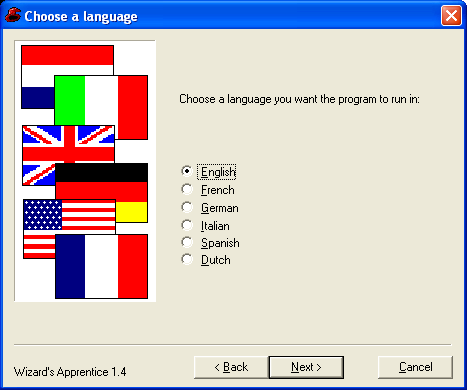
http://wizapp.sourceforge.net/

Example:


[ Last edited by tireless on 2008-9-11 at 11:50 PM ]
Floor 27 Posted 2008-09-14 13:45 ·  中国 上海 浦东新区 电信
中级用户
★★
Credits 400
Posts 211
Joined 2007-09-30 18:02
18-year member
UID 98650
Gender Male
Status Offline
Brother vkill's site has collected quite a few win32 command-line tools (repost)

http://www.vkill.net/tools.html

http://live.sysinternals.com/
(It's better to use the old version of PSTOOLS, since after being acquired by MS...)
Floor 28 Posted 2008-09-23 20:08 ·  中国 上海 浦东新区 电信
中级用户
★★
Credits 400
Posts 211
Joined 2007-09-30 18:02
18-year member
UID 98650
Gender Male
Status Offline
autordp.exe
More powerful than MSTSC!
http://www.abinsight.com/tools/

Autordp >]

<Connection file> -- .rdp file to specify parameters not handled by the utility: e.g. Remote desktop size, number of colors etc. To create this file run mstsc.exe, expand Options menu and click Save as.

<server> -- terminal server to which you want to connect

u:<user> -- user name (e.g. DOMAIN\\User)

p:<password> -- user password

/console -- connection to the console session of a server.

/? -- generates help message

This is also possible:
http://www.remkoweijnen.nl/blog/2007/10/17/launch-rdp-from-commandline/

[ Last edited by uiopuiop on 2008-9-23 at 08:15 PM ]
Floor 29 Posted 2008-09-23 22:58 ·  中国 江西 赣州 安远县 电信
银牌会员
★★★★
Credits 2,025
Posts 1,122
Joined 2007-09-05 20:15
18-year member
UID 96653
Gender Male
Status Offline
clip (73 KB)
http://www.drs.at/tools/

There are three usages:

1. Copy text (This command is not available in many such tools)
2. Copy the output of other commands
3. Copy the content of a text file


For example:

1. Copy text

clip [-e] http://www.cn-dos.net
Copies http://www.cn-dos.net to the clipboard. The optional parameter -e makes the text be echoed to the screen while copying.

clip \ http://www.cn-dos.net
Also copies the leading spaces

clip http://www.cn-dos.net \
Also copies the trailing spaces

(Multiple spaces will be merged into one)

2. Copy the output of other commands

dir /b | clip [-e]

3. Copy the content of a text file

clip [-e] < test.txt

[ Last edited by tireless on 2008-12-27 at 13:45 ]
Recent Ratings for This Post ( 1 in total) Click for details
RaterScoreTime
uiopuiop +1 2008-09-24 15:33
Floor 30 Posted 2008-09-24 15:46 ·  美国 惠普HP
中级用户
★★
Credits 400
Posts 211
Joined 2007-09-30 18:02
18-year member
UID 98650
Gender Male
Status Offline
Originally posted by tireless at 2008-9-23 10:58 PM:
http://www.drs.at/tools/index.htm

There are three usages:

1. Copy text (This command is not available in many such tools)
2. Copy the output of other commands
3. Copy ...


The Windows 98 Resource Kit also includes a tool with the same name, but its functions are not as powerful as yours.
http://support.microsoft.com/kb/247024/en-us
Forum Jump: