Windows NT 3.51 is a very classic operating system. It has the interface of Windows 3.x, and it is very powerful, with good stability. It supports FAT, NTFS, HPFS file systems and long file names, and can run 16-bit and 32-bit programs, etc. There are many netizens looking for it or asking how to surf the Internet, so this thread is specially issued as a tutorial.
First is the download of its Chinese version:
Workstation version:
http://help.cn-dos.net/soft/win3x/WindowsNT351WorkstationCHS.rar
Server version:
http://help.cn-dos.net/soft/win3x/WindowsNT351ServerCHS.part1.rar
http://help.cn-dos.net/soft/win3x/WindowsNT351ServerCHS.part2.rar
NT 3.51 Chinese version SP5 patch package:
ftp://ftp.microsoft.com/bussys/winnt/winnt-public/fixes/chs/nt351/SP5/351sp5i.exe
If installing on a relatively new real computer (such as a P3 computer), first modify the initial.inf and setup.inf files, change
to the following:
Of course, it can also be installed in virtual machines such as VPC, VMware. For VMware virtual machine, set the sound card to SB16 (find the sound.virtualDev line in the corresponding.vmx file and change it to sound.virtualDev ="sb16") to make it sound under WinNT 3.51.
WinNT 3.51 only supports FAT12/16/NTFS/HPFS file systems by default. If you want it to support FAT32 file system and large hard disks (such as 100GB hard disks), replace the files such as fastfast.sys in the system32 directory with the latest version (download as follows). If the FAT32 drive is not displayed, just add the corresponding drive definition in the registry, for example:
In this way, you can use drive F to access this FAT32 partition, and both Chinese and English long file names are supported.
Many new graphics cards do not come with WinNT 3.51 drivers, but it doesn't matter now because there are general WinNT 3.51 graphics card drivers that can directly support 65536 colors or even true colors(!), just install them directly (don't worry about warnings during installation, download as follows).
The following is the download of the enhancement package:
http://www.navozhdeniye.narod.ru/351pack_v6.rar
The content introduction in each directory:
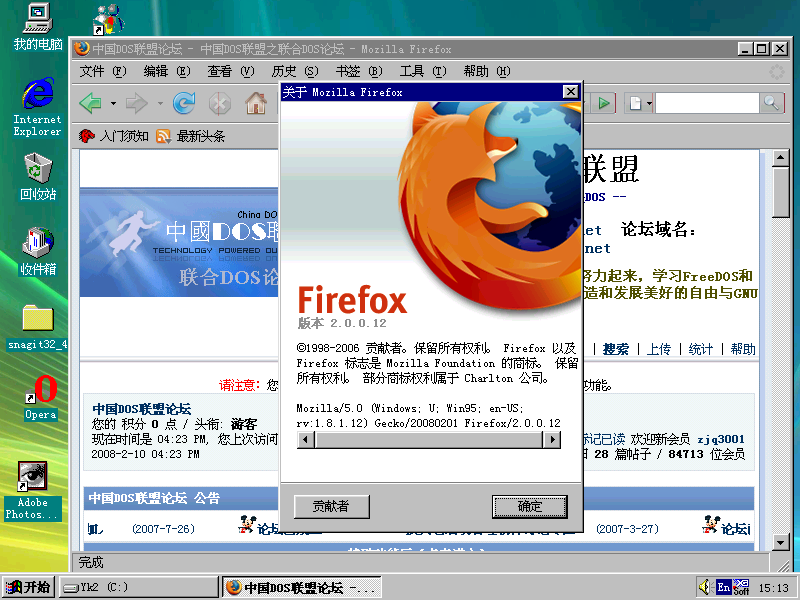
After everything is ready, you can use the browser to surf the Internet. The browsers available under NT 3.51 include 16-bit version of IE 5.0 and some versions of Opera, but their support for Chinese under NT 3.51 is not good. The best browser to run under NT 3.51 Chinese version is Firefox (including version 1.5 and the latest version 2.0), which supports the latest web standards and fully supports browsing Chinese and English web pages, including this forum! You can download its green optimized version here (Note: If it is the installation version, do not use its installation program to install, but you can directly extract the files with 7z):
http://pryan.org/mozilla/firefox/roytam1/
Firefox 1.5.x version can be run directly after extraction. For Firefox 2.0.x version, after extraction, first rename or delete the two files nsSafebrowsingApplication.js and nsSearchService.js in the components directory, otherwise it will not start normally.
Note: If SSE instructions are not supported, download the NoSSE version, otherwise Firefox will prompt "Illegal instruction" and refuse to run when started.
To run Firefox better, it is strongly recommended to download/update the following files (place in the system32 directory):
VC 7.1 runtime libraries (MSVCR71.DLL and other files):
http://pryan.org/mozilla/firefox/roytam1/fx_dlls.7z
Updated OLE 32 runtime libraries (OLEAUT32.DLL and other files):
http://www.navozhdeniye.narod.ru/nt351ole.rar
First is the download of its Chinese version:
Workstation version:
http://help.cn-dos.net/soft/win3x/WindowsNT351WorkstationCHS.rar
Server version:
http://help.cn-dos.net/soft/win3x/WindowsNT351ServerCHS.part1.rar
http://help.cn-dos.net/soft/win3x/WindowsNT351ServerCHS.part2.rar
NT 3.51 Chinese version SP5 patch package:
ftp://ftp.microsoft.com/bussys/winnt/winnt-public/fixes/chs/nt351/SP5/351sp5i.exe
If installing on a relatively new real computer (such as a P3 computer), first modify the initial.inf and setup.inf files, change
STF_PROCESSOR = "" ? $(!LIBHANDLE) GetProcessor
to the following:
STF_PROCESSOR = $(ProcessorID_I586)
Of course, it can also be installed in virtual machines such as VPC, VMware. For VMware virtual machine, set the sound card to SB16 (find the sound.virtualDev line in the corresponding.vmx file and change it to sound.virtualDev ="sb16") to make it sound under WinNT 3.51.
WinNT 3.51 only supports FAT12/16/NTFS/HPFS file systems by default. If you want it to support FAT32 file system and large hard disks (such as 100GB hard disks), replace the files such as fastfast.sys in the system32 directory with the latest version (download as follows). If the FAT32 drive is not displayed, just add the corresponding drive definition in the registry, for example:
Key: F:

String value: \Device\Harddisk0\Partition2 (that is, the second partition of the first hard disk)

Location: HKEY_LOCAL_MACHINE\SYSTEM\CurrentControlSet\Control\Session Manager\DOS Devices
In this way, you can use drive F to access this FAT32 partition, and both Chinese and English long file names are supported.
Many new graphics cards do not come with WinNT 3.51 drivers, but it doesn't matter now because there are general WinNT 3.51 graphics card drivers that can directly support 65536 colors or even true colors(!), just install them directly (don't worry about warnings during installation, download as follows).
The following is the download of the enhancement package:
http://www.navozhdeniye.narod.ru/351pack_v6.rar
The content introduction in each directory:
\ATDISK: Updated ST506/ST512/ESDI/(P)ATA controller drivers. Directly replace the original atdisk.sys file.

\BOOT: Updated NT boot files to support large hard disks in the boot menu. Directly replace the ntldr and ntdetect.com files in the root directory of drive C.

\DLL: Updated common component files. Directly replace the original DLL files with them.

\FAT32: Updated FAT system drivers to support FAT32 file system. Directly replace the original fastfat.sys file.

\FONT: Updated DOS full-screen fonts. Directly replace the original ega.cpi file.

\RENEW: Updated disk and modem drivers to support large hard disks and high-speed connections. Directly replace the original atapi.sys, atdisk.sys, scsidisk.sys and serial.sys files.

\UATA: Updated disk drivers to support IDE, SATA disks.

\VIAIDE: Updated EIDE drivers for VIA systems.

\VBEMP: General WinNT 3.51 graphics card driver.
After everything is ready, you can use the browser to surf the Internet. The browsers available under NT 3.51 include 16-bit version of IE 5.0 and some versions of Opera, but their support for Chinese under NT 3.51 is not good. The best browser to run under NT 3.51 Chinese version is Firefox (including version 1.5 and the latest version 2.0), which supports the latest web standards and fully supports browsing Chinese and English web pages, including this forum! You can download its green optimized version here (Note: If it is the installation version, do not use its installation program to install, but you can directly extract the files with 7z):
http://pryan.org/mozilla/firefox/roytam1/
Firefox 1.5.x version can be run directly after extraction. For Firefox 2.0.x version, after extraction, first rename or delete the two files nsSafebrowsingApplication.js and nsSearchService.js in the components directory, otherwise it will not start normally.
Note: If SSE instructions are not supported, download the NoSSE version, otherwise Firefox will prompt "Illegal instruction" and refuse to run when started.
To run Firefox better, it is strongly recommended to download/update the following files (place in the system32 directory):
VC 7.1 runtime libraries (MSVCR71.DLL and other files):
http://pryan.org/mozilla/firefox/roytam1/fx_dlls.7z
Updated OLE 32 runtime libraries (OLEAUT32.DLL and other files):
http://www.navozhdeniye.narod.ru/nt351ole.rar
Recent Ratings for This Post
( 2 in total)
Click for details
Wengier - 新DOS时代
欢迎大家来到我的“新DOS时代”网站,里面有各类DOS软件和资料,地址:
http://wendos.mycool.net/
E-Mail & MSN: wengierwu AT hotmail.com (最近比较忙,有事请联系DOSroot和雨露,谢谢!)

欢迎大家来到我的“新DOS时代”网站,里面有各类DOS软件和资料,地址:
http://wendos.mycool.net/
E-Mail & MSN: wengierwu AT hotmail.com (最近比较忙,有事请联系DOSroot和雨露,谢谢!)