
China DOS Union
-- Unite DOS · Advance DOS · Grow DOS --Union site: www.cn-dos.net Forum site: www.cn-dos.net/forum
|
China DOS Union-- Unite DOS · Advance DOS · Grow DOS --Union site: www.cn-dos.net Forum site: www.cn-dos.net/forum |
| Guest | Log in | Register | Members | Search | China DOS Union |
|
中国DOS联盟论坛 The time now is 2026-09-27 04:34 |
47,813 topics / 349,918 posts / today 0 new / 48,276 members |
| DOS批处理 & 脚本技术(批处理室) » How to implement the function of calling a bat file through the right-click menu to move files |
| Printable Version 3,507 / 43 |
| Floor1 pinghu | Posted 2008-02-04 16:51 |
| 中级用户 Posts 130 Credits 307 | |
|
Function 1: When multiple files and folders are selected with the right mouse button, the "Move to Parent Directory" command appears in the right-click menu. The result of execution is to move the selected files and folders to the parent directory. If there is a file name conflict, it will be automatically renamed.
Function 2: When multiple folders are selected with the right mouse button, the "Unpack" command appears in the right-click menu. The result of execution is to move all contents in the selected folder to the current directory and then delete the selected folder. If there is a file name conflict, it will be automatically renamed. I am using XP. If these two functions can be realized, it will be very useful. The problem is a bit difficult, and I hope everyone can study it! If someone can write a single BAT file to realize these two functions, I will be extremely impressed. If a single BAT file cannot be realized, it is also good to use a combination of BAT and reg. Thank you everyone! |
|
| Floor2 slore | Posted 2008-02-04 17:37 |
| 铂金会员 Posts 2,478 Credits 5,212 | |
|
Renaming is a bit troublesome... Moving is not difficult.
|
|
| Floor3 pinghu | Posted 2008-02-05 11:14 |
| 中级用户 Posts 130 Credits 307 | |
|
The difficulty is whether it is to ensure that after renaming, it will not conflict with other files, right?
|
|
| Floor4 3742668 | Posted 2008-02-05 11:41 |
| 荣誉版主 Posts 718 Credits 2,013 | |
|
It's not difficult to implement a single file, it's just that I'm too lazy to do the manual work. It is suggested that you learn about Wunaaihe's sendto+, as well as the right-click menu issues that have been discussed many times in this forum. It should be very simple to implement.
|
|
| Floor5 pinghu | Posted 2008-02-05 19:31 |
| 中级用户 Posts 130 Credits 307 | |
|
I can't find the post mentioned upstairs. Can someone give a reference address?
|
|
| Floor6 pinghu | Posted 2008-02-05 19:49 |
| 中级用户 Posts 130 Credits 307 | |
|
Suppose when I select the file, I use %1 to represent the file, and use the command cd %~dp1 to enter the folder. Then when I use xcopy /s/q/-y %1 ..\ to copy the file, there is a situation where the file is not found. How to handle it?
|
|
| Floor7 slore | Posted 2008-02-05 19:55 |
| 铂金会员 Posts 2,478 Credits 5,212 | |
|
Why not use move?
Is your file path has space? |
|
| Floor8 pinghu | Posted 2008-02-05 20:17 |
| 中级用户 Posts 130 Credits 307 | |
| Floor9 pinghu | Posted 2008-02-05 20:20 |
| 中级用户 Posts 130 Credits 307 | |
|
How to use the move command with parameters to specify all files and folders under a specified path?
|
|
| Floor10 slore | Posted 2008-02-05 20:35 |
| 铂金会员 Posts 2,478 Credits 5,212 | |
|
It should be *.*.
If there are spaces, you need to enclose it in quotes... Don't execute it directly in your script, it's better to echo it first... |
|
| Floor11 pinghu | Posted 2008-02-05 20:57 |
| 中级用户 Posts 130 Credits 307 | |
|
When selecting a file, the call to %1 returns an empty value. Why is that?郁闷啊,can't give the full code, at least give some hints啊
|
|
| Floor12 pinghu | Posted 2008-02-05 21:48 |
| 中级用户 Posts 130 Credits 307 | |
|
It seems that everyone hasn't attached importance to my post yet. I think it's because everyone thinks the difficulty lies in renaming. Moving files seems very easy. When you test it personally, you will find that when you select several files, call a bat file in the registry command line, the bat doesn't know what files you selected, and %1 doesn't work here. Then you can't continue. Interestingly, when a directory is selected, %1 can return the current path. That is to say, the second function is easier to implement than the first function (temporarily not considering renaming). If the problem is changed to "adding cmd or formatting in the right-click menu, I wouldn't bother to come here to ask questions."
|
|
| Floor13 pinghu | Posted 2008-02-05 22:17 |
| 中级用户 Posts 130 Credits 307 | |
|
Before the problem is solved, I don't want the post to sink. The fun can also be obtained while solving the problem.
|
|
| Floor14 slore | Posted 2008-02-05 22:36 |
| 铂金会员 Posts 2,478 Credits 5,212 | |
 |
|
| Floor15 slore | Posted 2008-02-05 22:39 |
| 铂金会员 Posts 2,478 Credits 5,212 | |
|
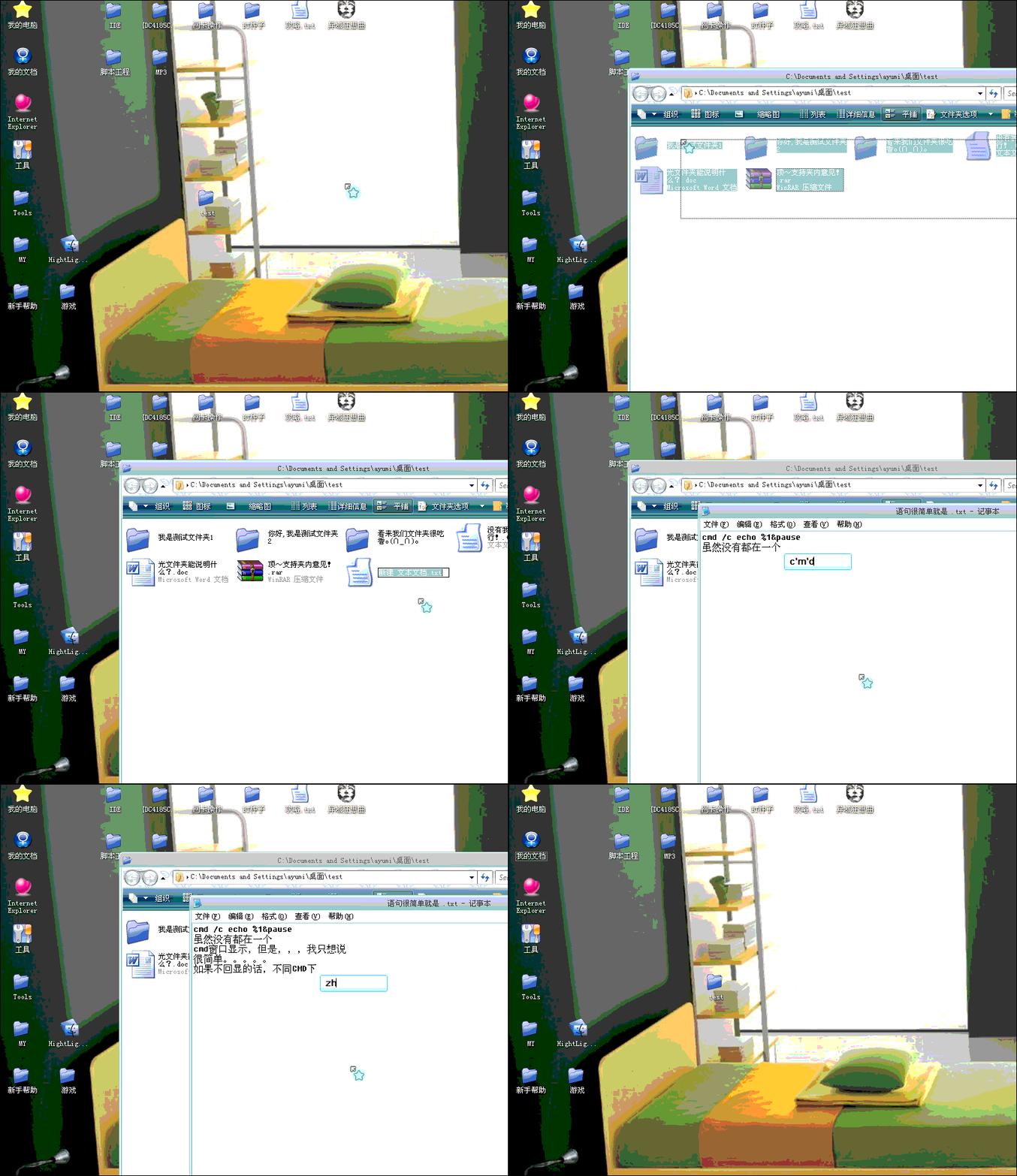
Temporarily uploaded it to the space.
If you can't see the picture, I'll find the address again... The forum's upload system is too frustrating~ |
|
| 1 2 3 Next |
|
[ Contact the Union admin team -
中国DOS联盟 -
Standard version ] Sponsored by ifanr Inc | © 2001–2023 |