大家知道,要想学习或使用DOS,安装一个DOS并进行实际操作是非常必要的。MS-DOS 7.10是一个非常好且强大实用的操作系统,而且兼容性和性能都十分强。要在系统中安装MS-DOS 7.10,可以使用MS-DOS 7.10安装程序自动将MS-DOS 7.10安装到系统中。MS-DOS 7.10安装程序是图形/菜单界面,并采用向导式进行。通过此安装程序,大家可以方便地将MS-DOS 7.10安装到硬盘中。
MS-DOS 7.10安装程序的特点:全图形方式操作,可以选择安装路径(默认是C:\DOS7)、安装方式(完全安装、只安装DOS命令、最小安装)等,而且支持与Win9x的和平共处、自动识别系统中已有的Windows NT/2K/XP或者旧版本的DOS(如MS-DOS 6.x)、并可以让用户选择是否自动做成双启动。
这个MS-DOS 7.10安装后可以直接运行硬盘上的Win3.x、Win9x等,因为Win3.x/9x都只是DOS下的GUI程序。
支持插件功能(后面的帖子中有插件下载,例如PDOS95插件、CCDOS97插件、Windows GUI插件等等,并有集合插件下载)!
说明:如果硬盘还未分区或格式化时,安装程序将自动对硬盘进行分区、格式化、激活分区等操作。然后继续进行MS-DOS 7.10的安装。
可以直接使用软盘安装版,即先做好安装软盘,然后用安装盘1启动系统后即可自动进行MS-DOS 7.10的完整安装(或用硬盘启动后直接运行里面的SETUP也行),按照提示进行下去即可完成安装。
MS-DOS 7.10安装程序的下载地址:
安装盘1:
http://www.cn-dos.net/msdos71/dos71_1.zip (必需)
安装盘2:
http://www.cn-dos.net/msdos71/dos71_2.zip (可选)
也可以将这两个1.44MB的IMG软盘镜像做成光盘的720K、1.44MB、2.88MB的启动镜像来进行安装。下面就有MS-DOS 7.10光盘安装ISO版:
安装光盘:
http://help.cn-dos.net/soft/dos71cd.zip
对于IMG文件,请使用HD-COPY或WinImage等软件将它展开到软盘中并启动即可。而且它也可以在虚拟机(例如Virtual PC、VMWare、Bochs)下完全正常运行!所以也可以在虚拟机下来测试或使用这个MS-DOS 7.10完整安装版。
在安装前最好请仔细阅读下面这篇文章,里面还有一些屏幕快照等:
http://www.cn-dos.net/newdos/dosart32.htm
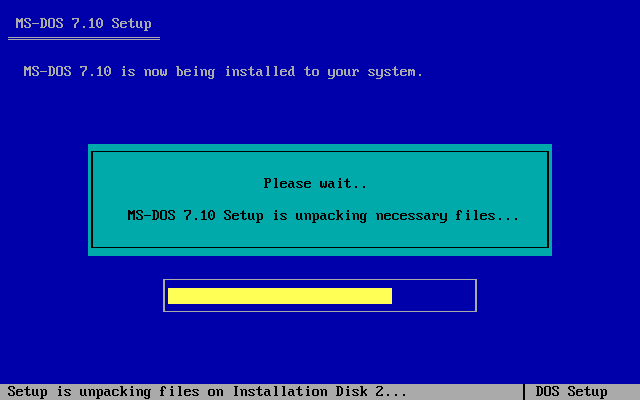
以下是安装界面的一个屏幕截图:
Everyone knows that to learn or use DOS, it is very necessary to install a DOS and carry out practical operations. MS-DOS 7.10 is a very good and powerful operating system, and it has very strong compatibility and performance. To install MS-DOS 7.10 in the system, you can use the MS-DOS 7.10 installer to automatically install MS-DOS 7.10 into the system. The MS-DOS 7.10 installer has a graphical/menu interface and adopts a wizard-style method. Through this installer, everyone can easily install MS-DOS 7.10 onto the hard disk.
Characteristics of the MS-DOS 7.10 installer: operates in full graphical mode, can select the installation path (default is C:\DOS7), installation method (full installation, install only DOS commands, minimal installation), etc., and supports coexistence with Win9x, automatically identifies existing Windows NT/2K/XP or older versions of DOS (such as MS-DOS 6.x) in the system, and allows the user to choose whether to automatically make a dual boot.
After installing this MS-DOS 7.10, you can directly run Win3.x, Win9x, etc. on the hard disk, because Win3.x/9x are just GUI programs under DOS.
Supports plug-in functions (there are plug-in downloads in the subsequent posts, such as PDOS95 plug-in, CCDOS97 plug-in, Windows GUI plug-in, etc., and there are also integrated plug-in downloads)!
Instructions: If the hard disk has not been partitioned or formatted, the installer will automatically partition, format, activate the partition, etc. for the hard disk. Then continue with the installation of MS-DOS 7.10.
You can directly use the floppy disk installation version, that is, first make the installation floppy disk, then boot the system with installation disk 1 and then automatically carry out the complete installation of MS-DOS 7.10 (or run SETUP inside directly after booting from the hard disk), and follow the prompts to complete the installation.
Download addresses of the MS-DOS 7.10 installer:
Installation disk 1:
http://www.cn-dos.net/msdos71/dos71_1.zip (required)
Installation disk 2:
http://www.cn-dos.net/msdos71/dos71_2.zip (optional)
You can also make the two 1.44MB IMG floppy disk images into boot images of 720K, 1.44MB, 2.88MB for CDs to carry out installation. Below is the MS-DOS 7.10 CD installation ISO version:
Installation CD:
http://help.cn-dos.net/soft/dos71cd.zip
For the IMG file, use software such as HD-COPY or WinImage to expand it to a floppy disk and then boot. And it can also run completely normally in virtual machines (such as Virtual PC, VMWare, Bochs)! So you can also test or use this complete MS-DOS 7.10 installation version in a virtual machine.
It is best to carefully read the following article before installation, which also has some screen captures, etc.:
http://www.cn-dos.net/newdos/dosart32.htm
The following is a screen capture of the installation interface:
